
Load Balancing in Practice: HAProxy, Nginx, and Cloudflare

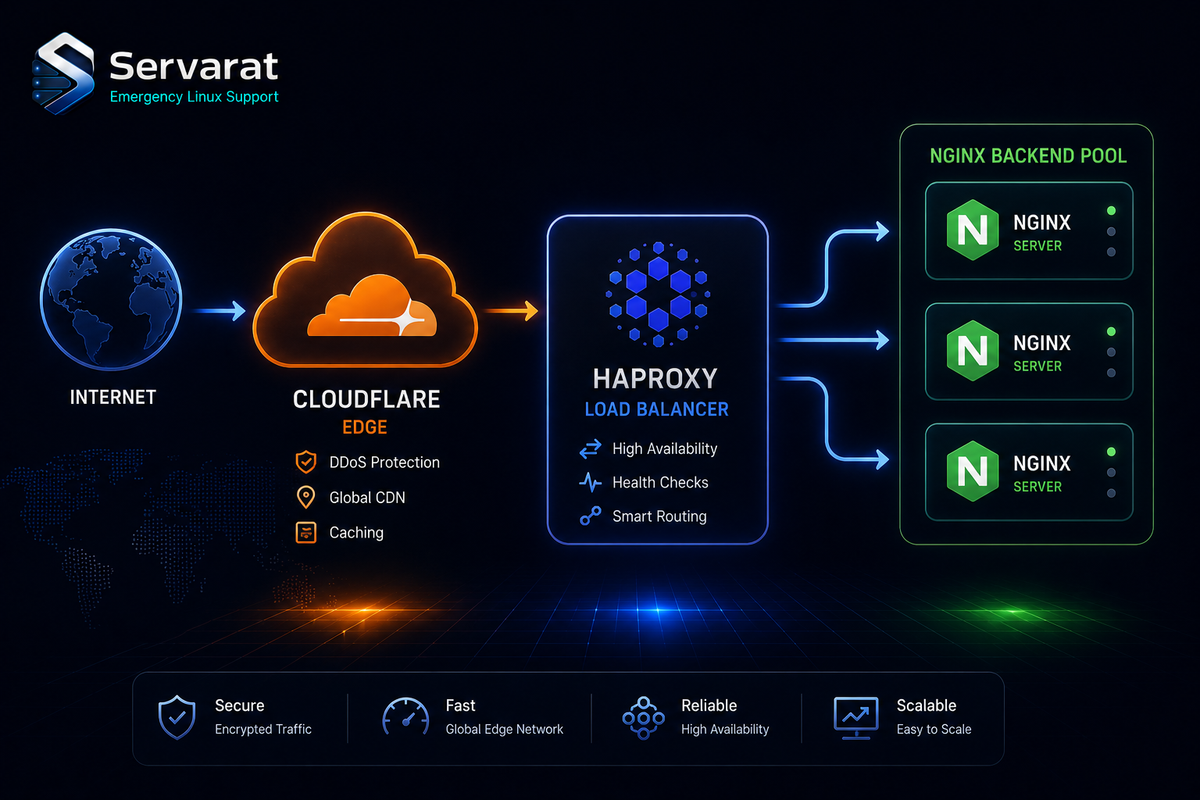
Three load balancers, three different jobs, and in real production they usually stack rather than compete. HAProxy for high-throughput L4/L7 distribution, Nginx for application-aware routing and TLS termination, Cloudflare for global Anycast edge and failover. Here are production-shaped configs for each, the tradeoffs that decide which layer does what, and the gotchas that actually cause outages.
L4 vs L7: The Decision That Frames Everything
Layer 4 routes on IP and port at the transport level — no visibility into the HTTP request, which is exactly why it's fast. Layer 7 parses HTTP, so it can route on URL, header, or cookie, at the cost of terminating and re-establishing the connection.
The practical call: use L4 when you need raw throughput and the routing logic is "spread it evenly" (TCP services, databases, anything non-HTTP, or an HTTP tier where a downstream proxy handles the smart routing). Use L7 when routing decisions depend on request content — path-based routing to microservices, header-based canary splits, cookie session stickiness. HAProxy does both; Nginx is L7 for HTTP (it has stream module L4, but that's not its strength); Cloudflare is L7 at the edge.
Algorithms matter less than people think, with one rule: leastconn beats round-robin whenever backend requests have variable duration (almost always, for real apps), because round-robin will happily pile requests onto a server that's already stuck on slow ones. Use weighted variants only when your backends have genuinely different capacity.
HAProxy
HAProxy is the throughput specialist — precise traffic control, both layers, and it's what you reach for in front of APIs and microservices when you care about connection-level behavior. This config load balances three backends with leastconn, HTTP health checks, and cookie stickiness:
global
    log /dev/log local0
    maxconn 50000
    user haproxy
    group haproxy
    daemon

defaults
    log     global
    mode    http
    option  httplog
    option  dontlognull
    timeout connect 5s
    timeout client  50s
    timeout server  50s

frontend http_front
    bind *:80
    default_backend web_servers

backend web_servers
    balance leastconn
    cookie SERVERID insert indirect nocache
    option httpchk GET /health
    server web1 10.0.0.11:80 check cookie web1
    server web2 10.0.0.12:80 check cookie web2
    server web3 10.0.0.13:80 check cookie web3
leastconn sends each request to the backend with the fewest active connections; the /health check pulls a failed server out of rotation until it recovers; the cookie pins returning sessions to the same backend.
⚠️ A few things this minimal config leaves on the table that you want in real production:
- No stats socket. Add a
statslistener so you can drain a backend for maintenance without a config reload. Without it, taking a server out gracefully means editing and reloading. bind *:80only — no TLS. If HAProxy is your edge, you're terminating TLS here; if it's behind Cloudflare or Nginx, fine, but be explicit about where termination happens.- Health check is bare.
option httpchk GET /healthdoesn't check the response body. A backend returning200 OKwith a broken app still passes. Usehttp-check expect status 200at minimum, and ideally a/healthendpoint that actually verifies DB connectivity rather than just "the web server is up."
⚠️ Security-wise: cookie stickiness with insert indirect nocache is fine, but the SERVERID cookie leaks your internal server naming to the client. Cosmetic, but if you'd rather not advertise web1/web2, use opaque cookie values.
Add a stats socket like this in global, then you can drain backends at runtime:
stats socket /run/haproxy/admin.sock mode 660 level admin
Nginx
Nginx is the application-aware layer — reverse proxy, TLS termination, request buffering, and load balancing in one process, which is why it's the default in front of Node, PHP, and CMS stacks. This config balances three app servers with automatic failover:
upstream app_backend {
    least_conn;
    server 10.0.0.21:3000 max_fails=3 fail_timeout=30s;
    server 10.0.0.22:3000 max_fails=3 fail_timeout=30s;
    server 10.0.0.23:3000 backup;
}

server {
    listen 80;
    server_name example.com;

    location / {
        proxy_pass http://app_backend;
        proxy_set_header Host $host;
        proxy_set_header X-Real-IP $remote_addr;
        proxy_set_header X-Forwarded-For $proxy_add_x_forwarded_for;
        proxy_http_version 1.1;
        proxy_set_header Connection "";
    }
}
Two primaries take normal traffic; the third is backup, used only when both primaries are down. The proxy_set_header lines preserve client IP through the proxy — critical for logging, rate limiting, and any security analysis downstream. The proxy_http_version 1.1 plus empty Connection header enables keepalive to the backends.
⚠️ The failover here is cruder than it looks. max_fails=3 fail_timeout=30s means a backend is only marked down after 3 failures within the window, and passive health checking only happens on real traffic — Nginx open-source has no active health probes (that's an Nginx Plus feature). So a backend can be dead for up to 30 seconds of live requests failing before it's pulled. If you need active health checks on open-source Nginx, that's an argument for putting HAProxy underneath, which does them natively.
⚠️ X-Forwarded-For is trust-on-faith. If this Nginx is directly internet-facing, a client can spoof the header and poison your logs or bypass IP rate limits. When Nginx sits behind Cloudflare, use set_real_ip_from with Cloudflare's IP ranges and real_ip_header CF-Connecting-IP so you get the true client IP and don't trust arbitrary XFF. That's the correct pattern and the source skips it entirely — I went deeper on the reverse-proxy tradeoffs in Traefik vs Caddy vs Nginx.
⚠️ No keepalive to upstreams is set. Add keepalive 32; inside the upstream block or you're opening a fresh backend connection per request despite the HTTP/1.1 setting.
Cloudflare
Cloudflare load balancing is the managed edge layer — Anycast network, origin pools across regions, HTTPS health probes, and automatic failover, all without you running the infrastructure. The typical setup: multiple origin pools (say EU and Asia), Cloudflare probes each over HTTPS, and routes users to the nearest healthy origin by geographic proximity. Lose an entire region and traffic fails over to the next pool with no manual intervention.
The value is what you don't operate: DDoS absorption, TLS at the edge, and global routing come built in. ⚠️ The tradeoff is that it's L7 and it terminates TLS at Cloudflare — meaning Cloudflare sees your plaintext traffic. For most sites that's an accepted trade; for anything where that's unacceptable (compliance, sensitive data), you either use Cloudflare in L4 Spectrum mode or don't terminate there. And origin-pool failover is only as good as your health probe — a probe hitting / that returns 200 from a broken app fails over nothing. Same lesson as HAProxy: probe something that reflects real health.
The Layered Architecture
In production these stack rather than compete, and the layering maps cleanly to what each does best:
- Cloudflare at the edge — DNS, DDoS protection, TLS, global routing, region-level failover.
- HAProxy behind it — high-performance L4/L7 distribution across your fleet, real active health checks, runtime backend draining.
- Nginx at the app tier — TLS re-termination if needed, application routing, static content, per-app header handling.
Edge resilience, precise internal control, application awareness, each layer earning its place. The one thing to keep straight across all three: where TLS terminates and where the real client IP is recovered. Get that wrong and you either break HTTPS or lose the client IP for logging and rate limiting across the whole chain. If load balancing is in service of raw scale, the broader patterns for handling that kind of traffic are in how large-scale platforms handle millions of daily transactions, and the same reverse-proxy fundamentals underpin scaling Laravel for high-traffic production.
Bottom Line
Pick by job, not preference: HAProxy when connection-level control and real health checks matter, Nginx when you're already terminating TLS and routing app traffic, Cloudflare when you want global edge and managed failover without operating it. Most serious setups run all three. And whichever you deploy, make the health checks verify actual application health and nail down TLS termination and real-IP handling before you go live — those two decisions cause more load-balancer outages and security gaps than algorithm choice ever will.



