Linux Server Hardening in 2026: The Runnable Version, Not Just a Checklist

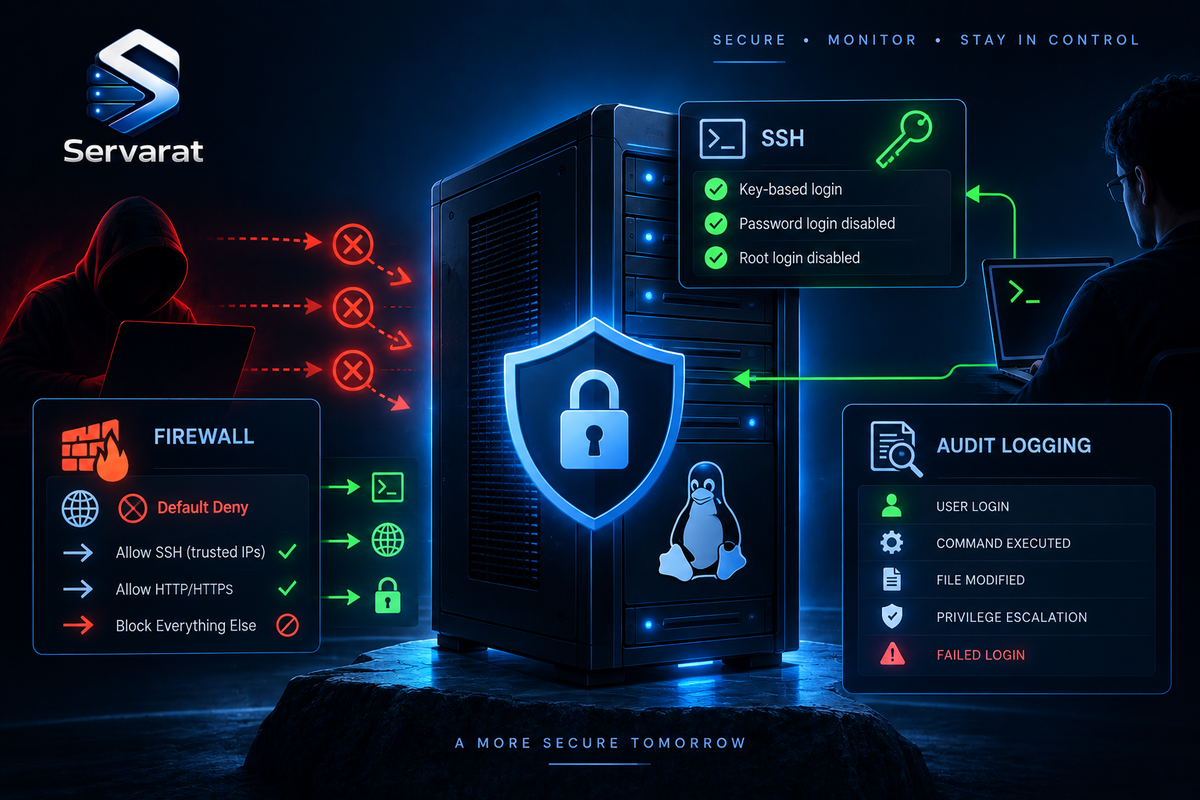
Most server-hardening checklists tell you to "disable root SSH login," "set the firewall to default deny," and "configure auditd with rules," and then stop, leaving you to work out the actual config. This is the version with the config filled in: every control as a copy-paste command or file, tuned for the Linux stack you actually run (Ubuntu/Debian, RHEL/AlmaLinux, CloudLinux, and cPanel fleets), with the fleet-scale angle where it matters. No Windows, no vendor pitch, no "consider implementing", the specific changes that move a box from default to hardened, in the order that gives you the most risk reduction per minute.
⚠️ Before you touch SSH config on a remote box, keep a second session open. A misconfigured sshd_config plus a reload can lock you out, and the fix from the console is a lot slower than not locking yourself out in the first place. This applies to the firewall section doubly.
1. SSH: The Most-Probed Door on Every Server
Default OpenSSH prioritized 2003-era compatibility, not 2026 security. Every setting below goes in /etc/ssh/sshd_config (or a drop-in under /etc/ssh/sshd_config.d/).
Key-based auth, no passwords, no root. Generate an Ed25519 key on your workstation first, and confirm you can log in with it, then disable passwords:
ssh-keygen -t ed25519 -a 100 -C "you@workstation"
Then in sshd_config:
PermitRootLogin no
PasswordAuthentication no
PubkeyAuthentication yes
AuthenticationMethods publickey
⚠️ PermitRootLogin no matters beyond the obvious: root sessions frequently bypass the individual-accountability logging you need for forensics. Log in as a named user, sudo up, so the audit trail names a human.
Modern crypto only. Restrict to algorithms without known weaknesses:
KexAlgorithms curve25519-sha256,curve25519-sha256@libssh.org,diffie-hellman-group16-sha512
Ciphers chacha20-poly1305@openssh.com,aes256-gcm@openssh.com,aes128-gcm@openssh.com
MACs hmac-sha2-512-etm@openssh.com,hmac-sha2-256-etm@openssh.com,umac-128-etm@openssh.com
⚠️ And remove the weak Diffie-Hellman moduli, a step most checklists mention but never show. Small DH groups are a real weakness, so strip anything under 3072 bits:
sudo awk '$5 >= 3071' /etc/ssh/moduli > /tmp/moduli.strong && sudo mv /tmp/moduli.strong /etc/ssh/moduli
Connection limits to blunt brute-force and hung sessions:
MaxAuthTries 3
LoginGraceTime 30
ClientAliveInterval 300
ClientAliveCountMax 2
X11Forwarding no
MFA on sensitive boxes. Install the PAM module and require a second factor on top of the key:
sudo apt install -y libpam-google-authenticator
Then AuthenticationMethods publickey,keyboard-interactive plus the PAM config, so a stolen key alone still isn't enough.
Validate the config before reloading, sshd -t catches syntax errors that would otherwise take the daemon down:
sudo sshd -t && sudo systemctl reload sshd
⚠️ cPanel-specific: WHM manages SSH settings through its own interface (Security Center), and cPanel updates can rewrite sshd_config. Set your hardening through WHM's SSH configuration where possible, or use a drop-in under sshd_config.d/ that survives updates, and re-verify after major cPanel upgrades. A hand-edited sshd_config that WHM overwrites on update is a silent regression.
⚠️ Put SSH behind a bastion or VPN rather than exposing it to the internet at all. A non-standard port cuts scan noise but is not security, treat it as defense in depth, never the control itself.
2. Firewall: Default Deny That Actually Holds
The goal is inbound default-deny with an explicit allowlist. The commands differ by tool.
UFW (Ubuntu/Debian):
sudo ufw default deny incoming && sudo ufw default allow outgoing && sudo ufw allow 22/tcp && sudo ufw allow 443/tcp && sudo ufw enable
⚠️ Order matters and this is the lockout trap: allow SSH before ufw enable. Enabling default-deny without an SSH allow rule drops your own session instantly on a remote box. Better still, scope SSH to your management IPs rather than the world:
sudo ufw allow from 203.0.113.0/24 to any port 22 proto tcp
firewalld (RHEL/AlmaLinux):
sudo firewall-cmd --set-default-zone=drop && sudo firewall-cmd --permanent --add-service=https && sudo firewall-cmd --permanent --add-rich-rule='rule family="ipv4" source address="203.0.113.0/24" service name="ssh" accept' && sudo firewall-cmd --reload
⚠️ cPanel/CSF fleets: if you run ConfigServer Security & Firewall (CSF), do not also run ufw/firewalld, they conflict. Manage the allowlist in /etc/csf/csf.conf (TCP_IN/TCP_OUT) and use CSF's own csf -a/csf -d. CSF also gives you the LFD brute-force daemon, which is doing real work on a cPanel box, so the hardening there is tuning CSF, not replacing it. Restrict SSH and WHM ports (2087, 2083, 2096) to management IPs in TCP_IN.
Review what's actually open regularly:
sudo ufw status verbose # or: sudo firewall-cmd --list-all # or: sudo csf -l
3. Patch Management: The Boring Control That Stops Most Breaches
Attackers exploit CVEs vendors already patched. The control is applying them on a risk-based cadence, fastest for the ones actively exploited.
The priority tiers worth codifying: actively-exploited critical (CISA KEV) within 24 to 72 hours, high within 7 to 14 days, medium on the monthly cycle, low quarterly. The collapsing patch-to-exploit window is why the top tier is now hours, not weeks, AI-assisted exploit generation has compressed the time between a public patch and a working exploit.
Automatic security updates (Ubuntu/Debian):
sudo apt install -y unattended-upgrades && sudo dpkg-reconfigure -plow unattended-upgrades
RHEL/AlmaLinux:
sudo dnf install -y dnf-automatic && sudo systemctl enable --now dnf-automatic.timer
⚠️ Kernel updates need a reboot to take effect, an updated-but-not-rebooted kernel is still running the vulnerable code. For servers you can't reboot on demand, use live patching (Canonical Livepatch, KernelCare, which is the CloudLinux/cPanel-native choice) so kernel fixes apply without the reboot. On a cPanel fleet, KernelCare is the answer here and it's worth the license.
Check which of your boxes are running a kernel older than the installed one (i.e. need a reboot):
for h in $(cat hosts.txt); do printf '%s: running %s, installed %s\n' "$h" "$(ssh $h uname -r 2>/dev/null)" "$(ssh $h 'ls -t /boot/vmlinuz-* | head -1 | sed s#/boot/vmlinuz-##' 2>/dev/null)"; done
Any host where "running" differs from "installed" is pending a reboot.
Containers don't self-patch. Rebuild base images on a schedule, scan them in CI with Trivy or Grype, and use minimal bases, the correct Dockerfile discipline (pinned, minimal, current) is what keeps the patch surface small.
4. Least Privilege and Zero Standing Access
"Zero trust" translated to a server: don't trust something because it's already inside the network; verify every access and grant the minimum.
Audit who has sudo/root, and remove what shouldn't be there:
getent group sudo wheel 2>/dev/null; grep -rE '^[^#].*ALL=\(ALL' /etc/sudoers /etc/sudoers.d/ 2>/dev/null
⚠️ Eliminate standing admin access where you can. Time-limited sudo, a bastion that grants access per-session, or a PAM tool means a compromised admin credential isn't a permanent all-access key. Even on a small fleet, "who can become root and why" is worth a quarterly review.
Secrets never in plaintext config or code. Use a secrets manager (Vault, AWS Secrets Manager) and scan your repos for leaked credentials, the secrets-scanning tooling (gitleaks for the gate, TruffleHog with --only-verified for history) is the concrete implementation. A hardcoded database password in a web-served .env undoes every other control on this list.
5. Audit Logging: See What Happened
auditd is the record you'll need if a box is compromised, and it's useless if you configure it after the fact. Install it and load rules for the events that matter:
sudo apt install -y auditd audispd-plugins # or: sudo dnf install -y audit
Core rules in /etc/audit/rules.d/hardening.rules:
-w /etc/passwd -p wa -k identity
-w /etc/shadow -p wa -k identity
-w /etc/sudoers -p wa -k priv_esc
-w /etc/sudoers.d/ -p wa -k priv_esc
-w /etc/ssh/sshd_config -p wa -k sshd_config
-w /var/log/auth.log -p wa -k auth_log
-a always,exit -F arch=b64 -S execve -F euid=0 -F auid>=1000 -F auid!=4294967295 -k root_cmd
That last rule logs every command run as root by a normally-unprivileged user, which is the trail that tells you what an attacker did after escalating. Load and verify:
sudo augenrules --load && sudo auditctl -l
⚠️ The critical follow-through: ship these logs off the host. An attacker who reaches root can wipe local audit logs, so the on-box record is only trustworthy up to the moment of compromise. Forward to a central collector, the tamper-resistant logging setup is the how. And enable a MAC layer while you're here, SELinux enforcing on RHEL-family, AppArmor on Ubuntu, both add a containment layer that limits what a compromised service can reach:
sudo setenforce 1; getenforce    # RHEL/AlmaLinux
sudo aa-status                    # Ubuntu, confirm profiles loaded
6. Reduce the Attack Surface
Every running service is a potential door. List what's actually running and turn off what you don't need:
systemctl list-units --type=service --state=running
⚠️ Disable, don't just stop, or it returns on reboot: sudo systemctl disable --now <service>. On a cPanel box, be careful here, many services are load-bearing (cpsrvd, the mail stack, MySQL), so know what each is before disabling. The target is unused daemons (a stray FTP server, an unused database engine, a forgotten dev tool), not core infrastructure.
Time sync, because Kerberos, TLS validation, and log correlation all depend on accurate clocks:
sudo timedatectl set-ntp true; timedatectl status
7. Backups You've Actually Tested
⚠️ In the ransomware era this is a security control, not just an ops one. The 3-2-1 rule (three copies, two media, one offline/air-gapped), encryption at rest, and, the part everyone skips, test the restore. A backup you've never restored is a hypothesis. Simulate a recovery on a throwaway host and confirm the data comes back intact, because discovering your backups were broken during a ransomware incident is the worst possible time to learn it. This ties directly to the disaster-recovery discipline that turns a compromise from a catastrophe into an inconvenience.
The Priority Order (Start Here)
If you do nothing else, do these, roughly in order of risk reduction per minute spent:
- SSH: kill password auth and root login, require keys. Biggest single win.
- Get SSH (and any admin port) off the public internet, bastion or VPN, or IP-restrict it.
- Firewall to default-deny inbound, allowlist only what's needed (mind the CSF-vs-ufw conflict on cPanel).
- Automatic security updates on, plus live patching for kernels you can't reboot.
- Audit and trim sudo/root access.
- auditd loaded and logs shipped off-host.
- Secrets out of code, scan the repos.
- SELinux/AppArmor enforcing.
- Disable unused services.
- Test a backup restore.
Bottom Line
Server hardening isn't a project you finish, configs drift, CVEs appear, and infrastructure changes open new gaps, but the fundamentals still deliver the overwhelming majority of the risk reduction: exposed management ports, missing MFA, unpatched known-exploited CVEs, and secrets in plaintext. The difference between a checklist and a hardened server is that the checklist says "disable password auth" and the server has PasswordAuthentication no actually loaded and verified. Work the priority list top to bottom, automate what you can with Ansible so a new box comes up hardened by default rather than hardened by hand, ship your audit logs somewhere an attacker can't reach, and set a quarterly review so drift gets caught. On a cPanel fleet, respect the tools already doing the job (CSF, KernelCare, WHM's SSH management) rather than fighting them, the hardening is tuning them correctly, not replacing them.