SSL/TLS on Apache, nginx, and OpenLiteSpeed: Install, Harden, Troubleshoot

Getting a certificate installed is table stakes; configuring TLS correctly is where servers actually differ. Plenty of production sites serve valid HTTPS and would still earn a C or D from SSL Labs, weak ciphers enabled, TLS 1.0 still accepted, HSTS missing, a certificate expiring next week because nobody automated renewal. This guide covers the whole thing across the three web servers you're most likely to run: what SSL/TLS actually is, why it's now non-negotiable, how to install and correctly configure certificates on Apache, nginx, and OpenLiteSpeed, and how to diagnose the errors that come up. The configuration targets the current standard, TLS 1.2 and 1.3 only, modern ciphers, automated renewal, because a 2026 TLS setup has different defaults than one from even two years ago.
SSL, TLS, and Why the Name Is a Bit of a Lie
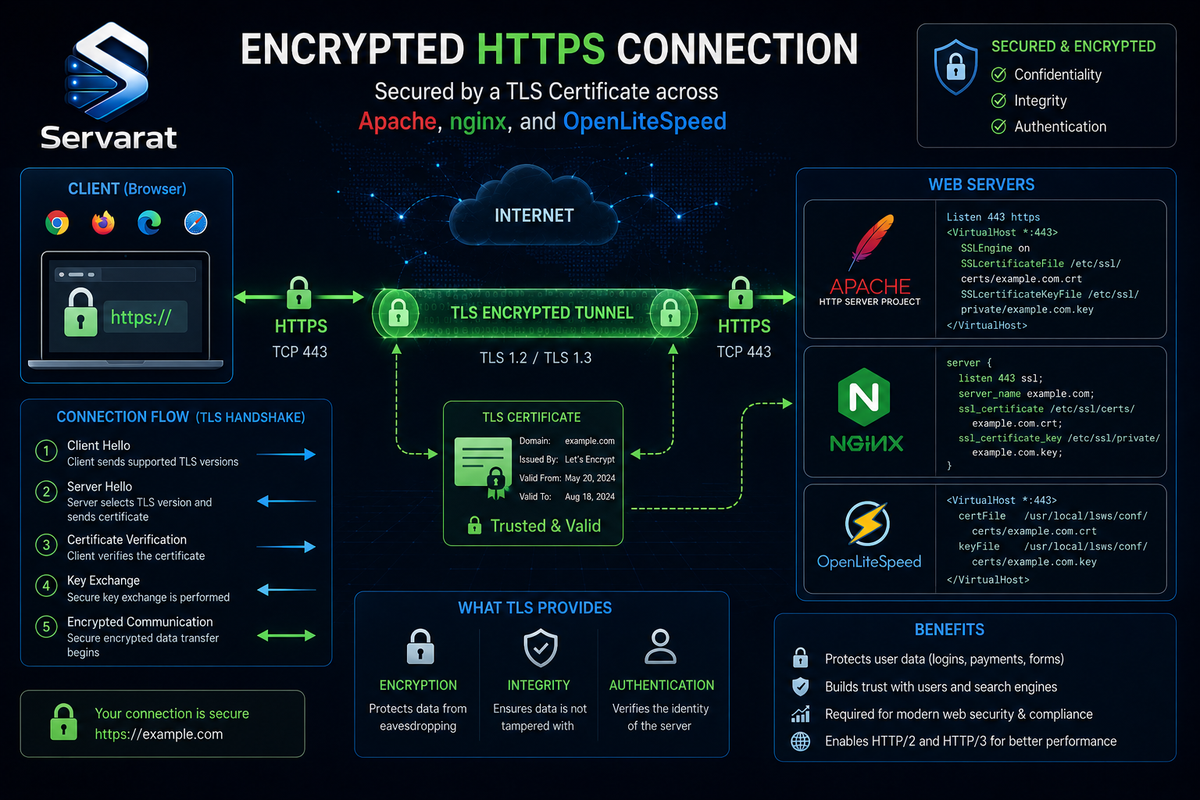
Everyone says "SSL certificate," but SSL (Secure Sockets Layer) has been dead for years, its last version, SSLv3, was broken by POODLE in 2014. What actually secures your traffic today is TLS (Transport Layer Security), SSL's successor. The word "SSL" survives as a colloquialism (even certificate vendors say it), but the protocol doing the work is TLS 1.2 or 1.3. This matters practically: when you configure a server, you're enabling TLS versions and disabling the old SSL and early TLS ones, and getting that list right is half the security of the setup.
TLS does three things for an HTTPS connection: it encrypts the traffic so nobody between the client and server can read it, it authenticates the server so the client knows it's really talking to your site and not an impostor, and it protects integrity so the data can't be tampered with in transit. The certificate is what proves the server's identity, a file signed by a Certificate Authority (CA) that browsers trust, binding your domain name to a cryptographic key.
Why It's Mandatory Now
HTTPS stopped being optional some time ago, and the pressure has only increased:
- Browsers mark HTTP as "Not Secure." Chrome and Firefox flag any plain-HTTP page, and increasingly warn before loading it. A site without TLS looks broken and untrustworthy to visitors.
- HTTP/2 and HTTP/3 effectively require it. Every browser only negotiates the faster modern protocols over TLS, so no HTTPS means no HTTP/2, which means a slower site.
- SEO and features depend on it. Search engines favor HTTPS, and browser APIs (geolocation, service workers, and more) refuse to run on insecure origins.
- Compliance mandates it. PCI DSS 4.0 outright prohibits TLS 1.0 and 1.1 for any environment handling cardholder data, and requires strong TLS everywhere sensitive data moves.
- It's free. Let's Encrypt removed the last excuse in 2015. There is no cost argument against TLS anymore.
The one change that reshapes how you must run TLS in 2026: certificate lifetimes are collapsing. Maximum validity drops from 398 days to 200 days on March 15 2026, to 100 days in 2027, and to 47 days by 2029. Manual renewal was always a liability; at 47-day certificates it becomes impossible to manage by hand. Automated renewal via ACME (Let's Encrypt + Certbot) is now mandatory, not a convenience. Every setup below is built around automation for exactly this reason.
Getting a Certificate: Let's Encrypt and Certbot
For nearly every site, a free Let's Encrypt DV (Domain Validation) certificate issued and auto-renewed by Certbot is the right answer. OV and EV certificates cost money and add organizational validation, but browsers no longer display the company name even for EV, so their value proposition is thin for most sites. DV is right for 99% of deployments.
Certbot is the standard ACME client. It can either configure your web server automatically (the --apache and --nginx plugins) or just obtain the certificate and let you install it yourself (certonly). I'll show both patterns because OpenLiteSpeed needs the manual approach.
⚠️ One decision worth making up front: ECDSA over RSA. An ECDSA P-256 certificate gives equivalent security to RSA 2048 with smaller signatures and a faster handshake. Request it explicitly with Certbot's --key-type ecdsa. It's the better default in 2026.
Install Certbot (Ubuntu/Debian):
sudo apt update && sudo apt install -y certbot
For the Apache or nginx auto-configuration plugins, also install the matching package (python3-certbot-apache or python3-certbot-nginx), shown per-server below.
Apache
Install Apache's Certbot plugin and the SSL module:
sudo apt install -y python3-certbot-apache && sudo a2enmod ssl headers http2
Obtain and install the certificate in one step, Certbot edits your vhost, sets up the HTTPS listener, and configures renewal:
sudo certbot --apache --key-type ecdsa -d example.com -d www.example.com
Certbot creates an SSL vhost, but its default TLS configuration is only adequate, not hardened. Edit the SSL vhost (typically /etc/apache2/sites-available/example.com-le-ssl.conf) to pin modern protocols and ciphers. The relevant block:
<VirtualHost *:443>
    ServerName example.com
    ServerAlias www.example.com
    DocumentRoot /var/www/example.com

    Protocols h2 http/1.1

    SSLEngine on
    SSLCertificateFile      /etc/letsencrypt/live/example.com/fullchain.pem
    SSLCertificateKeyFile   /etc/letsencrypt/live/example.com/privkey.pem

    SSLProtocol            -all +TLSv1.2 +TLSv1.3
    SSLCipherSuite         ECDHE-ECDSA-AES128-GCM-SHA256:ECDHE-RSA-AES128-GCM-SHA256:ECDHE-ECDSA-AES256-GCM-SHA384:ECDHE-RSA-AES256-GCM-SHA384:ECDHE-ECDSA-CHACHA20-POLY1305:ECDHE-RSA-CHACHA20-POLY1305
    SSLHonorCipherOrder    off

    Header always set Strict-Transport-Security "max-age=63072000; includeSubDomains"
</VirtualHost>
SSLProtocol -all +TLSv1.2 +TLSv1.3 disables everything and re-enables only the two current versions. SSLHonorCipherOrder off is correct for a modern all-strong cipher list, it lets the client pick the cipher its hardware handles best (ChaCha20 on mobile without AES acceleration, AES-GCM on servers with it). Redirect HTTP to HTTPS in the port-80 vhost:
<VirtualHost *:80>
    ServerName example.com
    ServerAlias www.example.com
    Redirect permanent / https://example.com/
</VirtualHost>
Test the config and reload:
sudo apache2ctl configtest && sudo systemctl reload apache2
nginx
Install nginx's Certbot plugin:
sudo apt install -y python3-certbot-nginx
Obtain and install:
sudo certbot --nginx --key-type ecdsa -d example.com -d www.example.com
As with Apache, harden the generated config. In your server block (/etc/nginx/sites-available/example.com):
server {
    listen 443 ssl;
    http2 on;
    server_name example.com www.example.com;

    ssl_certificate     /etc/letsencrypt/live/example.com/fullchain.pem;
    ssl_certificate_key /etc/letsencrypt/live/example.com/privkey.pem;

    ssl_protocols TLSv1.2 TLSv1.3;
    ssl_ciphers ECDHE-ECDSA-AES128-GCM-SHA256:ECDHE-RSA-AES128-GCM-SHA256:ECDHE-ECDSA-AES256-GCM-SHA384:ECDHE-RSA-AES256-GCM-SHA384:ECDHE-ECDSA-CHACHA20-POLY1305:ECDHE-RSA-CHACHA20-POLY1305;
    ssl_prefer_server_ciphers off;

    ssl_session_timeout 1d;
    ssl_session_cache shared:SSL:10m;
    ssl_session_tickets off;

    add_header Strict-Transport-Security "max-age=63072000; includeSubDomains" always;

    server_tokens off;

    root /var/www/example.com;
}

server {
    listen 80;
    server_name example.com www.example.com;
    return 301 https://$host$request_uri;
}
Three current-in-2026 details worth noting. http2 on; is a separate directive now, the old listen 443 ssl http2; combined form is deprecated in nginx 1.25.1+. ssl_prefer_server_ciphers off is deliberate, same reasoning as Apache. And I've left OCSP stapling out: ⚠️ Let's Encrypt stopped supporting OCSP, so ssl_stapling directives do nothing for their certificates now (they won't error, they just have no effect). If you use a commercial CA that still runs OCSP responders, add ssl_stapling on; ssl_stapling_verify on;, but for Let's Encrypt it's dead weight. Use $host not $server_name in the redirect, $server_name hardcodes the first name and breaks redirects for the others.
Test and reload:
sudo nginx -t && sudo systemctl reload nginx
OpenLiteSpeed
OpenLiteSpeed is the odd one out: its Certbot plugin support is limited, so the clean approach is to issue the certificate with Certbot's standalone or webroot method, then point OLS at the files, either through its WebAdmin console or its config. The webroot method issues without stopping the server:
sudo certbot certonly --webroot -w /usr/local/lsws/Example/html --key-type ecdsa -d example.com -d www.example.com
That writes the certificate to /etc/letsencrypt/live/example.com/. Now point OpenLiteSpeed at it. In the WebAdmin console (port 7080), under the listener for port 443, or directly in the virtual host config, set the SSL paths:
keyFile     /etc/letsencrypt/live/example.com/privkey.pem
certFile    /etc/letsencrypt/live/example.com/fullchain.pem
certChain   1
Then harden the TLS settings on the SSL listener. In the listener's SSL tab (or vhconf.conf):
sslProtocol             24
enableECDHE             1
enableDHE               1
ciphers                 ECDHE-ECDSA-AES128-GCM-SHA256:ECDHE-RSA-AES128-GCM-SHA256:ECDHE-ECDSA-AES256-GCM-SHA384:ECDHE-RSA-AES256-GCM-SHA384:ECDHE-ECDSA-CHACHA20-POLY1305:ECDHE-RSA-CHACHA20-POLY1305
⚠️ The sslProtocol 24 value is OpenLiteSpeed's bitmask, not a version number. It's the sum of the flags for TLS 1.2 (value 8) and TLS 1.3 (value 16), 8 + 16 = 24, which enables exactly those two and disables the older ones. This is the OLS-specific detail that trips people up: you don't list protocol names, you sum the bitmask values for the versions you want. Enable HTTP/2 and HTTP/3 in the listener's general settings, and add HSTS via a header. Then restart:
sudo /usr/local/lsws/bin/lswsctrl restart
⚠️ Because OLS isn't using the Certbot auto-installer, renewal won't reload OLS on its own. Add a deploy hook so the renewed certificate actually gets picked up (covered in the renewal section below).
Automating Renewal (the Part That Actually Matters)
With certificate lifetimes heading toward 47 days, renewal automation is the single most important thing in this whole guide. A tunnel that expires unnoticed takes your whole site down with browser security warnings.
Certbot installs a systemd timer (or cron job) automatically when you use the --apache/--nginx plugins. Confirm it's active:
sudo systemctl list-timers | grep certbot
Test that renewal actually works before you're relying on it, the dry run exercises the full renewal without using up rate limits:
sudo certbot renew --dry-run
⚠️ For Apache and nginx, Certbot reloads the server automatically after renewal. For OpenLiteSpeed (and any certonly setup), it does not, so a renewed certificate sits on disk while the server keeps serving the old one until it's manually reloaded. Add a deploy hook that reloads OLS after each successful renewal:
echo -e '#!/bin/bash\n/usr/local/lsws/bin/lswsctrl restart' | sudo tee /etc/letsencrypt/renewal-hooks/deploy/reload-ols.sh && sudo chmod +x /etc/letsencrypt/renewal-hooks/deploy/reload-ols.sh
Any script in /etc/letsencrypt/renewal-hooks/deploy/ runs after every successful renewal, which is the correct, general mechanism for reloading whatever server needs it.
Verify the Result
After configuring, confirm the setup from the outside. Check the served certificate and protocol from the command line:
echo | openssl s_client -connect example.com:443 -servername example.com 2>/dev/null | openssl x509 -noout -dates -subject
That prints the certificate's validity dates and subject, confirming the right cert is being served. To verify which TLS versions are accepted, test explicitly:
openssl s_client -connect example.com:443 -tls1_3 </dev/null 2>/dev/null | grep -E 'Protocol|Cipher'
For a full grade, run the domain through SSL Labs (ssllabs.com/ssltest) or, for a local scan without sending your domain to a third party, testssl.sh. The target is an A+, which requires strong protocols and ciphers plus HSTS with a long max-age. If you're not at A+, the scan tells you exactly which item is dragging the grade down.
Troubleshooting
TLS problems fall into a few recognizable categories. Work from the symptom.
"Your connection is not private" / certificate name mismatch. The certificate doesn't cover the hostname the visitor used. Usually it means you issued for example.com but not www.example.com (or vice versa), or the site is being accessed by an alias not in the cert. Check what names the cert actually covers:
echo | openssl s_client -connect example.com:443 -servername example.com 2>/dev/null | openssl x509 -noout -text | grep -A1 'Subject Alternative Name'
Re-issue including every hostname the site answers on (-d example.com -d www.example.com).
Certificate expired. The renewal automation failed silently at some point. Check the certificate's expiry and the renewal timer:
sudo certbot certificates
That lists every managed certificate with its expiry date and validity. If one's expired or close, run sudo certbot renew and investigate why the timer didn't fire, common causes are a webroot path that changed, a firewall now blocking the ACME challenge on port 80, or DNS having moved.
Incomplete certificate chain. The site works in browsers but fails in some clients (curl, older devices, payment gateways) with a "unable to get local issuer certificate" error. This means you served only the leaf certificate, not the full chain. Always point the server at fullchain.pem, not cert.pem, that's the difference between the leaf alone and the leaf plus intermediates. Verify the chain:
echo | openssl s_client -connect example.com:443 -servername example.com 2>/dev/null | grep -E 'verify|Verification'
Verification: OK and a returned chain of more than one certificate means it's complete.
Mixed content warnings. The page loads over HTTPS but pulls some resources (images, scripts, CSS) over HTTP, so the browser shows a partial-security warning or blocks the resources. This is an application problem, not a server one: find and fix the hardcoded http:// URLs in your site's content or configuration so everything loads over https:// or protocol-relative paths.
Renewal works but the site still serves the old certificate. The certificate renewed on disk but the server never reloaded to pick it up, the classic OpenLiteSpeed or certonly situation. Confirm the deploy hook exists and is executable, and reload the server manually to confirm it then serves the new cert. This is exactly what the deploy-hook section above prevents.
Handshake failures / no shared cipher. A client can't complete the handshake, often an older client or a security scanner testing legacy protocols. Check the server's error log (/var/log/apache2/error.log, /var/log/nginx/error.log, or the OLS error log). If it's a legitimate modern client failing, your cipher list may be too restrictive; if it's a legacy client or scanner failing because you correctly disabled TLS 1.0/1.1, that's the configuration working as intended, not a bug.
Config changes not taking effect. After editing, the old behavior persists because the server wasn't reloaded or the config didn't parse. Always validate then reload: apache2ctl configtest, nginx -t, or check the OLS error log after lswsctrl restart. A surprising share of "still broken" is testing against unreloaded config.
Bottom Line
TLS in 2026 is TLS 1.2 and 1.3 only, modern ECDHE/AEAD ciphers, prefer_server_ciphers off so clients optimize for their hardware, HSTS with a long max-age, and above all automated renewal, because with certificate lifetimes falling toward 47 days, manual management is a guaranteed future outage. Let's Encrypt with Certbot handles Apache and nginx end to end including reload; OpenLiteSpeed needs the certificate issued separately and a deploy hook to reload it, and its protocol setting is a bitmask (24 for TLS 1.2 plus 1.3), not a version list. Verify every setup from the outside with SSL Labs or openssl s_client, aim for A+, and when something breaks, read the symptom: name mismatch, expiry, incomplete chain, mixed content, or an unreloaded config cover the overwhelming majority of TLS problems you'll ever chase.