
Kubernetes StatefulSets and Persistent Volumes: The Parts Tutorials Leave Out

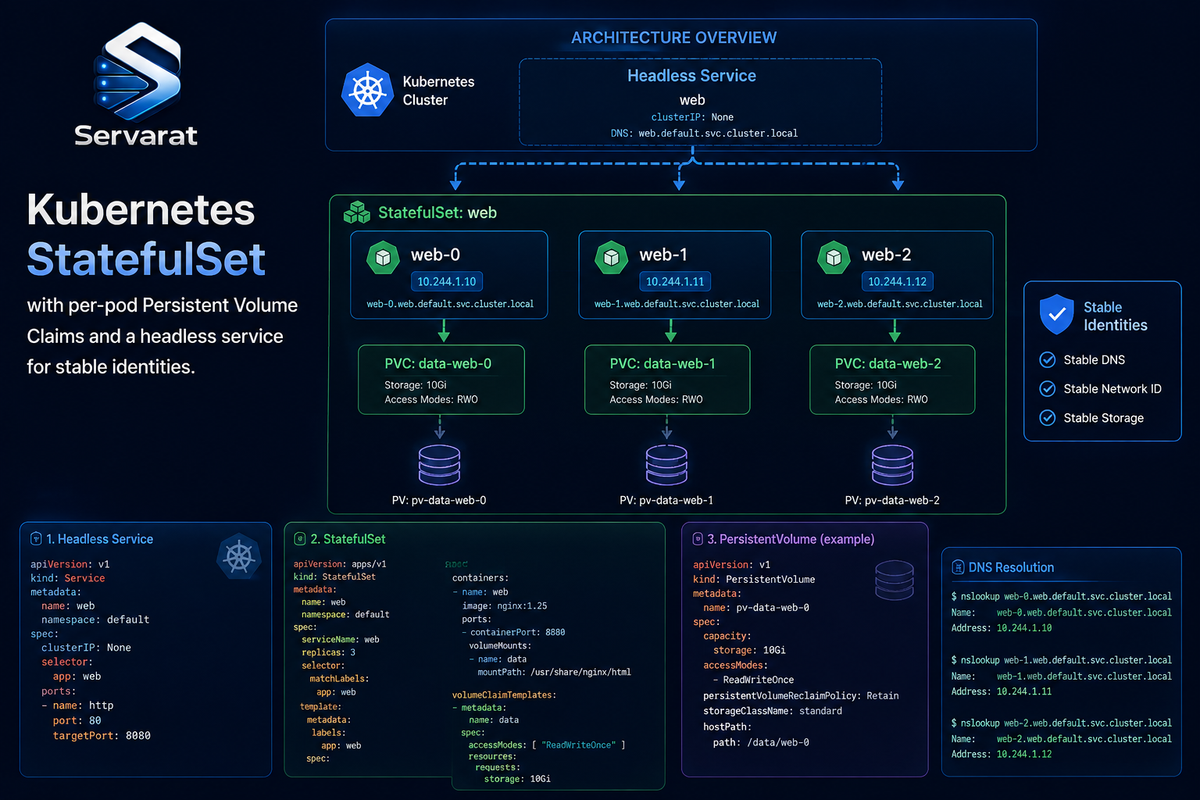
Most StatefulSet tutorials show you a volumeClaimTemplates fragment, list "back up your data" as a best practice, and stop. Then you deploy, and discover the three things they didn't mention: the headless service a StatefulSet requires to actually give pods stable identities, what happens to your storage when you scale down (it doesn't get cleaned up, and that's a billing surprise), and why PVCs outlive the StatefulSet that created them. This covers StatefulSets and Persistent Volumes the way you'll actually run them, with a complete working manifest and the operational gotchas that bite in production, not just the concept.
The Concept, Fast
Stateful applications (databases, message queues, distributed caches) need three things stateless ones don't: a stable identity per pod, persistent storage that survives restarts and rescheduling, and ordered deployment and scaling. A Deployment treats pods as interchangeable; a StatefulSet gives each pod a stable ordinal name (app-0, app-1, app-2), its own persistent storage, and predictable startup/shutdown order.
Storage is handled by two resources. A Persistent Volume (PV) is the actual storage (a cloud disk, an NFS share, a Ceph RBD). A Persistent Volume Claim (PVC) is a request for storage that binds to a PV by size, access mode, and StorageClass. The StatefulSet's volumeClaimTemplates creates a dedicated PVC per pod automatically, so app-0 gets data-app-0, app-1 gets data-app-1, and each pod reconnects to its own volume after a restart or reschedule.
The Full Manifest, Not a Fragment
Here's what the tutorials fragment. A StatefulSet needs a headless service (clusterIP: None) to give pods stable network identities, without it, you get stable storage but not the stable DNS names that make a StatefulSet useful for clustered software. The complete, working pair:
apiVersion: v1
kind: Service
metadata:
  name: app
  labels:
    app: app
spec:
  clusterIP: None          # headless: this is what gives pods stable DNS
  selector:
    app: app
  ports:
  - port: 5432
    name: postgres
---
apiVersion: apps/v1
kind: StatefulSet
metadata:
  name: app
spec:
  serviceName: app          # must match the headless service name
  replicas: 3
  selector:
    matchLabels:
      app: app
  template:
    metadata:
      labels:
        app: app
    spec:
      terminationGracePeriodSeconds: 30
      containers:
      - name: postgres
        image: postgres:17
        ports:
        - containerPort: 5432
          name: postgres
        volumeMounts:
        - name: data
          mountPath: /var/lib/postgresql/data
  volumeClaimTemplates:
  - metadata:
      name: data
    spec:
      accessModes:
      - ReadWriteOnce
      storageClassName: standard
      resources:
        requests:
          storage: 10Gi
⚠️ Two fields most tutorials omit and you'll wish you had. serviceName: app must match the headless service, this is the linkage that produces stable DNS names like app-0.app.namespace.svc.cluster.local, and clustered software (a Postgres replica set, a Kafka broker list) depends on those names being stable. Drop the headless service and your pods can't find each other by predictable address. And terminationGracePeriodSeconds matters for databases specifically: too short and a pod gets killed mid-flush, risking corruption; give stateful workloads enough time to shut down cleanly.
Deploy it and you get:
data-app-0   Bound
data-app-1   Bound
data-app-2   Bound
Each pod with its own independent volume, each reconnecting to the same PVC after any restart or reschedule.
The Gotcha That Costs You Money: Scale-Down Leaves Storage Behind
⚠️ This is the operational surprise the "review your PVCs" bullet gestures at without explaining. When you scale a StatefulSet down, Kubernetes deletes the pods but keeps their PVCs. Scale app from 3 replicas to 1, and app-1 and app-2 are gone, but data-app-1 and data-app-2 remain Bound, still holding their PVs, still billing you for the underlying cloud disks.
This is deliberate, it protects your data if the scale-down was a mistake or temporary. But it means orphaned PVCs silently accumulate cost. Find them:
kubectl get pvc -l app=app --sort-by=.metadata.creationTimestamp
Compare the PVC ordinals against your current replica count. Any PVC with an ordinal >= your replica count is orphaned. ⚠️ Deleting them is destructive and irreversible, you're destroying the data on that volume (depending on the PV's reclaimPolicy), so confirm you don't need it before running:
kubectl delete pvc data-app-1 data-app-2
⚠️ Whether the underlying PV (and cloud disk) actually gets deleted depends on the StorageClass's reclaimPolicy: Delete destroys the disk with the PVC, Retain keeps the PV around (and its cloud disk cost) until you manually remove it. Check yours:
kubectl get storageclass standard -o jsonpath='{.reclaimPolicy}'
If it's Retain, deleting the PVC is not enough to stop the billing, you also have to delete the released PV and, on some providers, the cloud disk itself. If it's Delete, deleting the PVC cascades to the disk. Know which before you scale down a big StatefulSet and assume the storage cleaned itself up.
Kubernetes 1.27+ Can Automate This
⚠️ Worth knowing because it's newer than most tutorials: as of Kubernetes 1.27 (stable), StatefulSets support persistentVolumeClaimRetentionPolicy, which lets you control PVC lifecycle on scale-down and deletion instead of the always-retain default:
spec:
  persistentVolumeClaimRetentionPolicy:
    whenScaled: Delete       # delete PVCs when scaling down
    whenDeleted: Retain      # but keep them if the whole StatefulSet is deleted
whenScaled: Delete auto-removes the orphaned PVCs on scale-down (no manual cleanup), while whenDeleted: Retain keeps data safe if you delete the whole StatefulSet. ⚠️ Set whenScaled: Delete only when you're certain scaled-down replicas' data is genuinely disposable, for a database where each replica holds unique shard data, that's data loss on every scale-down. For a cache or a read-replica that rebuilds from a primary, it's exactly what you want. Choose per workload.
StatefulSet vs Deployment: The Actual Decision
Use a StatefulSet when the app needs stable hostnames and network identity, per-pod persistent storage, ordered deployment/recovery, or replica coordination, databases, Kafka, etcd, Ceph, MinIO, anything clustered. Use a Deployment when pods are interchangeable and don't own durable per-pod state, stateless web tiers, API servers, workers.
⚠️ The common mistake: running a database as a Deployment with a single shared PVC because it "seemed simpler." A Deployment's pods all try to mount the same PVC, and ReadWriteOnce volumes can't be shared across nodes, so you get pods stuck ContainerCreating on volume-attach conflicts. If it's stateful and clustered, it's a StatefulSet. This connects to the CSI authorization-not-validation concern too: per-pod volumes are also per-pod trust boundaries, and how your CSI driver handles them is a security surface, not just an availability one.
Best Practices That Actually Matter
Beyond the source's list, the ones with teeth:
- Match the StorageClass to the workload. Databases want low-latency SSD-backed classes (
gp3,pd-ssd, premium); a log archive can use cheaper throughput-optimized storage. The StorageClass is where you pick, and it's set at PVC-creation time, you can't change a bound PVC's class without migrating. - ⚠️ PVs are not a backup. This is the one the source gets right and it bears repeating hard: a Persistent Volume survives pod restarts and rescheduling, it does not survive a
kubectl delete pvc, a corrupted database, aDROP TABLE, or a ransomware event inside the pod. You need real backups, volume snapshots via the CSI snapshot API, or application-level dumps (pg_dump,mongodump), stored off-cluster. Test the restore. - Plan replica count before scaling. Scaling a StatefulSet isn't like scaling a Deployment, adding a replica to a clustered database means the app has to rebalance/replicate data to the new member, which has performance and consistency implications the orchestrator won't manage for you.
- Set resource requests/limits so the scheduler places stateful pods on nodes that can actually hold them, and so a memory spike in one doesn't evict its neighbors.
- Use
podManagementPolicy: Parallelonly if your app tolerates pods starting simultaneously; the defaultOrderedReady(one at a time, in order) is what most clustered software needs for safe bootstrap.
Bottom Line
StatefulSets give stateful apps the stable identity, per-pod storage, and ordering that Deployments can't, but the parts that bite in production are the ones the fragment-tutorials skip: you need the headless service for stable DNS, PVCs survive scale-down and keep billing you until you clean them up (or set persistentVolumeClaimRetentionPolicy), and the PV is durable storage, not a backup. Deploy the full manifest above, know your StorageClass reclaimPolicy before you scale down, and keep real off-cluster backups of anything you can't afford to lose. Get those right and StatefulSets are a solid foundation for databases and clustered workloads; miss them and you find out during an incident.



