IPsec Site-to-Site VPN with strongSwan: A Complete Guide

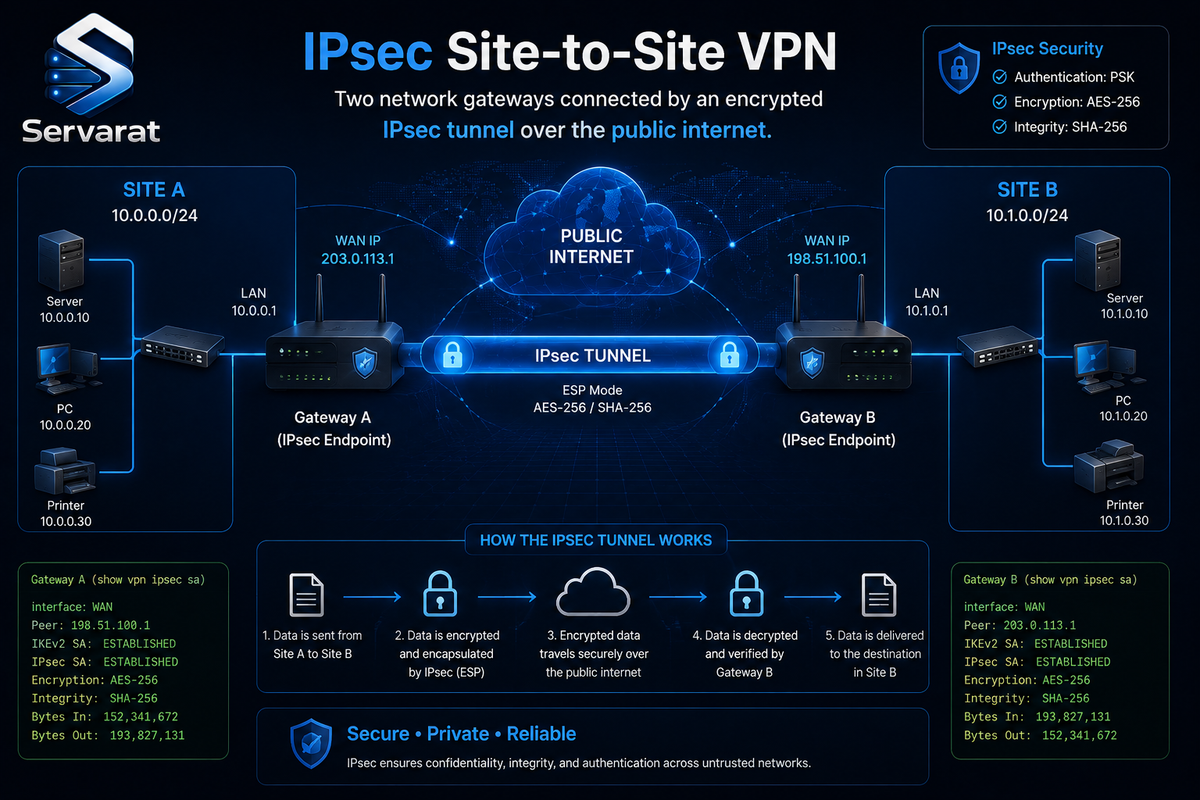
A site-to-site VPN encrypts all traffic between two networks so that two offices, a data center and a cloud VPC, or your infrastructure and a partner's, communicate as if they were on the same private LAN, even though the packets cross the public internet. IPsec is the protocol suite that does the encrypting, and on Linux strongSwan is the reference implementation. This guide covers the whole path: what IPsec actually is and when to reach for it, installing strongSwan, building a working site-to-site tunnel with the modern configuration interface, hardening it for production, and diagnosing it when the tunnel refuses to come up. The config here uses swanctl, not the legacy ipsec.conf that most tutorials still show, because the old stroke interface is deprecated and no longer built by default in current strongSwan.
What IPsec Actually Is
IPsec (Internet Protocol Security) is a suite of protocols that authenticates and encrypts IP packets. Unlike a TLS VPN that wraps traffic in an application-layer tunnel, IPsec operates at the network layer, so it can protect any IP traffic transparently, the applications on either side don't know or care that their packets are encrypted in transit.
Three pieces do the work:
- IKE (Internet Key Exchange), the negotiation protocol. Two gateways use IKE to authenticate each other and agree on the encryption keys. IKEv2 is the current version and the only one you should use for new deployments, it's faster, more robust, and handles connection interruptions better than IKEv1.
- ESP (Encapsulating Security Payload), the protocol that actually encrypts and authenticates the data packets once IKE has set up the keys. This is IP protocol 50, worth remembering for firewall rules.
- Security Associations (SAs), the negotiated agreements that say "between these two peers, encrypt this traffic with this algorithm and this key." A working tunnel has an IKE SA (the control channel) and one or more Child SAs (the actual encrypted data channels).
Two modes matter. Tunnel mode encrypts the entire original IP packet and wraps it in a new one, which is what site-to-site VPNs use because it hides the internal addressing. Transport mode encrypts only the payload and is used for host-to-host connections. For connecting two networks, tunnel mode is the answer.
When to Use IPsec (and When Not To)
IPsec site-to-site is the right tool when you need to connect two networks permanently and transparently: a branch office to headquarters, an on-prem network to a cloud VPC, two data centers. It's the standard that hardware firewalls, cloud VPN gateways (AWS, Azure, GCP all speak it), and enterprise routers interoperate with, so when you need to tunnel to something you don't control, IPsec is usually the only common language.
Reach for something else when the use case is different. For individual devices connecting to a network (road-warrior remote access), WireGuard or an IPsec IKEv2 roadwarrior setup both work, but WireGuard is simpler if every endpoint is Linux. For quick point-to-point links between two Linux hosts you fully control, WireGuard is dramatically easier to configure and audit. IPsec earns its complexity when you need interoperability with non-Linux gear or when compliance mandates it, which is often. As Circle Networks aptly put it, despite WireGuard's rise there's hardly any way around strongSwan for Linux VPNs that must speak established protocols to existing equipment.
The Example Topology
Throughout, two gateways connect two private networks:
  10.1.0.0/16 --- [ Gateway A ] === IPsec tunnel === [ Gateway B ] --- 10.2.0.0/16
   site-a-net       WAN: 203.0.113.10          WAN: 198.51.100.20    site-b-net
Gateway A protects the 10.1.0.0/16 network and has public IP 203.0.113.10. Gateway B protects 10.2.0.0/16 at 198.51.100.20. The goal: any host in 10.1.0.0/16 can reach any host in 10.2.0.0/16 over an encrypted tunnel, with neither network's internal addressing exposed on the wire.
Installing strongSwan
On Debian/Ubuntu, install strongSwan with the swanctl interface:
sudo apt update && sudo apt install -y strongswan strongswan-swanctl
On RHEL/Rocky/Alma (with EPEL enabled):
sudo dnf install -y strongswan
Enable IP forwarding so the gateway will route packets between its interfaces and the tunnel. This is required, a gateway that can't forward can't route traffic into the tunnel:
echo 'net.ipv4.ip_forward=1' | sudo tee /etc/sysctl.d/99-ipsec.conf && sudo sysctl -p /etc/sysctl.d/99-ipsec.conf
Confirm the daemon is present and enable it (the service is named strongswan on systems using the modern interface):
sudo systemctl enable --now strongswan
Verify the install and interface:
swanctl --version
Configuring the Tunnel with swanctl
The modern configuration lives in /etc/swanctl/swanctl.conf, using a structured, section-based syntax that is far clearer than the old flat ipsec.conf. The file has three top-level blocks that matter here: connections (the tunnel definitions), secrets (the keys), and optionally pools (for assigning addresses to remote clients, not needed for site-to-site).
Here is the complete config for Gateway A (/etc/swanctl/swanctl.conf):
connections {
    site-a-to-b {
        version = 2
        local_addrs  = 203.0.113.10
        remote_addrs = 198.51.100.20

        local {
            auth = psk
            id = gateway-a
        }
        remote {
            auth = psk
            id = gateway-b
        }

        children {
            net-net {
                local_ts  = 10.1.0.0/16
                remote_ts = 10.2.0.0/16
                start_action = trap
                dpd_action = restart
                esp_proposals = aes256gcm16-sha512-modp3072
            }
        }

        proposals = aes256-sha512-modp3072
        dpd_delay = 30s
    }
}

secrets {
    ike-site-b {
        id = gateway-b
        secret = "REPLACE_WITH_A_LONG_RANDOM_PRESHARED_KEY"
    }
}
Gateway B is the mirror image, swap the local/remote addresses, IDs, and traffic selectors:
connections {
    site-b-to-a {
        version = 2
        local_addrs  = 198.51.100.20
        remote_addrs = 203.0.113.10

        local {
            auth = psk
            id = gateway-b
        }
        remote {
            auth = psk
            id = gateway-a
        }

        children {
            net-net {
                local_ts  = 10.2.0.0/16
                remote_ts = 10.1.0.0/16
                start_action = trap
                dpd_action = restart
                esp_proposals = aes256gcm16-sha512-modp3072
            }
        }

        proposals = aes256-sha512-modp3072
        dpd_delay = 30s
    }
}

secrets {
    ike-site-a {
        id = gateway-a
        secret = "REPLACE_WITH_A_LONG_RANDOM_PRESHARED_KEY"
    }
}
What the key directives do, because understanding them is what lets you debug later:
version = 2forces IKEv2.local_ts/remote_tsare the traffic selectors, the subnets whose traffic goes through the tunnel. These must mirror exactly on the two peers: A'slocal_tsis B'sremote_tsand vice versa. A mismatch here is the single most common reason a tunnel establishes an IKE SA but passes no traffic.start_action = trapinstalls a policy that brings the tunnel up automatically when the first packet wants to cross it. Alternatives arestart(connect immediately at load) and none (connect only manually).dpd_action = restartwithdpd_delay = 30sis Dead Peer Detection: if the remote gateway stops responding, tear down and re-establish rather than leaving a dead tunnel in place. On a production link this is what makes the tunnel self-heal after a peer reboots.proposals(for IKE) andesp_proposals(for the data channel) define the cryptographic algorithms. More on choosing these in hardening.
Generate a genuinely strong pre-shared key rather than typing one, and put the same value in both gateways' secret fields:
openssl rand -base64 48
Bringing the Tunnel Up
Load the configuration on both gateways:
sudo swanctl --load-all
Confirm the connection loaded:
sudo swanctl --list-conns
With start_action = trap, the tunnel establishes on the first packet. To bring it up immediately for testing, initiate the child SA by name:
sudo swanctl --initiate --child net-net
Check that the tunnel is established:
sudo swanctl --list-sas
A healthy tunnel shows an ESTABLISHED IKE SA and an INSTALLED, TUNNEL Child SA, something like site-a-to-b: #1, ESTABLISHED, IKEv2 followed by net-net: #1, reqid 1, INSTALLED, TUNNEL, ESP. That second line means encrypted traffic can flow.
Test it properly by sourcing the ping from an IP inside your local traffic selector, so it actually matches the tunnel policy:
ping -I 10.1.0.1 10.2.0.1
Confirm the traffic is genuinely encrypted by watching for ESP (protocol 50) packets on the WAN interface:
sudo tcpdump -i eth0 -n esp
Seeing ESP packets rather than the plaintext ping is the proof the traffic is inside the tunnel.
Firewall and Routing Requirements
A tunnel that establishes but passes no traffic is almost always a firewall or routing problem, not an IPsec one. Three things must be open on both gateways' WAN-facing firewall:
- UDP 500 (IKE negotiation)
- UDP 4500 (IKE and ESP when NAT traversal is in play, which is common)
- ESP, IP protocol 50 (the encrypted data itself)
With firewalld:
sudo firewall-cmd --permanent --add-service=ipsec && sudo firewall-cmd --reload
With raw iptables, allow the IKE ports and ESP:
sudo iptables -A INPUT -p udp --dport 500 -j ACCEPT; sudo iptables -A INPUT -p udp --dport 4500 -j ACCEPT; sudo iptables -A INPUT -p esp -j ACCEPT
strongSwan installs its routing policies in routing table 220 automatically. You can confirm the tunnel routes exist:
ip route show table 220
If your internal hosts don't use the gateway as their default route, they need a route to the remote subnet pointing at the local gateway, otherwise return traffic never finds its way back into the tunnel.
Hardening for Production
A working tunnel and a secure tunnel are different things. Several changes move you from "it connects" to "it belongs in production."
Use strong, modern crypto proposals. The config above already specifies aes256gcm16-sha512-modp3072, AES-256 in GCM mode (authenticated encryption), SHA-512 for integrity, and a 3072-bit DH group. Avoid anything with MD5, SHA-1, 3DES, or DH groups below 2048 bits (modp2048); those are weak or broken. AES-GCM is preferred over AES-CBC because it does encryption and authentication in one pass. For the strongest forward secrecy, the modp3072 (or an elliptic-curve group like ecp384) ensures a compromised key can't decrypt past sessions.
Prefer certificate authentication over pre-shared keys for anything serious. PSK is fine for a quick two-gateway link you fully control, but a shared secret is a single point of failure, if it leaks, both ends are compromised, and it can't be revoked without touching both gateways. For production, especially with more than two sites or any third party involved, use X.509 certificates: each gateway gets its own key and certificate signed by a CA you control, and you can revoke one endpoint without disturbing the others. strongSwan's pki tool builds the whole chain, and the local/remote blocks change auth = psk to auth = pubkey with a certs = reference.
Enable perfect forward secrecy on the Child SA. Including a DH group in esp_proposals (as modp3072 does above) forces a fresh key exchange for the data channel on each rekey, so compromising the IKE key doesn't retroactively expose data traffic.
Set sane rekey and lifetime limits. Shorter SA lifetimes mean a compromised key is useful for less time. Add explicit lifetimes to the connection if your compliance regime requires them, the defaults are reasonable but auditors often want them stated.
Restrict the traffic selectors tightly. local_ts and remote_ts should be the specific subnets that need to communicate, not 0.0.0.0/0. A tunnel scoped to exactly the networks that need it limits what an attacker who compromises one gateway can reach through the tunnel.
Keep strongSwan patched. IKE daemons parse untrusted network input from the internet, so IKE implementation vulnerabilities are periodically serious. Keep the package current, and if you run a fleet, track strongSwan security advisories the same way you track kernel ones, because an unauthenticated IKE bug on an internet-facing daemon is exactly the kind of thing worth patching quickly.
Log to a central location. IPsec logs on the gateway are your only forensic record if the tunnel is attacked or misused. Ship them off-host so a compromised gateway can't erase its own history.
Troubleshooting
strongSwan's logs are detailed but not always obvious, so a systematic approach beats guessing. Work from the most common failures outward.
Raise the log verbosity first. In /etc/strongswan.conf, the charon daemon's log level controls detail. For live debugging, watch the journal as you initiate:
sudo journalctl -u strongswan -f
Then in another terminal, sudo swanctl --initiate --child net-net and read what charon reports.
The tunnel won't establish at all (no IKE SA). This is a negotiation or connectivity failure. Check, in order:
- Can the two gateways reach each other on UDP 500/4500 at all? A firewall between them (or a cloud security group) blocking those ports means IKE never starts. Test with
nc -uor check the firewall. - Do the crypto proposals overlap? If Gateway A offers only
aes256gcm16-sha512-modp3072and Gateway B offers onlyaes128-sha256-modp2048, they share no common proposal and negotiation fails with a "no proposal chosen" message. Ensure at least one matching proposal on both sides. - Do the IDs and PSK match? A mismatched
idor a differentsecreton the two gateways produces authentication failures. The logs will say the authentication failed rather than that no proposal was chosen, which is how you tell the two apart.
The IKE SA establishes but no traffic passes (Child SA missing or traffic dropped). The control channel is fine but the data channel isn't working:
- Traffic selector mismatch is the top cause. A's
local_ts/remote_tsmust be the exact mirror of B's. If they don't line up, the Child SA won't install or won't match your traffic. Checkswanctl --list-sasfor anINSTALLEDChild SA; if it's absent, the selectors are the first suspect. - IP forwarding is off. If
net.ipv4.ip_forwardisn't 1, the gateway drops transit packets silently. Re-checksysctl net.ipv4.ip_forward. - Return routing is missing. Traffic goes out but replies don't come back because the remote internal hosts have no route to your subnet via their gateway. Verify routes on both the gateways and the internal hosts.
- A NAT rule is masquerading tunnel traffic. If your gateway has a broad
MASQUERADErule, it may be NATing the traffic that should go into the tunnel before the IPsec policy sees it, so the packets never match the tunnel. Exclude the tunnel subnets from NAT with a rule that accepts the site-to-site traffic before the masquerade rule.
The tunnel drops and doesn't recover. If the link establishes but dies periodically, Dead Peer Detection settings and rekeying are the place to look. Confirm dpd_action = restart is set so a dropped peer triggers re-establishment rather than a dead tunnel. If it drops exactly on rekey, a proposal or lifetime mismatch between the peers is likely, check that both agree on rekey parameters.
Useful diagnostic commands, in order of what they tell you:
sudo swanctl --list-sas
shows what's currently established. Empty output means nothing is up.
sudo swanctl --list-conns
confirms the config actually loaded (if a connection you expect isn't listed, the config didn't parse or wasn't reloaded).
ip xfrm state; ip xfrm policy
shows the kernel-level IPsec state and policies, if swanctl --list-sas shows established but ip xfrm state is empty, the kernel and userspace disagree and something is wrong at the policy level.
sudo tcpdump -i eth0 -n 'udp port 500 or udp port 4500 or esp'
watches the actual IKE and ESP packets on the wire, which tells you whether negotiation traffic is even reaching the peer.
After any config change, reload before retesting, a surprising amount of "it's still broken" is simply testing against the old loaded config:
sudo swanctl --load-all
Bottom Line
An IPsec site-to-site VPN with strongSwan gives you an encrypted, transparent link between two networks that interoperates with essentially any firewall, cloud gateway, or router you'll meet, which is exactly why it remains the standard despite WireGuard's simplicity. Build it on the modern swanctl interface, use IKEv2 with AES-GCM and a strong DH group, mirror your traffic selectors exactly, and open UDP 500/4500 plus ESP on both ends. Harden it with certificate authentication and tight traffic selectors before it goes to production, ship the logs off-host, and when it misbehaves, work from the outside in: connectivity, then proposals, then authentication, then traffic selectors, then routing and NAT. Get those in order and strongSwan is a rock-solid foundation for connecting networks that need to trust each other across an untrusted internet.