
How to Scale Laravel Applications for High-Traffic Production Systems

The Scaling Problem Nobody Sees Coming
Your first scaling problem rarely arrives with a bang. For a while, everything works: pages load fast, the database barely breaks a sweat, and the team ships features without thinking about infrastructure.
Then traffic climbs. A campaign over-performs. A marketplace onboards a popular seller. A SaaS product signs a couple of enterprise accounts.
Suddenly /dashboard takes two seconds instead of 300 milliseconds. Queue jobs that used to clear in seconds sit waiting for minutes. Database CPU spikes every afternoon.
So you add another app server, and response time barely moves—because the real culprit was a slow query on a large table all along.
If you've run Laravel in production, you've lived some version of this. The good news: scaling Laravel almost never means abandoning the framework. It means learning where pressure builds and making the application behave predictably under load. The biggest wins come from practical work—removing inefficient queries, pushing slow tasks onto queues, adding the right indexes, caching carefully chosen data, and measuring whether each change actually helped.
What Happens When Laravel Apps Grow
Traffic changes a system's behavior because it turns small inefficiencies into permanent costs. A query taking 80 milliseconds is harmless when it runs a few hundred times an hour. Run it 30 times per page view on a page getting thousands of hits a minute, and that same query becomes a capacity problem.
The pressure shows up in predictable places. More requests mean more PHP workers, more database connections, more queue volume, more Redis operations. The database—MySQL or PostgreSQL—is usually the first thing to buckle. Queues back up when work is created faster than workers can drain it. Caches only help when hit rates stay high. And scaling everything horizontally can turn sloppy code into an expensive cloud bill.
That's why scaling work starts with measurement, not guesswork. Before you change anything, you want to know what's actually saturated: request CPU, database I/O, lock contention, Redis latency, queue depth, an external API, or oversized payloads.
⚠️ The key insight: Adding more app servers does nothing for a slow query, a missing index, or an overloaded queue. Horizontal scaling only pays off once the shared dependencies behind those servers can keep up.
Common Laravel Bottlenecks
Laravel itself causes very few scaling problems. Most issues come from how application code talks to the database, the network, and background workers.
N+1 Queries
The classic offender. You load a list of models, then lazily touch a relationship on each one:
use App\Models\Post;

$posts = Post::latest()->take(50)->get();

foreach ($posts as $post) {
    echo $post->author->name;
}
That's one query for the posts plus one query per author—51 queries for a single page. Eager load instead:
use App\Models\Post;

$posts = Post::with('author')
    ->latest()
    ->take(50)
    ->get();

foreach ($posts as $post) {
    echo $post->author->name;
}
In production these are sneaky. They hide inside API Resources, Blade components, and authorization checks, where the relationship access isn't obvious from the controller.
Missing Indexes
Adding an index is one of the highest-return fixes you can make. Take this query:
$orders = Order::where('account_id', $accountId)
    ->where('status', 'paid')
    ->whereBetween('created_at', [$start, $end])
    ->latest()
    ->paginate(50);
If orders has millions of rows and no useful compound index, the database scans far more rows than needed. Add an index that matches how you actually query:
use Illuminate\Database\Migrations\Migration;
use Illuminate\Database\Schema\Blueprint;
use Illuminate\Support\Facades\Schema;

return new class extends Migration {
    public function up(): void
    {
        Schema::table('orders', function (Blueprint $table) {
            $table->index(['account_id', 'status', 'created_at']);
        });
    }

    public function down(): void
    {
        Schema::table('orders', function (Blueprint $table) {
            $table->dropIndex(['account_id', 'status', 'created_at']);
        });
    }
};
⚠️ Indexes aren't free. They take space and slow down writes. Add them for real, repeated query patterns, not for every column that appears in a where clause.
Inefficient Eager Loading
You can swing too far the other way. Loading every relationship "just in case" burns memory and ships data the request never uses:
$users = User::with([
    'profile',
    'teams',
    'roles.permissions',
    'invoices.lineItems.product',
])->get();
Fine for an admin detail page showing one user. On a list page, it's a liability. Constrain the eager loads and select only the columns you need:
$users = User::query()
    ->select(['id', 'name', 'email'])
    ->with([
        'profile:id,user_id,avatar_url',
        'teams:id,name',
    ])
    ->latest()
    ->paginate(25);
⚠️ Tightly scoped select lists can break later code that expects a column you didn't load. Keep this close to read-heavy endpoints where the payoff is obvious.
Synchronous Processing
High-traffic apps need short web requests. Sending email, generating PDFs, calling third-party APIs, resizing images—all usually belong outside the request cycle. This hurts:
public function store(Request $request)
{
    $order = Order::create($request->validated());

    Mail::to($order->user)->send(new OrderReceipt($order));

    return response()->json($order, 201);
}
Push the work onto a queue:
public function store(StoreOrderRequest $request)
{
    $order = Order::create($request->validated());

    SendOrderReceipt::dispatch($order->id);

    return response()->json([
        'id' => $order->id,
        'status' => 'accepted',
    ], 202);
}
Now your response time no longer depends on your mail provider. If the provider has a slow afternoon, the queue absorbs it and your users don't wait.
Large Payloads
Oversized JSON hurts everyone: the app server serializing it, the network carrying it, the client parsing it. A frequent mistake is returning whole models when you meant a summary:
return User::with('orders', 'invoices', 'teams')->findOrFail($id);
Define an explicit API Resource instead:
use Illuminate\Http\Resources\Json\JsonResource;

class UserSummaryResource extends JsonResource
{
    public function toArray($request): array
    {
        return [
            'id' => $this->id,
            'name' => $this->name,
            'avatar_url' => $this->profile?->avatar_url,
            'plan' => $this->subscription_plan,
        ];
    }
}
A small, deliberate response contract keeps endpoint cost easy to reason about and prevents accidental coupling.
Expensive Joins
Joins are useful, but expensive joins across large tables can dominate your database time, especially when they sort or filter on unindexed columns:
$rows = DB::table('orders')
    ->join('users', 'users.id', '=', 'orders.user_id')
    ->join('accounts', 'accounts.id', '=', 'users.account_id')
    ->where('accounts.region', 'us-east')
    ->where('orders.status', 'paid')
    ->orderByDesc('orders.created_at')
    ->limit(100)
    ->get();
At scale, you may need to denormalize a small field, precompute a reporting table, or move analytics off the primary transactional database entirely. Denormalization isn't an admission of defeat—copying a stable field like account_id onto orders can remove a costly join from a hot path. The price is keeping that duplicated data consistent, which is often a worthwhile trade.
How to Optimize the Database
When a Laravel app slows down, the database is usually the first place to look.
Add Indexes Around Real Query Patterns
Start with your slow query log, database metrics, and traces—not intuition. If the app constantly looks up active subscriptions by account, build a compound index that matches:
Schema::table('subscriptions', function (Blueprint $table) {
    $table->index(['account_id', 'status', 'renews_at']);
});
Then write the query so it can actually use the index:
$subscription = Subscription::where('account_id', $accountId)
    ->where('status', 'active')
    ->where('renews_at', '>=', now())
    ->orderBy('renews_at')
    ->first();
Get in the habit of running EXPLAIN after you add an index to confirm the plan changed. An index the optimizer ignores is just write overhead.
Use Eager Loading Deliberately
Match eager loading to what the endpoint actually returns. For list endpoints, keep relationships shallow and constrained:
$projects = Project::query()
    ->select(['id', 'account_id', 'name', 'updated_at'])
    ->withCount('openTasks')
    ->with([
        'owner:id,name',
    ])
    ->where('account_id', $accountId)
    ->latest('updated_at')
    ->paginate(30);
When you only need a number, withCount beats loading a whole relationship to count it:
$teams = Team::query()
    ->withCount([
        'members',
        'invitations as pending_invitations_count' => fn ($query) => $query->whereNull('accepted_at'),
    ])
    ->paginate(25);
Your memory footprint stays flat, which matters more on a list page than a detail page.
Optimize Queries Before Adding Hardware
A bigger database instance buys you time. It also hides the inefficient queries that put you there until the next traffic jump exposes them again. Find your highest-cost queries first. In local or staging, logging slow ones is easy:
use Illuminate\Database\Events\QueryExecuted;
use Illuminate\Support\Facades\DB;
use Illuminate\Support\Facades\Log;

DB::listen(function (QueryExecuted $query) {
    if ($query->time > 100) {
        Log::warning('Slow query detected', [
            'sql' => $query->toRawSql(),
            'time_ms' => $query->time,
        ]);
    }
});
⚠️ Be careful doing this in production. Bindings can contain sensitive data, and verbose logging at high volume can become its own performance problem.
Process Large Tables with Chunking
Never pull an entire large table into memory for a batch job:
User::where('is_active', true)
    ->chunkById(1000, function ($users) {
        foreach ($users as $user) {
            RefreshUserSearchIndex::dispatch($user->id);
        }
    });
chunkById is safer than offset-based chunking when rows can change while the job runs, because it tracks the last seen ID instead of a numeric offset. For very large exports, stream the records or write them in batches.
Use Cursor Pagination for High-Volume Feeds
Offset pagination gets slower the deeper a user scrolls, because the database still skips every row it's not returning. For feeds, audit logs, messages, and timelines, cursor pagination usually fits better:
$events = AuditEvent::query()
    ->where('account_id', $accountId)
    ->orderByDesc('id')
    ->cursorPaginate(50);

return AuditEventResource::collection($events);
It relies on a stable, indexed ordering column and uses next/previous cursors rather than arbitrary page numbers—exactly what infinite scroll needs.
Split Reads with Read Replicas
As read traffic grows, replicas can take load off the primary:
'mysql' => [
    'driver' => 'mysql',
    'read' => [
        'host' => [
            env('DB_READ_HOST', '127.0.0.1'),
        ],
    ],
    'write' => [
        'host' => [
            env('DB_WRITE_HOST', '127.0.0.1'),
        ],
    ],
    'sticky' => true,
    'database' => env('DB_DATABASE', 'laravel'),
    'username' => env('DB_USERNAME', 'root'),
    'password' => env('DB_PASSWORD', ''),
],
The sticky option keeps reads on the write connection after a write within the same request, helping avoid read-after-write surprises.
⚠️ Replicas come with replication lag, and that lag matters. Don't route payment confirmations, password changes, or permission checks to a replica that might be a few seconds stale unless the business flow can genuinely tolerate old data.
How to Scale with Redis
Redis often does a lot in a Laravel production stack: caching, sessions, rate limiting, queues, locks, Horizon metrics. It's fast, but it needs thought—sensible key design, expiration policies, memory monitoring, and a real invalidation plan.
Caching
Cache expensive reads requested often that tolerate being slightly stale:
use Illuminate\Support\Facades\Cache;

$stats = Cache::remember(
    "accounts:{$account->id}:dashboard-stats",
    now()->addMinutes(5),
    fn () => DashboardStats::forAccount($account)->calculate()
);
Short TTLs go a surprisingly long way. A five-minute cache can wipe out thousands of duplicate queries while keeping data fresh enough for most dashboards.
When the data changes after a known event, invalidate explicitly:
Order::created(function (Order $order) {
    Cache::forget("accounts:{$order->account_id}:dashboard-stats");
});
Caching works best when keys are predictable and invalidation ties to domain events rather than guesswork.
Sessions
⚠️ For horizontally scaled app servers, file-based sessions are a trap: the next request can land on a different server that's never seen the session. Store sessions in Redis or a database so any server can handle any request:
SESSION_DRIVER=redis
CACHE_STORE=redis
QUEUE_CONNECTION=redis
Rate Limiting
Rate limits protect you from abusive clients, runaway loops, and hammered endpoints:
use Illuminate\Cache\RateLimiting\Limit;
use Illuminate\Http\Request;
use Illuminate\Support\Facades\RateLimiter;

RateLimiter::for('api', function (Request $request) {
    return Limit::perMinute(120)->by(
        optional($request->user())->id ?: $request->ip()
    );
});
Expensive endpoints deserve stricter limits:
RateLimiter::for('exports', function (Request $request) {
    return Limit::perHour(10)->by($request->user()->id);
});
Let business cost drive the numbers. Login, search, export, and webhook endpoints rarely need the same limit.
Queues
Redis is a common queue backend because it's quick and Horizon supports it well:
QUEUE_CONNECTION=redis
Dispatch work onto named queues from the request:
GenerateInvoicePdf::dispatch($invoice->id)
    ->onQueue('documents');
Split work by profile—default, emails, webhooks, documents, imports—because each workload needs different worker counts and retry rules. Keep names meaningful. During an incident, "the documents queue is 20 minutes behind" tells you far more than "default is slow."
How to Use Queue-Driven Architectures
Queues are one of Laravel's best scaling tools. They let the app accept work quickly and process it asynchronously with controlled concurrency. They also make the system resilient: when a third-party API goes down, jobs retry on their own instead of tying up your PHP-FPM request workers.
Laravel Queues
A good job is small, idempotent, and safe to retry:
use App\Mail\OrderReceiptMail;
use App\Models\Order;
use Illuminate\Contracts\Queue\ShouldQueue;
use Illuminate\Foundation\Queue\Queueable;
use Illuminate\Support\Facades\Mail;

class SendOrderReceipt implements ShouldQueue
{
    use Queueable;

    public int $tries = 3;
    public int $backoff = 60;

    public function __construct(public int $orderId)
    {
    }

    public function handle(): void
    {
        $order = Order::with('user')->findOrFail($this->orderId);

        Mail::to($order->user)->send(new OrderReceiptMail($order));
    }
}
⚠️ Pass IDs into jobs rather than full Eloquent models. The model might change before the job runs, and serializing a whole model bloats the payload. For external APIs, add timeouts and guard against duplicate work:
use App\Models\Order;
use App\Services\CrmClient;
use Illuminate\Contracts\Queue\ShouldQueue;
use Illuminate\Foundation\Queue\Queueable;

class SyncOrderToCrm implements ShouldQueue
{
    use Queueable;

    public int $tries = 3;
    public int $backoff = 60;

    public function __construct(public int $orderId)
    {
    }

    public function handle(CrmClient $crm): void
    {
        $order = Order::findOrFail($this->orderId);

        if ($order->crm_synced_at) {
            return;
        }

        $crm->upsertOrder($order->external_reference, [
            'total' => $order->total,
            'status' => $order->status,
        ]);

        $order->forceFill(['crm_synced_at' => now()])->save();
    }
}
The crm_synced_at check is the whole point. Jobs run more than once in real life, and idempotency is what keeps a retry from double-charging or double-syncing.
Horizon
Horizon gives you visibility and control over Redis queues. A typical setup runs different supervisors for different workloads:
'production' => [
    'supervisor-default' => [
        'connection' => 'redis',
        'queue' => ['default', 'emails'],
        'balance' => 'auto',
        'maxProcesses' => 20,
        'tries' => 3,
    ],

    'supervisor-documents' => [
        'connection' => 'redis',
        'queue' => ['documents'],
        'balance' => 'simple',
        'maxProcesses' => 5,
        'tries' => 2,
        'timeout' => 300,
    ],
],
The separation matters: a long-running document job shouldn't starve a quick password-reset email.
Failed Jobs and Retries
Retries only help when failures are temporary. Retrying a permanently broken job just burns capacity. For jobs with a business deadline, use retryUntil:
use DateTime;
use Throwable;

public function retryUntil(): DateTime
{
    return now()->addMinutes(30);
}

public function failed(Throwable $exception): void
{
    ImportBatch::whereKey($this->batchId)->update([
        'status' => 'failed',
        'failed_reason' => $exception->getMessage(),
    ]);
}
Use failed to flag the problem somewhere a human will see it. ⚠️ Don't set unlimited retries on jobs that hit a third-party service.
Queue Monitoring
Track queue depth, wait time, failure rate, and processing time together. Depth alone can mislead you. When depth climbs, walk through it methodically: are workers keeping pace with incoming jobs? If the queue keeps growing, check how long individual jobs take. If the slow part is the database, fix the query or dial back worker concurrency. If it's an external API, add backoff or a circuit breaker. If the work is CPU-bound, scale workers or break jobs into smaller pieces.
⚠️ Be careful with the "scale workers" instinct. Adding more workers without checking the database first can make an incident worse—more workers mean more concurrent queries, more locks, and more pressure on the primary exactly when it's already struggling.
How to Optimize API Performance
APIs earn special attention because clients call them repeatedly and payloads grow quietly over months.
API Resources
Resources keep your response shape intentional:
class OrderResource extends JsonResource
{
    public function toArray($request): array
    {
        return [
            'id' => $this->id,
            'status' => $this->status,
            'total' => $this->total,
            'placed_at' => $this->created_at->toIso8601String(),
            'customer' => new CustomerSummaryResource($this->whenLoaded('customer')),
        ];
    }
}
whenLoaded is doing real work here. It stops the resource from quietly triggering a lazy query when the relationship wasn't eager loaded:
$orders = Order::query()
    ->with('customer:id,name')
    ->where('account_id', $accountId)
    ->latest()
    ->paginate(50);

return OrderResource::collection($orders);
Pagination
Returning unbounded collections creates a performance problem you won't notice until a client has a lot of data:
$perPage = min((int) request('per_page', 50), 100);

$orders = Order::where('account_id', $accountId)
    ->latest()
    ->paginate($perPage);
Cap the page size. If a client genuinely needs every record for an export, make that an async job rather than a giant synchronous response.
Response Optimization
Stop returning fields nobody reads. On read-heavy endpoints, selecting only the columns you need cuts both database I/O and serialization cost:
$products = Product::query()
    ->select(['id', 'name', 'slug', 'price', 'thumbnail_url'])
    ->where('is_visible', true)
    ->orderBy('name')
    ->paginate(40);
It's also worth turning on compression at the web server or load balancer. JSON compresses extremely well—often a small config change with a real bandwidth payoff.
Rate Limiting
Design API rate limits around identity and endpoint cost:
Route::middleware(['auth:sanctum', 'throttle:api'])
    ->group(function () {
        Route::get('/orders', [OrderController::class, 'index']);
        Route::post('/exports/orders', [OrderExportController::class, 'store'])
            ->middleware('throttle:exports');
    });
This keeps casual browsing and expensive exports under separate policies, so one heavy user can't squeeze out everyone else.
Caching API Responses
Cache responses that are expensive to compute and tolerate being a little stale:
public function index(Request $request)
{
    $accountId = $request->user()->account_id;
    $page = $request->integer('page', 1);

    $cacheKey = "api:accounts:{$accountId}:orders:v1:page:{$page}";

    return Cache::remember($cacheKey, now()->addSeconds(60), function () use ($accountId) {
        return OrderResource::collection(
            Order::with('customer:id,name')
                ->where('account_id', $accountId)
                ->latest()
                ->paginate(50)
        )->response()->getData(true);
    });
}
Notice the v1 in the key. Bumping that version lets you invalidate an entire response format at once when the shape changes. Always scope the key to the tenant or user for anything not truly global.
How to Monitor Laravel in Production
The teams that catch problems before customers do collect signals from everywhere: Laravel, queues, the database, Redis, the infrastructure, and external services.
Laravel gives you good starting points. Horizon shows queue throughput, failed jobs, wait times, and worker balancing. Telescope surfaces request details, queries, exceptions, jobs, mail, and cache events. Your logs capture slow operations, unexpected retries, and external failures. Your metrics track latency, error rate, queue depth, job runtime, database CPU, lock waits, cache hit ratio, and Redis memory. Your alerting ties all of it back to something a customer would actually feel.
That last part is where teams make mistakes. The best alerts are about symptoms, not busy machines: p95 API latency over 800ms for 10 minutes, checkout error rate above 1%, the emails queue waiting more than 5 minutes, database CPU over 85% with slow queries rising, Redis memory over 80%, or failed payment webhooks crossing a threshold.
A useful mental model: logs tell you what happened, metrics tell you whether the system is healthy, and traces tell you where the time went. Wrapping expensive business operations in a bit of instrumentation pays off quickly:
use Illuminate\Support\Facades\Log;

$startedAt = microtime(true);

$report = $builder->forAccount($account)->build();

Log::info('Billing report generated', [
    'account_id' => $account->id,
    'duration_ms' => (int) ((microtime(true) - $startedAt) * 1000),
    'invoice_count' => $report->invoiceCount(),
]);
When something fails at 2am, a log line like that tells you which account, import, or report is causing the pressure.
⚠️ One more thing: monitor wait time, not just throughput. A queue can process thousands of jobs a minute and still be unhealthy if important jobs sit waiting too long before they start. Users feel the wait, not the throughput.
An Example High-Traffic Laravel Architecture
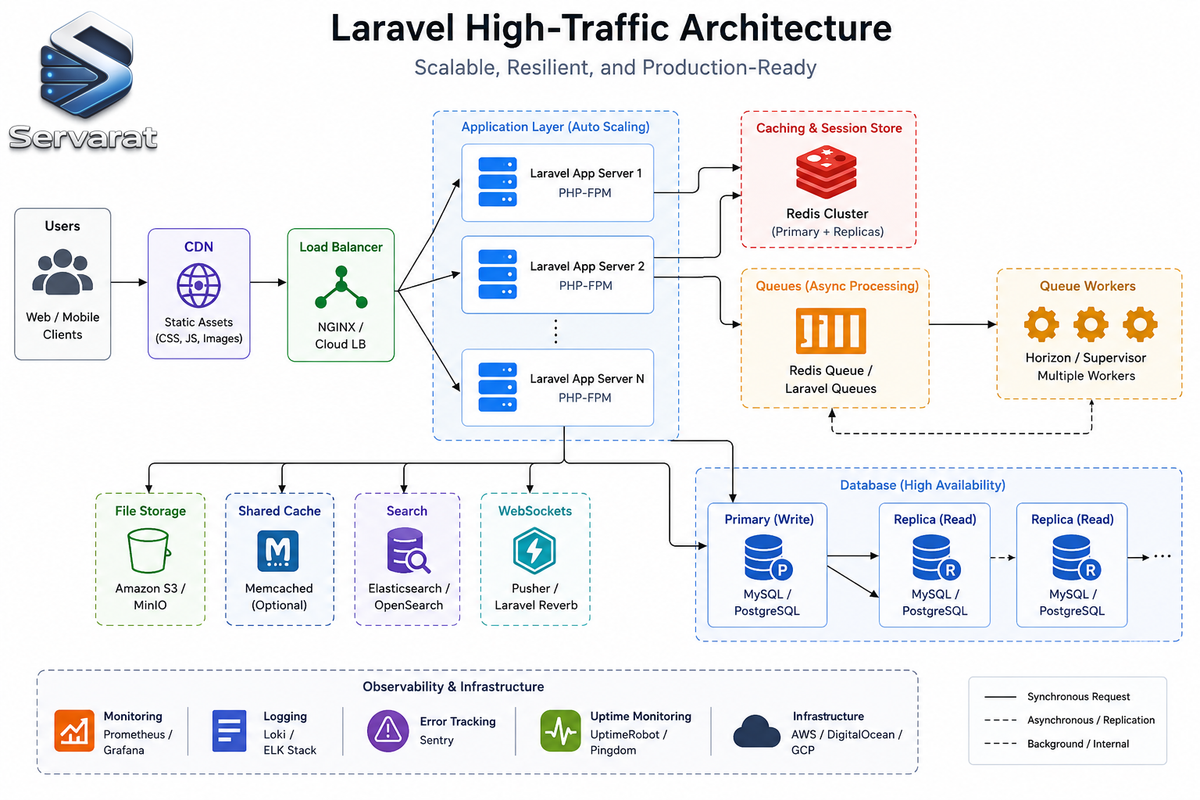
A high-traffic Laravel setup generally separates four things: stateless web requests, shared cache and session storage, asynchronous workers, and database roles.
Users hit a load balancer, which spreads traffic across a fleet of stateless Laravel app servers. Those servers use Redis for cache, sessions, rate limits, queues, and Horizon data. Queue workers handle slow or unreliable work off to the side. A MySQL primary takes all writes and consistency-sensitive reads, while a read replica absorbs read-heavy endpoints that can tolerate replication lag.
Users
  -> Load balancer
  -> Stateless Laravel app servers
  -> Redis for cache, sessions, rate limits, queues, and Horizon data
  -> Primary database for writes and consistency-sensitive reads
  -> Read replica for safe read-heavy endpoints

Redis queue
  -> Queue workers
  -> Database, external APIs, mail providers, object storage, and other services
This isn't the only valid shape. PostgreSQL can stand in for MySQL, Amazon SQS can replace Redis queues, a CDN can serve static assets and cache public responses, and object storage should hold user uploads. The principle that matters: each layer has one clear job and can be scaled or tuned on its own.
⚠️ The flip side of stateless app servers: anything a user needs after the request ends has to live in shared storage. Uploads, generated files, and session state shouldn't sit on a single server's local disk, or they may disappear when the load balancer sends the next request somewhere else.
Lessons Learned the Hard Way
1. Premature Optimization
This shows up as elaborate infrastructure built before the app has any real visibility into itself. The practical path works better: measure, rank the bottlenecks, fix the biggest one, repeat. For most Laravel apps, the first round of scaling is mostly indexes, N+1 fixes, queue separation, and trimming payloads.
2. Over-caching
Caching can make a system faster and harder to reason about at the same time. One team cached an account-settings response for 30 minutes, then later folded role changes into that same response. Users who had just lost access could still see features until the cache expired. The fix was splitting stable account metadata away from permission-sensitive state. ⚠️ Avoid caching authorization data unless you've thought carefully about invalidation.
3. Missing Indexes
These hide until a table crosses a size threshold. A query that scanned 20,000 rows in development can scan 20 million in production. Bake index review into feature work, and plan big index migrations carefully so they don't lock a hot table at the worst possible time.
4. Queue Overload
Queues don't remove work, they move it. The classic failure is letting one noisy workload block everything else. A big CSV import floods the default queue, and password-reset emails get stuck behind it. Separate queues are cheap insurance against that entire class of incident.
5. Large Transactions
Long transactions hold locks longer and make failures more expensive. Dispatching a job inside a transaction is especially risky because a worker can grab it before the transaction commits:
DB::transaction(function () use ($request) {
    $order = Order::create([...]);
    $order->items()->createMany($request->items);

    GenerateInvoicePdf::dispatch($order->id);
    SyncOrderToCrm::dispatch($order->id);
});
Use after-commit dispatching for any job that depends on committed data:
GenerateInvoicePdf::dispatch($order->id)->afterCommit();
SyncOrderToCrm::dispatch($order->id)->afterCommit();
Keep transactions scoped to the data that genuinely has to change atomically, and nothing more.
6. Treating Symptoms as Causes
This is the expensive one. If latency is high because an endpoint runs 300 queries, adding app servers adds database pressure. If jobs are slow because an external API is rate-limiting you, adding workers multiplies the failures.
Good scaling work keeps asking the same questions: What resource is saturated? Which endpoint, job, tenant, or query is causing it? Is this work necessary during the request? Can I reduce it, defer it, cache it, or isolate it? How will I know whether the change helped?
A Pre-Launch Scaling Checklist
Run through this before a big launch, a traffic campaign, or an enterprise rollout.
Application and runtime: Cache config, routes, and views during deploy. Set APP_DEBUG=false. Turn on OPcache. Keep web requests short and move slow work to queues. Store uploads in object storage, not app-server disk. Keep servers stateless. Set timeouts on every external HTTP call.
Database: Review slow query logs first. Add indexes for high-volume filters, joins, and ordering. Hunt for N+1 queries in controllers, resources, policies, and views. Paginate every list endpoint. Use chunkById or cursors for batch work. Avoid long transactions and external calls inside transactions. Confirm your backup and restore process works. Test stale-read behavior if you use replicas.
Redis and cache: Use Redis for cache, sessions, rate limiting, and queues where it fits. Set TTLs unless you have a clear reason not to. Include tenant, user, locale, and version in keys when relevant. Watch memory and the eviction policy. Avoid caching permission-sensitive responses without careful invalidation. Guard against cache stampedes on expensive recomputation.
Queues: Separate queues by workload. Configure Horizon supervisors per queue. Set timeouts, retries, and backoff on purpose. Make jobs idempotent where you can. Use afterCommit for jobs that depend on committed data. Monitor wait time, runtime, failures, and retries. Review failed jobs instead of ignoring them.
APIs: Use Resources to control response shape. Cap per_page. Use cursor pagination for big feeds and logs. Cache expensive reads with safe, versioned keys and short TTLs. Apply rate limits by endpoint cost. Don't return raw Eloquent models. Compress responses at the edge.
Observability: Track p50, p95, and p99 latency on the endpoints that matter. Track error rates by route and job class. Alert on queue wait time, not just size. Watch database CPU, connections, slow queries, and lock waits. Watch Redis memory, latency, and evictions. Log important business operations with durations and identifiers. Test your alerts before launch night—a silent alert is worse than no alert.
Conclusion
Laravel runs high-traffic production systems well when you design around the real costs of data, concurrency, and external dependencies. Measure before you optimize, because guessing wastes time and tends to complicate the wrong layer.
Fix the database first: indexes, query shape, pagination, and eager loading usually deliver the biggest early wins. Lean on queues to keep requests fast and push slow work into controlled background workers. Cache deliberately, with clear keys, sane TTLs, and an invalidation plan. Keep watching latency, errors, queue wait time, database health, Redis memory, and your external dependencies.
The best scaling work is practical and repeatable. You study the system you actually have, remove waste, isolate slow parts, and give yourself enough visibility to make the next change with confidence. Do that on a loop, and you rarely need the big rewrite.
References
- freeCodeCamp: How to Scale Laravel Applications for High-Traffic Production Systems (Source)
- Laravel Official Documentation: Eloquent Relationships
- Laravel Documentation: Queues
- Laravel Horizon Documentation
- Laravel Documentation: Database Read & Write Connections
- Laravel Documentation: Rate Limiting
- Laravel Documentation: Eloquent API Resources
- Laravel Telescope Documentation
- MySQL EXPLAIN Statement Documentation
- Redis Documentation: Key Eviction Policies



