
AWS Elastic Load Balancing for High Availability: ALB vs NLB vs GWLB

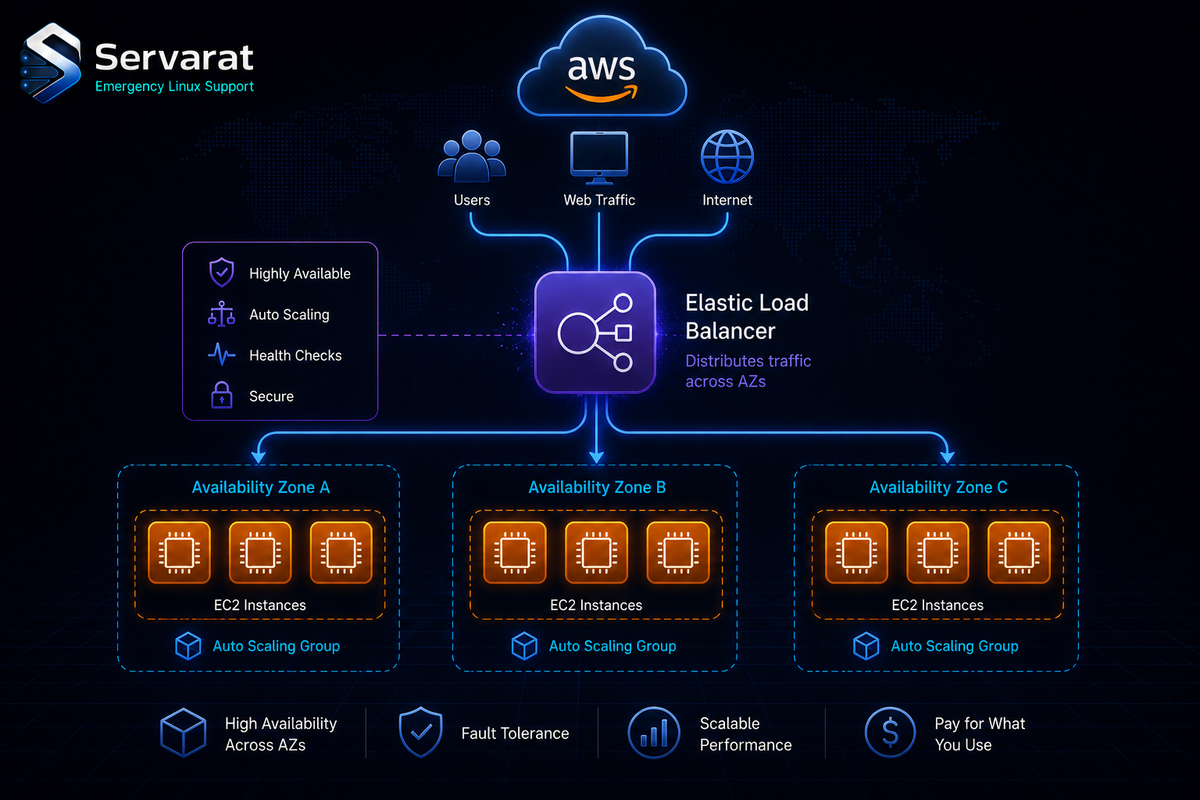
ELB is the piece that makes "highly available on AWS" mean something — a stable entry point that spreads traffic across targets, drops unhealthy ones, survives an AZ going dark, and scales with Auto Scaling underneath. The three flavors solve different problems, and picking the wrong one is the most common expensive mistake. Here's the breakdown, the multi-AZ mechanics, and the config details that decide whether it actually delivers HA or just looks like it does.
The Three Types, and When Each Is Right
Application Load Balancer (ALB) — Layer 7, HTTP/HTTPS. Path-based and host-based routing (/api to one target group, /auth to another), native ECS/EKS integration, WAF attachment, HTTP/2. This is your default for web apps, microservices, and anything where routing depends on the request. It terminates TLS and speaks HTTP, so it can make smart decisions — at the cost of being HTTP-only.
Network Load Balancer (NLB) — Layer 4, TCP/UDP. Ultra-low latency, millions of requests/sec, static IPs, and it preserves the client source IP. Reach for it when you need raw throughput, non-HTTP protocols, a fixed IP to whitelist, or when a downstream proxy handles the smart routing. Real-time systems, game servers, MQTT, database frontends.
Gateway Load Balancer (GWLB) — Layer 3, IP. Purpose-built for inserting virtual security appliances (firewalls, IDS/IPS, DPI) transparently into the traffic path. Niche unless you're doing centralized traffic inspection, but the right tool when you are — it scales appliance fleets behind a single gateway.
⚠️ The decision that bites: people default to ALB because it's L7 and "smarter," then discover they needed the client IP preserved for rate limiting or geoblocking. ALB replaces the source IP with its own and hands you the real one in X-Forwarded-For (which is spoofable if you don't validate it at the edge). NLB preserves the actual source IP at the packet level. If real client IP matters and you don't need L7 routing, NLB is the correct call, not ALB.
How the HA Actually Works
Multi-AZ. This is the core of ELB's availability story, and it only works if you enable it. With multiple AZs turned on, ELB deploys load balancer nodes in each AZ, routes only to healthy zones, and survives a complete AZ failure transparently. ⚠️ HA across AZs is only real if your application is stateless — an ELB spread across three AZs in front of instances holding local session state just means users get randomly logged out when they land on a different node. The load balancer being HA doesn't make a stateful app HA. Externalize session state (ElastiCache, DynamoDB) or you've built the illusion of availability, not the thing.
Health checks. ELB probes targets over HTTP/HTTPS/TCP and pulls unhealthy ones from rotation until they recover. ⚠️ Same trap as any load balancer: a health check hitting / that returns 200 from a broken app fails over nothing. Point the check at an endpoint that actually verifies the app can serve — DB connectivity, dependency reachability — not just "the web server answered." A shallow health check is worse than none because it gives you false confidence.
Auto Scaling integration. ELB and EC2 Auto Scaling work together: new instances register automatically, failed ones get removed, capacity tracks demand. This is what turns a flash-sale traffic spike into "Auto Scaling added capacity" instead of "the site fell over."
Setup
The console path: EC2 → Load Balancers → create, pick type, configure listeners, create a target group, register targets. The parts worth having as code:
Listener config (HTTP:80 to a target group):
{
  "ListenerConfigurations": [
    {
      "Protocol": "HTTP",
      "Port": 80,
      "TargetGroupARN": "arn:aws:elasticloadbalancing:region:account-id:targetgroup/my-targets"
    }
  ]
}
Register targets via CLI:
aws elbv2 register-targets --target-group-arn arn:aws:elasticloadbalancing:region:account-id:targetgroup/my-targets --targets Id=i-1234567890abcdef0 Id=i-abcdef01234567890
⚠️ Terminate TLS on the ALB with an ACM cert rather than managing certs on instances — ACM auto-renews, and one cert on the LB beats N certs on N instances. Redirect HTTP→HTTPS at the listener, don't do it in the app. And if you're fronting the ALB with CloudFront or a WAF, lock the ALB security group to only accept traffic from those sources so nobody bypasses the edge by hitting the ALB directly.
Config Details That Actually Matter
The source's "best practices" are fine but generic. The ones that cost real money or cause real outages:
⚠️ Cross-zone load balancing billing. ALB has cross-zone LB on by default and free. NLB has it off by default, and turning it on incurs inter-AZ data transfer charges. On a high-throughput NLB this is a line item that surprises people — decide deliberately whether you need even distribution across AZs badly enough to pay for the cross-AZ traffic.
⚠️ Connection draining (deregistration delay). Default is 300 seconds. When you deregister an instance (deploy, scale-in), ELB waits this long for in-flight requests to finish before killing the connection. Too high and deploys crawl; too low and you cut active requests. Tune it to your longest reasonable request, not the default.
⚠️ Idle timeout. ALB default is 60s. If you have long-polling, websockets, or slow uploads, the LB will sever connections mid-request unless you raise it — and if your backend keepalive is shorter than the ALB idle timeout, you get intermittent 502s as the backend closes a connection the ALB still thinks is open. Backend keepalive must exceed ALB idle timeout.
Deploy across multiple AZs, keep the app stateless, write health checks that mean something, terminate TLS with ACM, and watch ELB metrics in CloudWatch (specifically HTTPCode_ELB_5XX_Count, TargetResponseTime, and UnHealthyHostCount — those three tell you when it's actually degrading).
Where This Fits Against Self-Hosted
If you're weighing ELB against running your own, the tradeoff is the usual managed-vs-self one: ELB removes the operational burden (no LB nodes to patch, HA and scaling handled) at the cost of AWS lock-in and per-hour + per-LCU billing. The self-hosted equivalents — HAProxy for L4/L7, Nginx at the app tier — give you full control and no vendor bill but you own the availability of the load balancer itself, which is its own problem. I compared those directly in load balancing with HAProxy, Nginx, and Cloudflare, and the same client-IP and health-check lessons carry across both worlds. The scaling patterns ELB+Auto Scaling automates are the same ones covered in how large-scale platforms handle millions of daily transactions — ELB is one implementation of those principles, not the principles themselves.
Bottom Line
ELB is the backbone of HA on AWS, but "add a load balancer" isn't the same as "highly available." The load balancer being multi-AZ only helps if the app behind it is stateless; health checks only help if they verify real health; and picking ALB over NLB (or vice versa) has consequences for client IP, latency, and cost that outlast the setup. Pick the type by what the traffic actually needs, keep the app stateless, make the health checks honest, and mind the cross-zone billing and timeout defaults — that's the difference between real availability and an expensive illusion of it.



