
Verifying Docker Container Isolation: What's Actually Separated and What Isn't

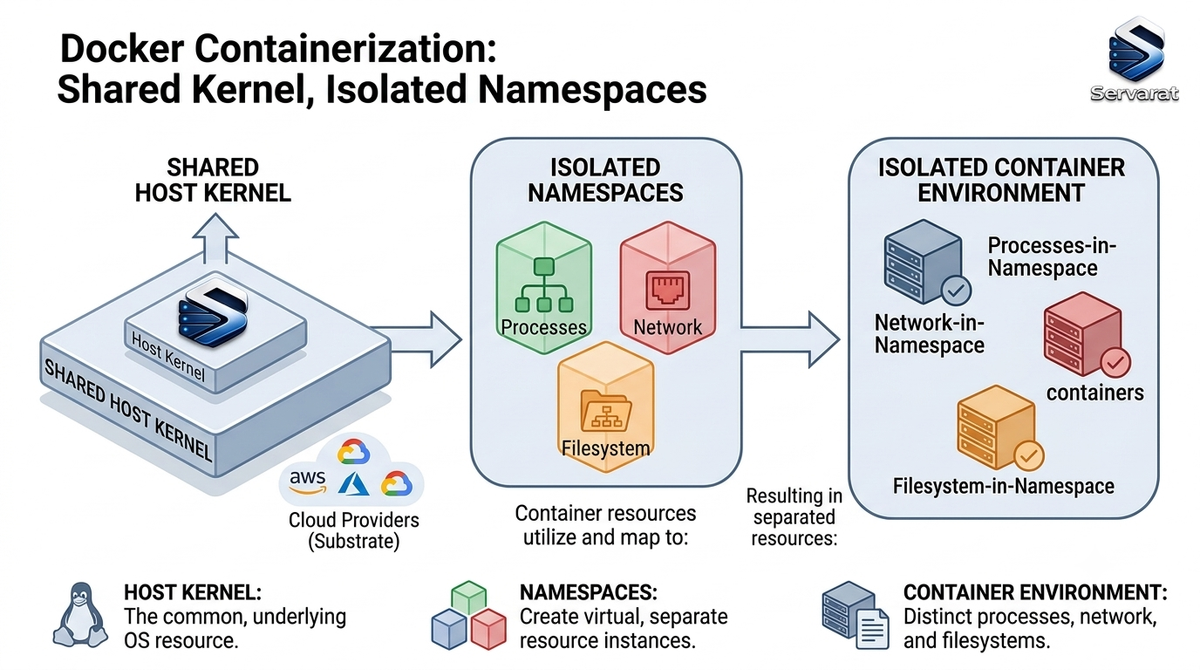
Containers feel like VMs — own hostname, own process list, own network — but the isolation is namespace sleight-of-hand over a shared kernel, not a hardware boundary. Worth verifying rather than assuming, because the gap between "looks isolated" and "is isolated" is exactly where container escapes live. Here's how to actually confirm each namespace boundary, inspect the shared surface, and see where the isolation stops being a security guarantee.
The Boundaries, Verified
Spin up a throwaway and check each namespace against the host. Nothing here is destructive.
docker run -it --rm --name isotest ubuntu bash
From a second host terminal, confirm it's up:
docker ps --filter name=isotest
UTS (hostname). Inside vs host:
hostname
Different values — the UTS namespace gives the container its own hostname. Cosmetic on its own, but it's the simplest namespace to confirm the mechanism is active.
PID. Inside the container, ps aux shows a near-empty list with bash as PID 1; the host shows everything. The container can't see host processes because it's in its own PID namespace. ⚠️ The reverse isn't true — the host sees every container process (with remapped PIDs), which is why ps aux | grep <container-proc> on the host is a legitimate forensic move during an incident. Isolation is one-directional by design.
Network. ip addr inside shows a lone eth0 on the bridge subnet (usually 172.17.x.x); the host shows its real interfaces plus the docker0 bridge and veth pairs. Separate network namespace, separate stack.
Mount. Create a file inside:
touch /testfile.txt
It doesn't appear in the host's cwd — separate mount namespace. It does exist on the host, buried in the container's writable layer under /var/lib/docker/overlay2/, which is the thing to remember: mount-namespace separation is a view, not a vault.
The Rigorous Way to Compare Namespaces
The hostname/ps checks are fine for a demo, but the actual audit is comparing namespace inodes directly. Every namespace is a file under /proc/<pid>/ns/, and two processes share a namespace if and only if the inode matches. Get the container's host-side PID:
docker inspect --format '{{.State.Pid}}' isotest
Then compare its namespaces against PID 1 (the host):
sudo ls -Li /proc/1/ns/ /proc/<container_pid>/ns/
⚠️ This is the check that actually matters. Matching inodes mean shared namespace, not isolated. On a default container the pid, net, mnt, uts, and ipc inodes differ from the host's — but user will match unless you've enabled userns-remap (more below), and cgroup behavior depends on your setup. Eyeballing hostnames won't catch a namespace you think is separated but isn't; inode comparison will.
Drop into the container's namespaces from the host without docker exec (useful when a container has no shell of its own):
sudo nsenter -t <container_pid> -a
What's Still Shared — the Part That Matters for Security
uname -r
Identical, inside and out. This is the whole security story in one command: containers share the host kernel. Every syscall a container makes hits the same kernel as every other container and the host itself. Namespaces partition the view; they don't put a kernel boundary between tenants the way a hypervisor does.
⚠️ This is not academic. A kernel-level vulnerability is a container escape, full stop — the namespace boundary is irrelevant if the attacker is talking to the shared kernel underneath it. The recent wave makes the point: cgroups escape via CVE-2022-0492 walked straight out of a container through a kernel bug, and the DirtyClone page-cache UAF and pedit COW both reach root from an unprivileged context that a container does nothing to contain. "We run it in a container" is not a mitigation for a kernel CVE — patching the host kernel is. That's why host kernel patching is your primary container-security control, not an afterthought.
The User Namespace: The One People Skip
The default Docker setup does not remap UIDs — root inside the container is root (UID 0) on the host kernel, constrained only by capabilities and seccomp. Check whether userns-remap is active:
docker info --format '{{.SecurityOptions}}'
⚠️ If userns doesn't appear in that output, a process running as root in a container is UID 0 against the host kernel. Combine that with a --privileged flag or a mounted Docker socket and "container root" is effectively "host root." Enabling userns-remap (/etc/docker/daemon.json with "userns-remap": "default") maps container root to an unprivileged host UID, so a container escape lands as nobody instead of root. ⚠️ It breaks some workflows (bind-mount ownership, a few images that assume real root), so test before rolling it fleet-wide — but for multi-tenant or untrusted workloads it's one of the highest-value toggles you're probably not using.
The Config Mistakes That Delete Your Isolation
Four flags/mounts that hand isolation back, in rough order of how often they cause incidents:
--privileged— grants nearly all capabilities and host device access, bypassing most namespace and cgroup restrictions. Almost never actually needed; when someone reaches for it, the real fix is usually a specific--cap-addor a device mount.- Mounting the Docker socket (
/var/run/docker.sock) — this is root-on-host handed to the container, because it can spawn a new container with the host filesystem mounted. Treat a socket mount as equivalent to giving that container your root password. The ArgoCD-style read access leaking more than expected lesson applies: "just read access" to the wrong thing is full control. --net=host— drops the network namespace entirely; the container shares the host stack, sees all interfaces, and can bind host ports. Kills network isolation completely.- Mounting
/etc,/, or other sensitive host paths — a writable bind-mount of host config is a direct path to host compromise.
Audit what your running containers actually mount and how they're privileged:
docker ps -q | xargs docker inspect --format '{{.Name}} priv={{.HostConfig.Privileged}} net={{.HostConfig.NetworkMode}} mounts={{range .Mounts}}{{.Source}}:{{.Destination}} {{end}}'
⚠️ Run that on any host you inherited. A priv=true, a net=host, or a docker.sock in the mounts list is a finding, not a config choice — chase down why it's there before you trust the host's isolation.
Where to Go From Verified-Isolation to Actually-Hardened
Confirming the namespaces are up is the floor. The layers that turn logical isolation into a real security posture:
- Patch the host kernel religiously — the shared kernel is the escape surface, so this is control #1, not a maintenance chore.
- Never run as root inside the container — drop to an unprivileged user in the image; combine with userns-remap.
- Drop capabilities —
--cap-drop=ALLthen add back only what's needed.CAP_SYS_ADMINandCAP_SYS_MODULEin particular are escape-adjacent. - seccomp and AppArmor/SELinux — constrain the syscall surface so a kernel bug in an unused syscall isn't reachable from your containers.
- Audit mounts and privilege on a schedule, not just at deploy.
These map to the CIS Docker Benchmark, and I've gone deeper on the full pipeline in 8 container security best practices and the container security tools buyer's guide — this verification exercise is the foundation those build on.
Bottom Line
Containers give you effective logical isolation — separate PID, net, mount, UTS, IPC views — but not the air-gapped boundary of a VM, because the kernel underneath is shared. Verify the namespaces by inode, not by hostname; check whether userns-remap is on (it usually isn't); audit for --privileged, --net=host, and socket mounts; and treat host kernel patching as your primary defense, because every container on the box escapes through the same kernel. Isolation you've verified is worth far more than isolation you assumed.



