8 Container Security Best Practices for 2026

Controls Without Context Don't Work
Container security programs lose effectiveness when controls are implemented without connecting them to specific attack outcomes. Running a container as root increases the impact of a container escape. Non-root execution reduces what an attacker can do with that foothold. The control only makes sense when you understand the risk it reduces.
This article connects each practice to the attack it prevents, how to implement it, and where its coverage ends. No single control protects against everything—and being clear about coverage gaps is more useful than pretending comprehensive coverage comes from one tool.
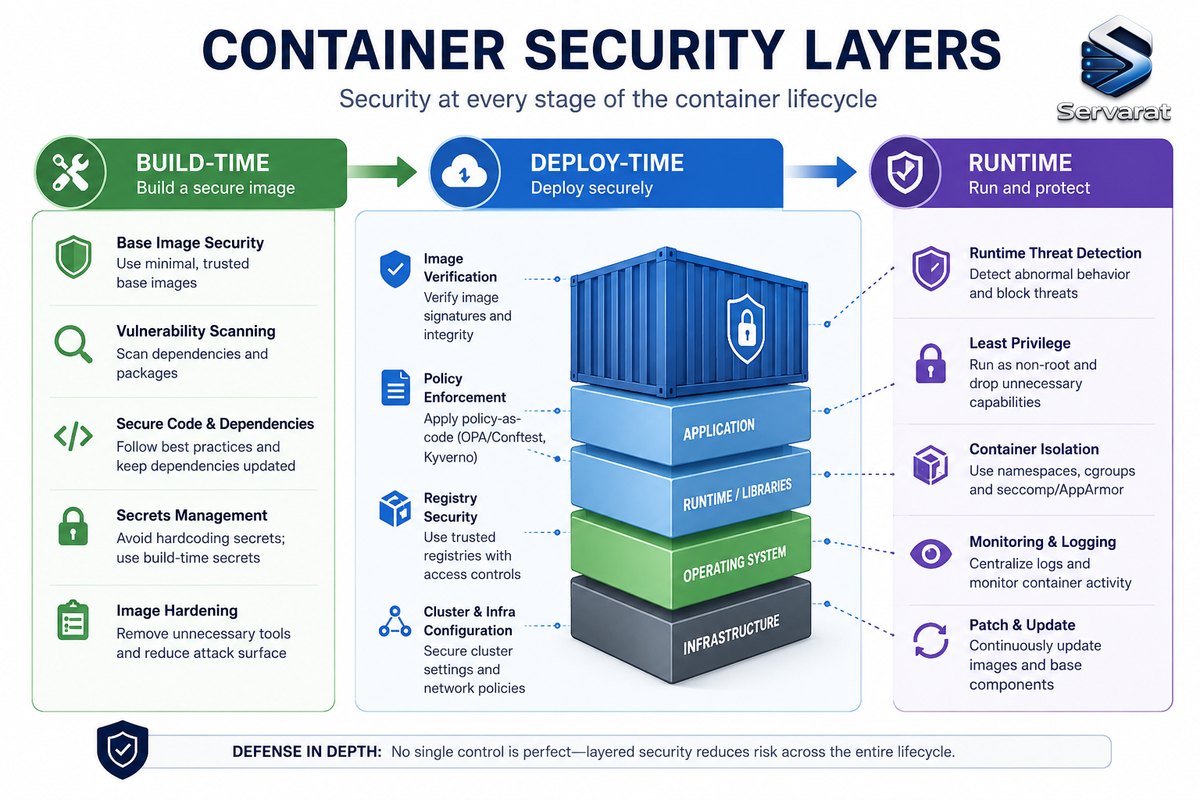
Container Security in Three Phases
Container security protects images, running containers, the engine, and orchestration. Operationally, it breaks into three phases:
Build-time security: Catches problems in the image before deployment—CVEs in base images and dependencies, Dockerfile misconfigurations, secrets committed to image layers.
Deploy-time security: Enforces policies at the Kubernetes admission layer—which images can run, what privileges they claim, what network traffic is allowed between pods.
Runtime security: Monitors running containers for active exploitation—unexpected processes, outbound connections to unusual destinations, writes to read-only filesystems.
Many programs start with build-time scanning. But runtime monitoring is still needed because exploitation, lateral movement, and persistence happen after deployment.
Why Container Security Matters Across the SDLC
Container vulnerabilities have a delay built in. A CVE introduced in a base image at build time becomes a production incident when a public exploit drops weeks or months later—after the image is already running across a hundred pods. The build and the breach are separated by time, making the connection non-obvious and remediation reactive.
The outcomes container security prevents, ordered by severity:
- Code execution inside the container
- Lateral movement to adjacent services
- Container escape to the host
- Distribution of a compromised image that multiplies across every environment that pulls it
Each outcome requires a different control. Each is a step in the same attack chain.
The 2026 Verizon DBIR found that exploitation of vulnerabilities became the most common initial access vector for breaches, rising to 31% of the dataset. While not container-specific, the trend reinforces the need to scan images, fix vulnerable dependencies, rebuild patched base images quickly, and prevent risky workloads from reaching production.
Architecture Components to Secure
Container images: The build artifact everything runs from. A vulnerable image across a thousand pods is a thousand attack surfaces. Every extra shell, package manager, or network utility gives an attacker more options after code execution.
Container registries: A registry allowing unauthenticated pulls, or not enforcing signature verification, is a supply chain attack vector. An attacker who pushes a compromised image achieves code execution across every environment that pulls it.
Container orchestrators: Kubernetes defaults are not secure. A default cluster allows pods to run as root, doesn't enforce network policies, and doesn't restrict host path mounts. Each default is a privilege escalation or lateral movement path requiring explicit configuration to close.
Container engine: Docker, containerd, CRI-O. A container with access to the Docker socket can launch privileged containers, mount the host filesystem, and compromise the host. ⚠️ The Docker socket should never be mounted into a container.
Shared Responsibility: The Dangerous Misconception
In managed Kubernetes (EKS, AKS, GKE), the cloud provider secures the control plane. Customers remain responsible for workloads, container images, RBAC/IAM policy, pod configuration, and most network and security controls.
⚠️ The misconception that kills: A managed Kubernetes service does NOT mean the cloud provider handles pod security. A misconfigured pod security standard, an overpermissive RBAC role, or a vulnerable container image in a managed cluster remains a customer-side risk.
- Platform teams own cluster-level controls: Pod Security Admission, network policies, RBAC, node hardening
- Application teams own image-level controls: base image selection, dependency management, Dockerfile hygiene
- Runtime monitoring is shared: platform configures infrastructure, apps define normal behavior
Practice 1: Secure Container Images
Use minimal, purpose-built base images. Google Distroless and hardened images reduce attack surface by omitting shells, package managers, and debugging tools. Alpine is small but includes a package repository and apk, so it's not equivalent to distroless. Removing tools limits an attacker's options after code execution.
Scan every image for CVEs before it enters the registry and again on push/promotion:
# Scan with Trivy
trivy image myapp:latest

# Scan with Grype
grype myapp:latest
Block deployment of images with unresolved critical vulnerabilities above your policy threshold.
Sign images with Cosign and enforce verification in the admission controller:
# Sign the image
cosign sign --key cosign.key myregistry.io/myapp:latest

# Verify
cosign verify --key cosign.pub myregistry.io/myapp:latest
An unsigned image or one whose signature doesn't match a trusted signer is rejected before the container starts. This is the supply chain control preventing a compromised registry image from reaching production.
Coverage ends at: Runtime threats. Scanning catches known CVEs, not zero-days or post-deployment attacks.
Practice 2: Reduce the Attack Surface
Run containers as non-root users. Set USER in the Dockerfile or configure in Kubernetes:
securityContext:
  runAsNonRoot: true
  runAsUser: 1000
If a workload is compromised, non-root execution reduces available privileges and can reduce the impact of a container escape.
Use read-only root filesystems:
securityContext:
  readOnlyRootFilesystem: true
This limits changes to application files and many persistence techniques. Workloads needing writable paths should use explicitly mounted volumes with narrow scope.
Drop all Linux capabilities by default, add back only what's required:
securityContext:
  capabilities:
    drop: ["ALL"]
    add: ["NET_BIND_SERVICE"]  # only if needed
⚠️ Treat SYS_ADMIN as especially sensitive—it enables a broad set of administrative operations and is frequently exploited in container escapes.
Coverage ends at: Application-layer attacks and supply chain compromises that don't depend on container privileges.
Practice 3: Use the Right Tools for Each Phase
Tool selection matters because the category determines which attack phase it covers. No single tool covers all three:
Build-phase (Trivy, Grype, Clair): Scan images for CVEs and misconfigurations before deployment. Do NOT detect runtime threats.
Deploy-phase (OPA Gatekeeper, Kyverno): Enforce admission policies blocking non-compliant pods. Do NOT detect vulnerabilities or runtime anomalies.
Runtime (Falco, Tetragon): Detect anomalous behavior in running containers. Do NOT scan CVEs or enforce admission policies.
A team with only a build-phase scanner has limited visibility after deployment. A team with only runtime detection has limited control over which images run. A practical stack covers all three.
Practice 4: Prepare a Container-Specific IR Plan
When a pod terminates, its filesystem and process state are gone. Evidence preservation requires capturing runtime state before terminating a compromised container, not after.
Steps that differ from VM incident response:
- Preserve the container filesystem snapshot and process list before terminating the pod
- Capture Kubernetes audit log events for the affected namespace covering the period before detection
- Identify the image digest of the running container to trace it back to the build and CI/CD pipeline run
# Capture process list before terminating
kubectl exec <pod> -- ps aux > incident-processes.txt

# Get image digest
kubectl get pod <pod> -o jsonpath='{.status.containerStatuses[0].imageID}'

# Capture audit logs for the namespace
kubectl logs -n kube-system <audit-pod> | grep <namespace>
⚠️ Without these additions in place before an incident, investigators lose key evidence. If the pod terminated, audit logs weren't retained, or the image digest wasn't recorded, you can't reconstruct the path from build artifact to runtime compromise.
NIST SP 800-61 Rev. 3 provides current incident response recommendations.
Practice 5: Implement Regular Audits
Container security configuration drifts. An admission policy enforcing pod security standards last month may have had exceptions added that were never removed. An RBAC role scoped to read-only may have had write permissions added for an incident and never reverted. Both are common. Neither shows up in a quarterly manual audit if the audit checks policy existence rather than current state.
Run CIS Kubernetes Benchmark checks on a schedule against live cluster configuration:
# kube-bench for CIS Kubernetes Benchmark
kube-bench run --targets master,node
This produces a drift signal rather than relying on point-in-time reviews.
⚠️ Verify network policies are actually enforced. Network policies are Kubernetes objects, but enforcement requires a CNI plugin that supports them (Calico, Cilium). A cluster using a non-enforcing CNI has policies defined but not applied. Easy to miss in a review that checks whether objects exist rather than whether they're enforced.
Practice 6: Enforce Strict Access Controls
Kubernetes RBAC governs which principals can perform which operations on which resources in which namespaces.
⚠️ Wildcard rules are risky:
# DANGEROUS - grants overly permissive access
rules:
- verbs: ["*"]
  resources: ["*"]
Each workload gets its own service account with only the permissions it uses. Pods not needing Kubernetes API access:
automountServiceAccountToken: false
In Kubernetes v1.22+, service account credentials are short-lived and auto-rotating, but a compromised container can still use them within scope.
Use workload identity instead of static cloud keys:
- AWS: EKS Pod Identity or IAM Roles for Service Accounts (IRSA)
- GCP: Workload Identity Federation for GKE
- Azure: Microsoft Entra Workload ID
These reduce reliance on long-lived credentials and limit the blast radius if a workload is compromised.
Practice 7: Update and Patch Regularly
An image built six months ago from an unpatched base contains every CVE published against that base image's packages since the build date. The CVEs accumulate quietly while the image runs in production because nothing has visibly broken.
Automate base image rebuild notifications using registry webhooks. When a base image updates, dependent application image pipelines trigger automatically to produce a new image. Manual tracking doesn't scale past a handful of images and stops happening after the first few months.
Prioritize CISA KEV-listed CVEs regardless of CVSS score. The Known Exploited Vulnerabilities catalog lists vulnerabilities observed being exploited in the wild. KEV indicates observed exploitation, not theoretical severity.
# Check images against KEV catalog (using Trivy with severity)
trivy image --severity CRITICAL,HIGH myapp:latest
Practice 8: Protect Container Orchestration
The Kubernetes attack surface is large. The API server, etcd, kubelet, and dashboard each represent an access point that, if compromised, provides control over the entire cluster.
Enable Pod Security Admission with the Restricted profile:
apiVersion: v1
kind: Namespace
metadata:
  name: production
  labels:
    pod-security.kubernetes.io/enforce: restricted
The Restricted profile requires non-root execution, no privilege escalation, seccomp enforcement, and dropping all Linux capabilities except NET_BIND_SERVICE.
Encrypt Kubernetes API data at rest. By default, the API server stores plaintext resource data in etcd. Configure the EncryptionConfiguration API for Secrets and verify existing resources are rewritten encrypted.
Enable audit logging with retention matching regulatory requirements:
- PCI DSS v4.0.1 requirement 10.5.1: at least 12 months of audit log history
- HIPAA: audit controls for systems containing ePHI
Open Source Tools by Use Case
Image vulnerability scanning:
- Trivy: OS packages, language packages, IaC files, Kubernetes coverage
- Grype: Container images, filesystems, SBOMs
- Clair: Registry-integrated scanning
Runtime threat detection:
- Falco: Abnormal behavior across hosts, containers, Kubernetes using kernel events
- Tetragon: eBPF-based observability and runtime enforcement (filter, block, react in kernel)
Admission control:
- OPA Gatekeeper: Rego-based policy authoring
- Kyverno: Kubernetes-native policy resources
Supply chain integrity:
- Cosign: Image signing and verification
- Syft: SBOM generation (SPDX, CycloneDX)
The Context Gap: Why CVSS Isn't Enough
A critical CVE carries different risk depending on deployment. The same CVE in a container running on an internal development workload with no data access versus an internet-facing API service with read access to a customer PII database—identical CVSS score, completely different production risk.
Closing that gap requires cloud deployment context: exposure, identity permissions, workload configuration, sensitive-data access. Pipeline-only tools can't provide it. Prioritize a critical CVE on an exposed, privileged workload differently from the same CVE on an isolated internal one.
The 5 Highest-Impact Controls
If you implement nothing else:
- Run containers as non-root users
- Use read-only root filesystems where feasible
- Enforce Pod Security Admission with the Restricted profile
- Scan container images for CVEs before deployment
- Enforce Kubernetes RBAC with least-privilege service accounts
References
- Orca Security: 8 Container Security Best Practices for 2026 (Source)
- NIST SP 800-190: Application Container Security Guide
- NIST SP 800-61 Rev. 3: Incident Response
- CIS Kubernetes Benchmark
- Trivy Vulnerability Scanner
- Grype Container Scanner
- Falco Runtime Security
- Tetragon eBPF Security
- Cosign Image Signing
- OPA Gatekeeper
- Kyverno Policy Engine
- Kubernetes Pod Security Standards
- Verizon 2026 Data Breach Investigations Report