
SPF Record Syntax: The Four Mechanisms You Use and the Two That Break Your Mail

Meta Description
Featured Image Alt Text
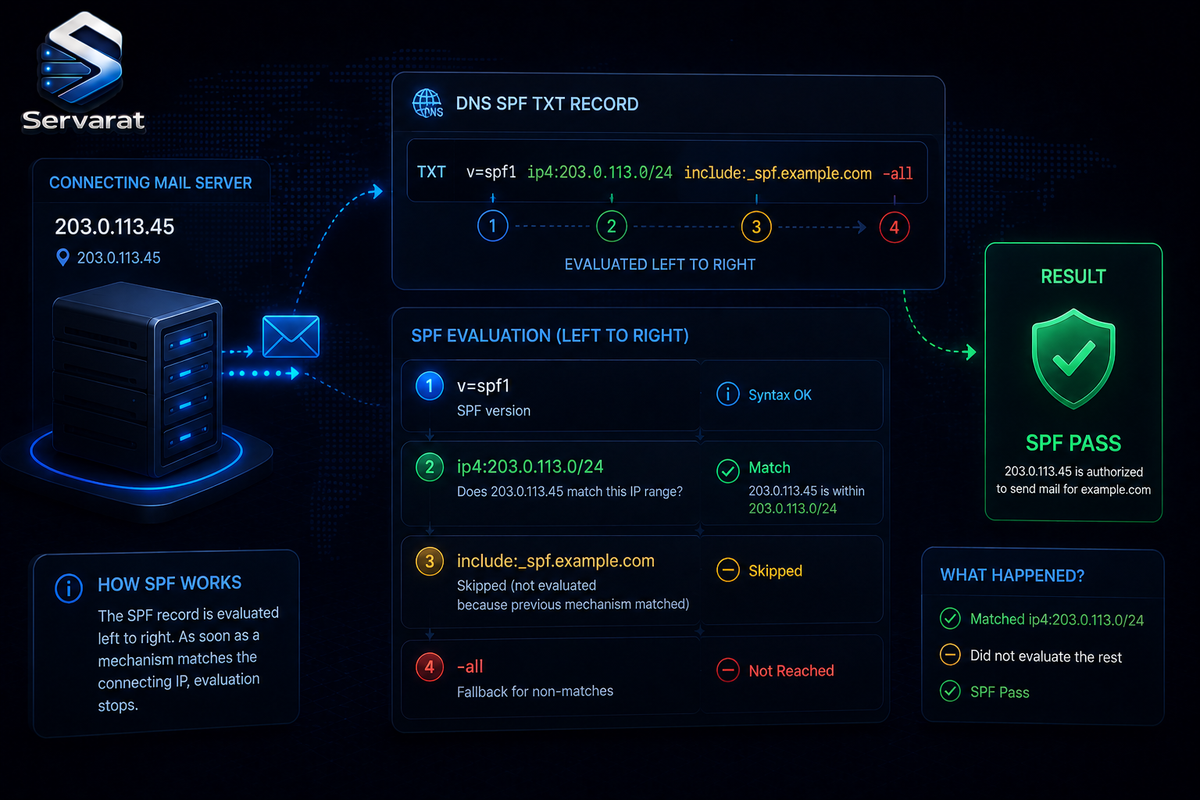
An SPF TXT record being evaluated left to right against a connecting mail server's IP address.
Most SPF references drown you in eight mechanisms, eleven macro letters, and two modifiers as if you'll use all of them. You won't. In practice a working SPF record uses four terms (include, ip4, ip6, all), and the two things that actually break mail aren't syntax at all, they're the DNS-lookup limits that silently PermError every message you send. This is the reference with that priority order: what you deploy, what breaks you, then the complete term-by-term table for reading anyone else's record. Every rule traces to RFC 7208, the SPF standard.
This is the SPF-mechanics companion to the DMARC explainer and the MTA-level spoofing detection guide. SPF is one of the two authentication legs DMARC stands on; get its syntax and lookup budget right or DMARC alignment collapses on top of it.
The Shape
One DNS TXT record, starting with v=spf1, then space-separated terms evaluated left to right until the first match:
v=spf1 ip4:192.0.2.0/24 include:_spf.example.com -all
That authorizes a /24, a third party's servers, then fails everything else. Three kinds of parts exist and no more:
- Version tag:
v=spf1, always first, exact. A record startingv=spf10is discarded, not partially matched. - Mechanisms:
[qualifier]name[:arg][/cidr], tested against the connecting IP, match or don't. - Modifiers:
name=value, at most once each, provide information, never matched.
⚠️ One syntax error anywhere invalidates the entire record. The receiver's evaluation routine (check_host() in the RFC) validates syntax first and returns PermError immediately if anything is malformed, without evaluating a single term. One stray character fails authentication for every message the domain sends. This is the recurring theme: SPF fails whole-record, not gracefully.
The Four Terms You Actually Deploy
For 95% of real records, this is the entire toolkit:
include:domainpulls in a provider's SPF record (Google, Microsoft 365, SendGrid). Matches only when the referenced record returns Pass. ⚠️ Counts toward the lookup limit, and so does everything nested inside it.ip4:network/cidrandip6:...authorize literal networks.ip4:192.0.2.10(no CIDR) is an exact/32match. Zero DNS cost, these are the cheapest terms you can publish, and the fix when you're over the lookup limit.allat the end is the catch-all default, always paired with a qualifier (-allor~all).
⚠️ Use the colon, not equals: ip4:192.0.2.0/24, never ip4=. Mechanisms take :; only modifiers take =. The =-for-: swap is one of the most common errors Microsoft's support teams report, and it silently breaks the term.
A real record for a provider plus your own mail server:
v=spf1 ip4:192.0.2.10 mx include:_spf.google.com -all
Two lookups (mx and include; the ip4 is free). Authorize one fixed IP, your MX hosts, and Google; fail everything else.
The Qualifier Decision: -all vs ~all
A qualifier is a single prefix character setting the result when its mechanism matches. Omit it and the default is + (so mx and +mx are identical).
| Qualifier | Result | Meaning |
|---|---|---|
+ |
Pass | Authorized (default) |
- |
Fail | Explicitly not authorized |
~ |
Softfail | Probably not authorized, but not a hard fail |
? |
Neutral | No assertion |
In practice the only choice you make is the final term: -all vs ~all. And the two largest mailbox providers disagree. Google's setup doc tells single-provider domains to publish ~all (softfail); Microsoft recommends -all "because we also recommend DKIM and DMARC."
⚠️ The resolution: if you enforce DKIM and DMARC, publish -all. If you're still discovering which services send as you, start with ~all and tighten once your DMARC aggregate reports confirm you've caught every legitimate sender. A hard -all before you've found all your senders bounces legitimate mail; a lingering ~all after you're confident is just a weaker policy than you could have. On a cPanel or multi-tenant box where each domain may have a different sender set, this is a per-domain decision, not a fleet-wide default.
What Actually Breaks Your Mail: The Two Lookup Limits
This is the part that matters more than any mechanism, and it's where real fleets fail. Neither of these is a syntax error, both PermError every message anyway.
The 10-lookup limit
RFC 7208 §4.6.4: SPF evaluation must not exceed 10 DNS-querying terms, or the receiver returns PermError. What counts and what doesn't:
| Term | Counts? | Notes |
|---|---|---|
include |
Yes | Nested lookups inside it count too |
a |
Yes | |
mx |
Yes | Plus ≤10 address queries per MX host, else PermError |
ptr |
Yes | Deprecated, see below |
exists |
Yes | |
redirect |
Yes | |
ip4, ip6, all |
No | Never query DNS |
exp |
No | Looked up later, only on Fail |
⚠️ The trap is nesting. include:_spf.google.com is one lookup on paper, but if it internally includes three more domains, that's four. Stack Google + Microsoft 365 + a marketing platform + a help desk + a CRM and you cross 10 without a single visible mistake. ⚠️ PermError is silent: nothing in DNS warns you, deliverability just degrades, and the only signal is in your DMARC aggregate reports. This is why you deploy DMARC at p=none first even if you never enforce, the RUA reports are how you see an SPF PermError at all.
The fix when you're over: replace lookup-heavy mechanisms (include, a, mx) with the ip4:/ip6: addresses they resolve to, consolidate providers, or move senders onto subdomains with their own SPF records. ⚠️ Manual flattening (hardcoding resolved IPs) works but goes stale the moment a provider changes its ranges, which then silently drops mail, so if you flatten, you need a process to re-check, not a one-time edit.
The void-lookup limit (the one everyone forgets)
⚠️ There's a second, separate cap: void lookups (queries returning NXDOMAIN or no records) are limited to 2. Exceed that and you PermError even if you're well under 10 total lookups. A record with a couple of stale include: entries pointing at domains that no longer publish SPF can PermError on void lookups long before it reaches ten. When you retire a vendor, remove its include:, don't just leave it pointing at a dead domain.
ptr: Do Not Use
RFC 7208's own heading for §5.5 is literally "ptr" (do not use). The mechanism does a reverse-DNS lookup and is slow, unreliable under DNS errors, and burdens the .arpa name servers. Receivers must still support it, but you should never publish it. If you inherit a record with ptr in it, removing it both fixes a deprecation and frees a DNS lookup. It's the single easiest term to delete when trimming a bloated record.
The Placement Rules
Three hard rules that PermError when violated:
⚠️ Exactly one SPF record per name. Two v=spf1 TXT records don't merge, don't race, don't half-work, they PermError outright. This is a common self-inflicted failure: an admin adds a new record without removing the old, or a third-party service appends its own. If you have two, merge the mechanisms into one. On a hosting fleet this is worth auditing proactively (command below), because a client adding a second record to "fix" their mail actually breaks it entirely.
TXT type only. The dedicated SPF record type (type 99) from SPF's experimental phase was dropped as "fundamentally flawed." Publish as TXT.
The 255-byte limit is per string, not per record. This is the rule most guides get wrong. The 255-octet max applies to a single character-string inside the TXT record, not the record itself. A TXT record can hold multiple quoted strings, and receivers concatenate them with no space added:
example.com. IN TXT "v=spf1 ip4:192.0.2.0/24 include:_spf.exam" "ple.com -all"
That evaluates as one clean record, note the split lands mid-token and concatenation heals it. That's the correct way to publish a record over 255 characters. The practical ceiling is elsewhere: keep the whole DNS answer under ~450 octets so it fits a 512-octet UDP packet, since oversized answers can get silently dropped by middleboxes that mishandle DNS over TCP.
Check Your Own Fleet
The single most useful thing you can do on a hosting box is find records that are already broken. Count v=spf1 TXT records per domain (more than one = PermError):
for d in $(cat domains.txt); do n=$(dig +short TXT "$d" | grep -c 'v=spf1'); [ "$n" -gt 1 ] && echo "$d: $n SPF records (PermError)"; done
Spot the two deprecated/dangerous patterns across a domain list, published ptr mechanisms and +all (which authorizes the entire internet):
for d in $(cat domains.txt); do r=$(dig +short TXT "$d" | tr -d '"' | grep 'v=spf1'); echo "$r" | grep -qE '(^| )ptr' && echo "$d: uses deprecated ptr"; echo "$r" | grep -qE '\+all|[^-~?]all' | grep -q 'all' && echo "$d: check all qualifier"; done
⚠️ Counting actual DNS lookups requires walking every nested include, which a shell one-liner does poorly, use a proper SPF validator for the lookup-budget count. But the two greps above catch the outright-broken records (double records, ptr, +all) fast across a whole cPanel fleet, and those are the ones failing mail right now.
The Complete Mechanism Table (for Reading Other People's Records)
You won't publish most of these, but you'll read them:
| Mechanism | Matches when | Lookup? |
|---|---|---|
all |
Always (terminal default) | No |
include:domain |
Referenced record returns Pass | Yes |
a[:domain][/cidr] |
Client IP is in the domain's A/AAAA records | Yes |
mx[:domain][/cidr] |
Client IP is an MX host's address | Yes |
ptr[:domain] |
Reverse DNS validates into the domain (do not use) | Yes |
ip4:net[/cidr] |
Client IP in the IPv4 network | No |
ip6:net[/cidr] |
Client IP in the IPv6 network | No |
exists:domain |
The constructed domain has any A record | Yes |
include is not a splice, its name was admittedly "poorly chosen." A -all inside an included record does not fail your outer record; a non-Pass result inside just means "no match here, keep going." Think of it as if-match, not paste. And if the included domain publishes no SPF at all, include returns PermError.
The Two Modifiers
redirect=domainhands the whole evaluation to another domain's record, but only after every mechanism misses, and it's ignored whenever anallmechanism appears anywhere in the record. Its result replaces yours entirely. Use it to share one policy across your own domains; useincludeto cross into a provider's. Both PermError if the referenced record is missing.exp=domainnames a TXT record whose macro-expanded text is returned as the explanation on Fail. It's the only term that never counts toward the lookup limit, its lookup happens after evaluation and only on Fail.
Macros: Real, Not Folklore
Macros (%{...}) are the least-covered corner of SPF and fully standard. The one worth knowing is %{i}, the connecting client IP. Paired with exists:, it powers dynamic authorization, a single lookup that authorizes an entire fleet without listing one address. Salesforce runs exactly this in production:
v=spf1 exists:%{i}._spf.mta.salesforce.com -all
For each connection, it asks whether <client-ip>._spf.mta.salesforce.com has an A record and passes if so. One exists lookup authorizes a whole dynamic sender set. ⚠️ One caution the RFC itself gives: macros using s, l, o, or h defeat result caching at receivers, so avoid those in mechanism directives. %{i} and %{ir} (reversed IP) are the safe, useful ones. Unless you operate a large dynamic gateway, you'll read macros far more than write them.
Bottom Line
Deploying SPF is four terms: include for your providers, ip4/ip6 for your own servers, -all to close it (or ~all while you're still finding senders). The failures that actually matter aren't syntax, they're the 10-lookup limit (nested includes stack up silently and PermError every message) and the 2-void-lookup limit (stale includes to dead domains break you under 10 total). Publish exactly one record, drop any ptr, and audit your fleet for double records and +all. Get the lookup budget right and SPF holds up its half of DMARC; blow it and DMARC alignment collapses no matter how clean the rest of your setup is.



