
How to Dockerize an Application Without Shipping the Usual Mistakes

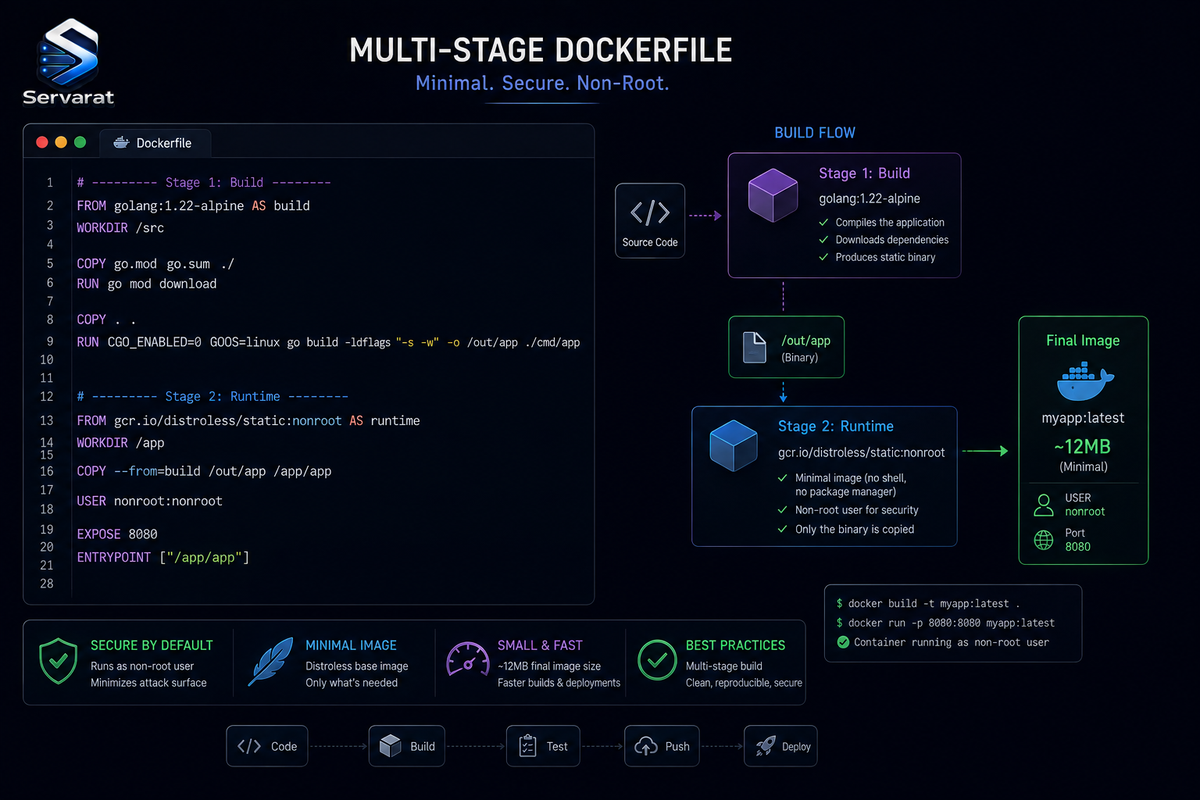
Most "how to dockerize an app" tutorials get you a container that runs, and quietly teach you three habits you'll have to unlearn: an outdated base image, a container running as root, and a single-stage build that bakes your compiler and dev dependencies into production. This walks the same path, Dockerfile, image, container, but the Dockerfile at the end is the one you'd actually ship: multi-stage, non-root, pinned, and free of the copy-paste bugs that make the typical example fail on first build. The concepts are language-agnostic (Python here, but the pattern is identical for Node, Go, Ruby); the security is not optional.
If you want the deeper "is my container actually isolated" follow-up to this, that's in verifying Docker container isolation. This piece is how to build the image right in the first place.
The Model, Briefly
Three components: the Dockerfile (the build recipe), the image (the built artifact), the container (a running instance of the image). You write a Dockerfile, docker build it into an image, docker run the image as a container. Before writing anything, know how your app runs outside Docker, its runtime version, its dependency file, and its start command, because Docker doesn't change how the app works, it packages an environment you already understand into a reproducible one.
Most apps share the same shape: source code, a dependency definition (requirements.txt, package.json, go.mod), and a startup command. The Dockerfile builds around that pattern regardless of language.
The Naive Dockerfile, and Why It's Wrong
Here's the version nearly every tutorial hands you. It works, sort of, and it's wrong in four ways:
FROM python:3.9-slim
WORKDIR /app
COPY requirements.txt .
RUN pip install --no-cache-dir -r requirements.txt
COPY . .
CMD ["python", "app.py"]
⚠️ First, a warning that catches people copying from web tutorials: make sure that's --no-cache-dir with two straight hyphens, and the CMD uses straight quotes ". Many published versions (including the one this is based on) render en-dashes (–) and smart quotes ("), which are invisible-looking Unicode that make docker build fail with a cryptic error. If your build dies on the pip install or CMD line, retype those characters by hand.
Now the substantive problems:
- ⚠️
python:3.9-slimis end-of-life. Python 3.9 stopped receiving security fixes in October 2025. Building on it in 2026 means shipping an unsupported runtime with no patch path. Use a current, supported version. - ⚠️ It runs as root. No
USERinstruction means the process is UID 0 inside the container, and by default that's UID 0 against the host kernel too. A container escape from a root process is a host-root problem. - ⚠️ It's single-stage. Everything used to build the app (pip's cache, build tools, dev headers) ends up in the final image, bloating it and widening the attack surface.
- No pinned base, no healthcheck.
python:3.9-slimis a moving tag; a rebuild months later can pull a different image.
The layer-ordering is right, and it's the one thing to keep: copy the dependency file and install before copying the source, so Docker caches the dependency layer and only re-installs when requirements.txt changes, not on every code edit. That's the caching win worth preserving.
The Dockerfile You Should Actually Ship
Same app, built correctly. This is multi-stage (build deps stay out of the final image), non-root, on a current pinned base, with a healthcheck:
# ---- Build stage ----
FROM python:3.13-slim AS build
WORKDIR /app

# Install dependencies into a separate prefix we can copy out
COPY requirements.txt .
RUN pip install --no-cache-dir --prefix=/install -r requirements.txt

# ---- Runtime stage ----
FROM python:3.13-slim AS runtime

# Create an unprivileged user to run the app
RUN groupadd --system app && useradd --system --gid app --home /app app
WORKDIR /app

# Copy only the installed packages from the build stage, not the build tooling
COPY --from=build /install /usr/local
COPY --chown=app:app . .

# Drop to the unprivileged user before running anything
USER app

# Document the port and define a healthcheck
EXPOSE 8080
HEALTHCHECK --interval=30s --timeout=3s --start-period=10s \
  CMD python -c "import urllib.request,sys; sys.exit(0 if urllib.request.urlopen('http://localhost:8080/health').status==200 else 1)"

CMD ["python", "app.py"]
What each fix buys you:
- Multi-stage (
AS build/AS runtime): the build stage compiles/installs; the runtime stage copies only the result (/install) and none of the tooling. Smaller image, smaller attack surface. - ⚠️
python:3.13-slim: a currently-supported Python. For real production, pin to the immutable digest (FROM python:3.13-slim@sha256:...) so a rebuild can never silently pull a changed base, the same digest-over-tag discipline that matters for supply-chain provenance. - ⚠️
USER app: the single highest-value security line in the file. The process runs as an unprivileged user, so a compromise or container escape doesn't land as root. Combine it with--cap-drop=ALLat runtime (below) and you've closed the most common container-to-host paths. HEALTHCHECK: lets Docker/Compose/orchestrators know if the app is actually serving, not just if the process is alive. Adjust the path to your real health endpoint.
.dockerignore: Not Optional, and a Security Control
Docker sends the entire build-context directory to the daemon during a build. Without filtering, that sweeps in .git, local virtualenvs, caches, and, the dangerous part, any .env or credential file sitting in the directory. Create .dockerignore:
.git
.gitignore
.env
.env.*
*.pyc
__pycache__/
venv/
.venv/
node_modules/
*.log
Dockerfile
.dockerignore
⚠️ This is a security control, not just a size optimization. Without it, a .env in your project root gets copied into the image by COPY . ., and now your database password ships inside every pull of that image. .dockerignore is how you make sure COPY . . can't exfiltrate secrets into a layer, the same secrets-in-the-wrong-place failure I covered in where .env went wrong. The rule: if a file isn't needed to run the app, it doesn't belong in the image.
Build, Tag, Run
Build with a version tag (never rely on latest for anything real):
docker build -t my-app:1.0 .
Run it detached, on a published port, non-root, with capabilities dropped and a read-only root filesystem, the hardened runtime the tutorials skip:
docker run -d --name my-app --restart unless-stopped -p 8080:8080 --cap-drop=ALL --security-opt no-new-privileges --read-only --tmpfs /tmp -e APP_ENV=production my-app:1.0
⚠️ Each of those runtime flags earns its place: --cap-drop=ALL removes every Linux capability the app doesn't need (add back only specific ones with --cap-add if required); --security-opt no-new-privileges blocks privilege escalation via setuid binaries; --read-only plus --tmpfs /tmp makes the container filesystem immutable except where it genuinely needs to write, so an attacker can't drop a payload on disk. This is the runtime half of the isolation story whose verification I walk through in checking container isolation.
⚠️ On secrets: the -e APP_ENV=production pattern is fine for non-sensitive config, but don't pass real secrets with -e. Environment variables leak, they show up in docker inspect, in /proc/PID/environ, and in child processes. Use Docker secrets (mounted as files) or a secrets manager for anything sensitive, which is exactly why Docker mounts managed secrets as files rather than env vars.
The Best Practices, Actually Applied
The source's tutorial lists these and never implements them. Here they are, done, in the Dockerfile above:
| Practice | Where it's applied |
|---|---|
| Pin base image versions | python:3.13-slim, ideally @sha256: digest |
| Minimal base image | -slim variant, or distroless/alpine for smaller still |
| Exclude unnecessary files | .dockerignore |
| Don't run as root | USER app + --cap-drop=ALL |
| Config via environment | -e for config, secrets via files |
| Multi-stage build | AS build / AS runtime |
| Health monitoring | HEALTHCHECK |
For anything past a single container, compose the same principles: Docker Compose orchestrates multiple services (app, database, cache) with the identical build discipline per service, and each service still gets its own non-root user, dropped capabilities, and no secrets in the environment.
Bottom Line
Dockerizing an app is genuinely three steps, write the Dockerfile, build the image, run the container, but the version most tutorials hand you ships an end-of-life base, runs as root, and bakes build tooling and possibly secrets into the image. The corrected pattern costs a few extra lines and fixes all of it: a current pinned base, a multi-stage build that keeps tooling out of the runtime image, a non-root USER, a .dockerignore that keeps .env out of your layers, and runtime flags (--cap-drop=ALL, --read-only, no-new-privileges) that shrink what a compromise can do. Watch out for the Unicode-dash and smart-quote bugs when copying Dockerfiles from the web, and treat "don't run as root" as a line you write, not a bullet you nod at.



