
Choosing a Secrets Scanner: gitleaks vs TruffleHog vs detect-secrets vs GitGuardian

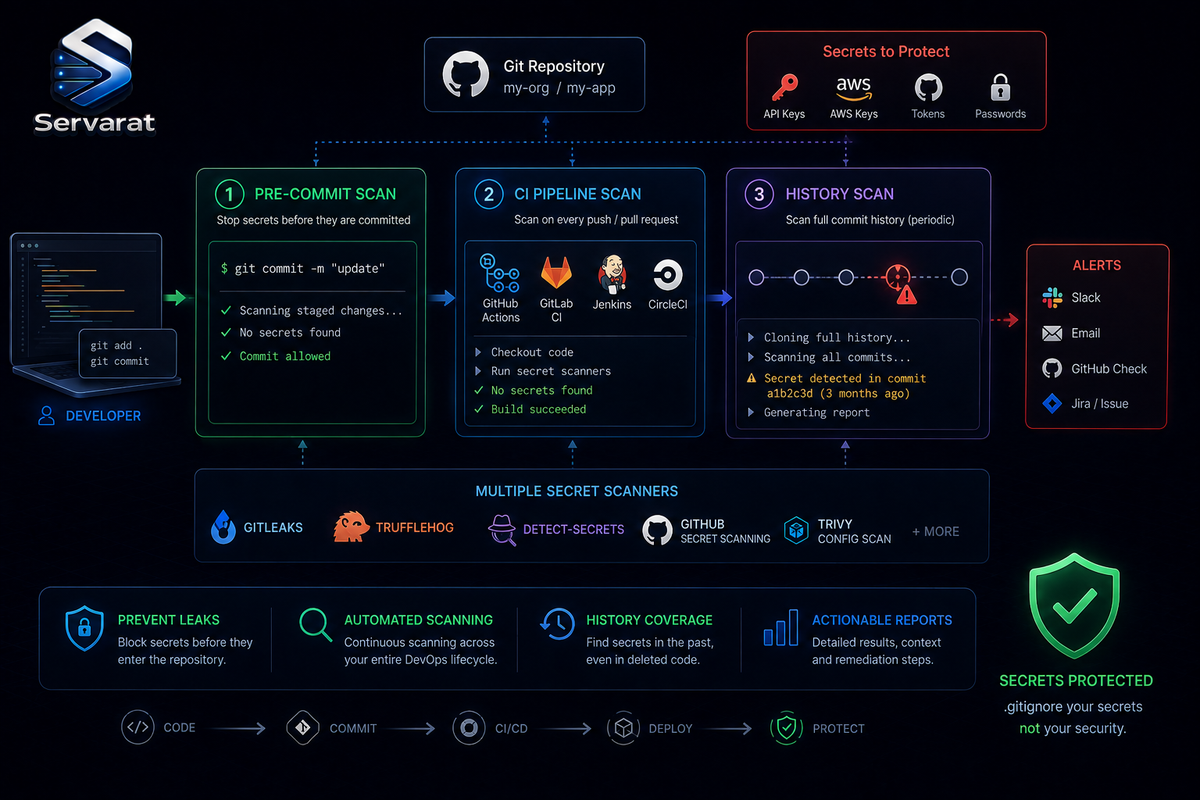
Most secrets-detection buyer's guides refuse to name tools. They talk about "evaluation criteria" and "workflow fit" and then, if they name anything at all, drop one sponsored product as the answer. That's useless when you actually have to pick something. This is the concrete version: the real open-source and commercial tools, an honest comparison of what each is genuinely good at, and the commands to run the free ones against your own repositories today. The criteria matter, but they matter in service of a decision, so we'll get to the decision.
The problem is real and cheap to exploit: a developer commits a config file with a token, assumes they'll remove it later, forgets. Git doesn't forget, the secret persists in history even after you "delete" it, and automated crawlers find exposed credentials in public repos within minutes. This is the same class of failure behind the CISA GitHub leak, where the inability to catch a committed credential turned into a national-scale incident, and it's why secrets scanning belongs in the workflow, not in an occasional audit.
The One Distinction That Decides Everything: Detection vs Verification
Before any tool comparison, the single concept that separates a useful scanner from a noise machine: pattern matching tells you a string looks like a secret; verification tells you the secret is live.
- A pattern match says "this matches the shape of an AWS access key, please review."
- A verified finding says "this AWS key is active right now and can read S3 in us-east-1, rotate it immediately."
That difference is the whole game on a real repository. Large projects are full of things that look like secrets: placeholder tokens, mock credentials, test fixtures, expired keys, random hashes, example configs. A scanner that flags all of them equally creates nearly as much work as no scanner at all, and worse, it trains developers to write broad ignore rules that eventually hide the real leak. ⚠️ A leaked production credential should never compete for attention with a placeholder in an old demo, and the tool that can't tell them apart is the tool your team mutes in month two.
The Tools, Compared Honestly
Five that actually matter in 2026, with what each is genuinely for:
| Tool | Type | Verification | Best at | License |
|---|---|---|---|---|
| gitleaks | Regex CLI | No | Fast pre-commit + CI diff blocking | MIT (free) |
| TruffleHog | Detector CLI | Yes (800+ detectors) | History sweeps, "is this live?" | AGPL / commercial |
| detect-secrets | Regex + entropy CLI | No | Baseline-driven, brownfield repos | Apache (free) |
| GitGuardian | Managed platform | Yes | Enterprise governance, public-repo monitoring | Commercial |
| Kingfisher | Regex + validation CLI | Yes (newer) | Fast validating open-source option | MIT (free) |
The consensus across independent 2026 benchmarks is consistent, and it's not "one tool wins":
gitleaks is the pragmatic open-source starting point. A single fast Go binary, a solid default ruleset (150+ patterns), and a clean pre-commit hook that blocks most leaks before they leave the laptop, in milliseconds, with no network calls. ⚠️ Its tradeoff is the flip side of its speed: it does not validate whether a secret is live, so noise and follow-up are on you. It tells you a string matches; it can't tell you it still works.
TruffleHog is verification-first, and that's its defining feature. It finds candidates, then for each one makes a safe read-only API call to the provider (AWS, GitHub, Stripe, Slack, 800+ types) to confirm whether the credential still authenticates. A verified TruffleHog finding means "this works now, rotate it." ⚠️ The tradeoffs: it's slower (network calls per candidate), verification can hit provider rate limits on a big history scan, and, worth thinking about, you're sending potentially-live credentials to external APIs to test them, which some security-sensitive environments won't accept. That's a real consideration for a regulated or air-gapped shop.
detect-secrets (Yelp) is built around a baseline. It scans, records all current findings in a .secrets.baseline file, and then only alerts on new secrets introduced after that point. ⚠️ This is the right tool for a brownfield repo with hundreds of pre-existing findings you can't triage overnight, it lets you draw a line and stop the bleeding without drowning in historical backlog. It doesn't verify liveness either.
GitGuardian is the polished managed platform: broad detector coverage, ML-based filtering that pushes false positives down to the low single digits, an incident dashboard, ownership routing, and the one capability no CLI has, real-time monitoring of public GitHub for your organization's secrets leaking on developer personal accounts or forks. ⚠️ The tradeoff is that it's commercial, and adopting it means sending code (or at least metadata) to a third party, the deployment-model question below.
Kingfisher is the newer entrant worth watching: MIT-licensed, fast, and it does inline validation like TruffleHog but as free open source. If you want verification without the commercial tier, it's the one to evaluate.
The Answer Is Usually Two Tools, Not One
The mistake the buyer's guides push you toward is picking one platform. Every serious benchmark lands on the same architecture: a fast scanner at the commit/CI gate, a verifying scanner against history. They're complementary, not competing.
The four gates, and what each catches that the previous missed:
- Pre-commit (local): stops the accidental commit before it leaves the laptop. Speed is everything here, sub-second, so gitleaks.
- CI diff scan (per-PR): catches what bypassed pre-commit (hooks disabled, different machine, server-only secret). gitleaks on the diff, or GitGuardian CI.
- Git history sweep (scheduled): finds credentials buried in old commits. Verification matters most here to separate the still-live from the long-dead, so TruffleHog (or Kingfisher).
- Platform/runtime monitoring: public-repo leaks, secrets outside version control. This is where a managed platform like GitGuardian earns its cost, or you go without.
⚠️ Coverage shouldn't mean duplication. Running three scanners over the same repos just produces the same finding in three dashboards without reducing risk. Each gate should catch something the others structurally can't.
Run the Free Ones on Your Fleet Today
No buyer's guide gives you this, so here it is. You can start scanning right now with the open-source tools, no procurement needed.
gitleaks, scan a repo including full history:
gitleaks detect --source /path/to/repo --report-format json --report-path gitleaks-report.json
As a pre-commit hook (in .pre-commit-config.yaml), or the raw git hook for the whole team:
gitleaks git --pre-commit --staged --verbose
⚠️ Scan your whole fleet of repos in one pass to find which already contain secrets, the highest-value first run on an inherited estate:
find /home /var/www /srv -name '.git' -type d -prune 2>/dev/null | while read g; do r=$(dirname "$g"); echo "=== $r ==="; gitleaks detect --source "$r" --no-banner --report-format csv --report-path "/tmp/gitleaks-$(basename "$r").csv" 2>/dev/null; done
TruffleHog, scan a repo's full history with verification, so you learn which findings are actually live and need immediate rotation:
trufflehog git file:///path/to/repo --only-verified
⚠️ --only-verified is the flag that turns a wall of noise into an actionable list, it suppresses everything except credentials TruffleHog confirmed still authenticate. That's your rotate-these-now list. Scan a GitHub org (with a token) to sweep every repo:
trufflehog github --org=yourorg --only-verified
detect-secrets, establish a baseline on a brownfield repo, then only alert on new secrets from here forward:
detect-secrets scan > .secrets.baseline
detect-secrets-hook --baseline .secrets.baseline $(git diff --staged --name-only)
Finding a Secret Is Not Cleaning It Up
⚠️ This is where the source is right and it's worth reinforcing: detection is the easy half. A scanner flags a token in seconds; someone still has to respond, and deleting it from the current file is almost never enough. The value may already be in commit history, build logs, cached artifacts, forks, and local clones, and there's no reason to assume it went unnoticed while exposed.
The response order matters, and getting it wrong leaves the door open:
- Revoke or rotate the credential first. ⚠️ For an active production token, revoke before touching Git history. Rewriting commits first makes the repo look clean while the real access path stays open, you've cosmetically fixed the symptom and left the vulnerability live.
- Replace it in applications and deployment pipelines (this is the step that breaks things if you don't know which service uses the secret).
- Review logs and related repos for signs it was already used.
- Assign an owner and confirm the fix, then rewrite history / invalidate caches / check forks if the value warrants it.
⚠️ The organizational trap: security spots the risk but doesn't know what breaks on rotation; developers know the app but not the secret store; platform teams control CI and the vault. An alert that reaches a team with no owner and no service-mapping becomes an org problem, not a technical one. This is exactly the "burn it and rebuild" discipline from any credential compromise, and it connects to the broader remediation forensics in why Linux servers get compromised, assume a leaked secret is a compromised secret and work the timeline.
And the deeper fix, so you're not just scanning for a problem you keep re-creating: the reason secrets end up in Git at all is usually that config and secrets got mixed into one file. Separating them, and moving real secrets into managed storage, is the structural prevention I covered in where .env went wrong and the GitOps secrets pipeline. A scanner is the smoke detector; secrets management is not leaving the stove on.
Open Source vs Hosted vs Self-Hosted
The deployment model often narrows the shortlist before detection quality even enters the conversation:
- Can't send code off-site (compliance, regulated data)? Self-host the open-source tools (gitleaks + TruffleHog + detect-secrets), and accept that updates, integrations, reporting, and alert routing are your internal work.
- Don't want another internal system to maintain? A hosted platform (GitGuardian) bundles scanning, history, policy, and collaboration, which grows in value from a handful of repos to hundreds.
- ⚠️ The honest cost note: an open-source stack is zero license but real operational work; a managed platform is real license cost but less maintenance. And check pricing beyond the entry tier, historical scans, extra repos, more seats, and public-monitoring add-ons are where the real number lives.
How to Actually Test One Before Committing
A demo makes any platform look effortless. Real repos don't cooperate. ⚠️ The fastest honest test: give the tool a controlled mess, a private repo with a deliberate mix of active test credentials, expired tokens, fake values, copied config, and the same secret repeated across several commits, and watch what it does. Specifically check:
- Does it catch secrets in both new commits and old history?
- Can it separate active from expired/fake (verification)?
- Does one repeated secret create one case or dozens of duplicate alerts?
- Does the alert land inside GitHub/GitLab where developers already work, or in a dashboard they'll never open?
- Is there a clean way to dismiss known test data without writing an ignore rule so broad it hides real leaks?
- What happens to your PRs when the scanner is unavailable, fail-open or fail-closed?
The real benchmark isn't whether it works in ideal conditions. It's whether your team still has it enabled six months after rollout, because a scanner developers stop trusting gets muted, and a muted scanner protects nothing.
Bottom Line
Skip the single-platform pitch. For nearly every team the answer is gitleaks at the commit and CI gates (fast, free, blocks the accident before it lands) plus TruffleHog against history (verification tells you which buried secrets are actually live and need rotating now), with detect-secrets if you're taming a brownfield repo and GitGuardian if you need public-repo monitoring and enterprise governance enough to pay for it. Run the free ones across your fleet this week, --only-verified is your rotate-now list, and remember that detection is the smoke detector, not the fix: the secret has to be revoked, rotated, and traced, and the durable prevention is keeping secrets out of Git in the first place.



