
The Regex Subset That Works on Every Box You'll Land On

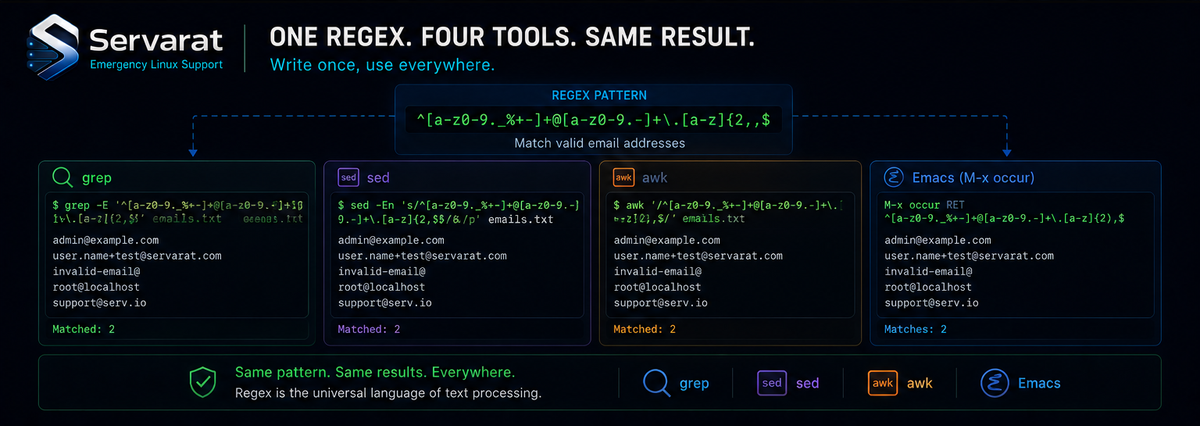
The most maddening thing about regular expressions isn't the syntax — it's that the syntax changes depending on what you run it through. A feature that works in one tool is missing in another, or present but spelled differently. You write a pattern that works perfectly in Perl, paste it into a sed command on a server, and it silently does nothing or throws an error.
John D. Cook wrote a sharp piece on this problem from the angle that matters most for anyone who works on machines they don't control: instead of fighting the differences, identify the subset of regex that works everywhere, and stick to it when portability counts. For sysadmins who regularly land on boxes where they can't install their preferred tooling, that subset is worth committing to memory.
Why This Matters for Server Work
If you live in one editor on one machine, you can learn its regex flavor and never think about it again. The problem shows up the moment you're working across tools and systems — which, for anyone managing servers, is constantly. You SSH into a box you've never touched, and you get whatever sed, awk, and grep shipped with it. You can't apt install your favorites. Whatever pattern you reach for has to work with the base utilities already there.
This is the same reality behind keeping a portable skill set in general: the tools you can count on are the ones present on every Unix-like system out of the box, the same base-utility thinking that makes something like a zero-dependency Bash blog engine able to run anywhere. A regex that only works in your local Perl or PCRE setup is useless when you're three SSH hops deep on a minimal box at 2 a.m. trying to grep through logs.
The Strictest "Everywhere"
How much regex works everywhere depends on how strict your definition of "everywhere" is. At the absolute most conservative — the features that work in essentially any regex implementation ever made — you get very little:
- literals (the characters themselves)
- character classes,
[…] - the special characters
.*^$
That's the bedrock. A literal string, "any character" (.), "zero or more of the preceding" (*), anchors for start and end of line (^ and $), and bracketed character classes. You can do a surprising amount with just that, and it will work in tools you've never heard of.
A More Useful "Everywhere": sed, awk, grep, Emacs
Most of us don't need literally every regex engine. We need the handful of tools we actually use. Cook's working set is sed, awk, grep, and Emacs — and if you scope "everywhere" to those, the common subset gets meaningfully larger.
The key trick: use the GNU versions of sed, awk, and grep, and pass the -E flag to sed and grep (extended regular expressions). With that, the three tools line up closely. awk's regex features are the effective lowest common denominator — what works in awk works in the others — with one notable exception:
⚠️ Word boundaries differ in awk. In awk, word boundaries are \< (start of word) and \> (end of word), rather than the \b and \B that the other tools accept. If you're writing a pattern meant to run identically across all four, this is the spot that'll trip you. Know which tool you're targeting, or avoid word boundaries in patterns that must be truly portable.
Emacs Is the Oddball
Emacs supports analogs of most of awk's regex features, but with a frustrating quirk: the characters
+ ? ( ) { } |
all need a backslash in front to behave like their awk counterparts. So where awk writes (foo|bar)+, Emacs wants \(foo\|bar\)\+. This is the basic-regular-expression style (BRE), where those metacharacters are literal until escaped — the inverse of extended regex, where they're special by default.
There's a second Emacs wrinkle worth knowing:
⚠️ \s and \S mean something different in Emacs. In awk (and most flavors), \s is whitespace and \S is non-whitespace. In Emacs, \s and \S begin a character class — the whitespace analog is specifically \s- and \S-. The - there names the "space" syntax class, and Emacs has many others: \s. matches a punctuation character, \S. matches a non-punctuation character. Powerful, but not what your muscle memory expects.
What Works Everywhere (For This Definition)
Scoping "everywhere" to GNU sed -E, GNU grep -E, awk, and Emacs — with the caveats above — the following features are reliable across all four:
.              any character
^  $           line anchors
[…]  [^…]      character classes, negated
*              zero or more
\w  \W         word char, non-word char
\s  \S         whitespace, non-whitespace
\1 - \9        backreferences
\b  \B         word boundary, non-boundary
?  +           optional, one-or-more
|              alternation
{n,m}          counted repetition
(...)          capturing group
That's a genuinely capable toolkit — alternation, quantifiers, capture groups, backreferences, counted matches — far more than the strict bedrock, and enough for the overwhelming majority of real log-munging and text-processing work.
⚠️ Two footnotes that matter in practice. First, with awk's word boundaries being \</\> and Emacs needing escapes on + ? ( ) { } |, "works everywhere" means the feature exists — the spelling may still shift per tool. Second, gawk supports backreferences in replacement strings but not within the regular expressions themselves, so don't count on \1 inside a gawk match the way you would in sed.
The Perl Trap
Cook makes a point worth internalizing: if you learned regex in Perl — a maximalist environment where nearly everything is supported — you'll constantly expect features that aren't there elsewhere. And the line between "basic" and "advanced" isn't where intuition puts it.
Look-around assertions (lookahead, lookbehind) are clearly advanced, and sure enough, they don't travel. But \d for digits feels basic — and it's not supported in many flavors. awk, sed, and POSIX tools generally don't honor \d; you write [0-9] or [[:digit:]] instead. That mismatch between what feels fundamental and what's actually portable is exactly the kind of thing that burns you on an unfamiliar box. When in doubt, the POSIX character classes ([[:digit:]], [[:alpha:]], [[:space:]]) are more portable than their backslash shorthands.
The Practical Takeaway
If you write regex that has to run on machines you don't control, adopt two habits. Use GNU tools with -E where you can, and lean on the common subset above rather than reaching for whatever your local Perl or PCRE setup spoiled you with. When a pattern absolutely must be portable, prefer [0-9] over \d, prefer POSIX classes over backslash shorthands, and steer clear of word boundaries and look-around unless you know exactly which tool will run it.
It's the regex equivalent of the broader sysadmin discipline of knowing your base tools cold — the same reason fluency with core process and system utilities pays off precisely when you're on an unfamiliar system with nothing installed. The flashy features are nice when you have them. The portable subset is what gets the job done when you don't.



