
Least-Privilege AWS Secrets Manager When You Can't Touch IAM

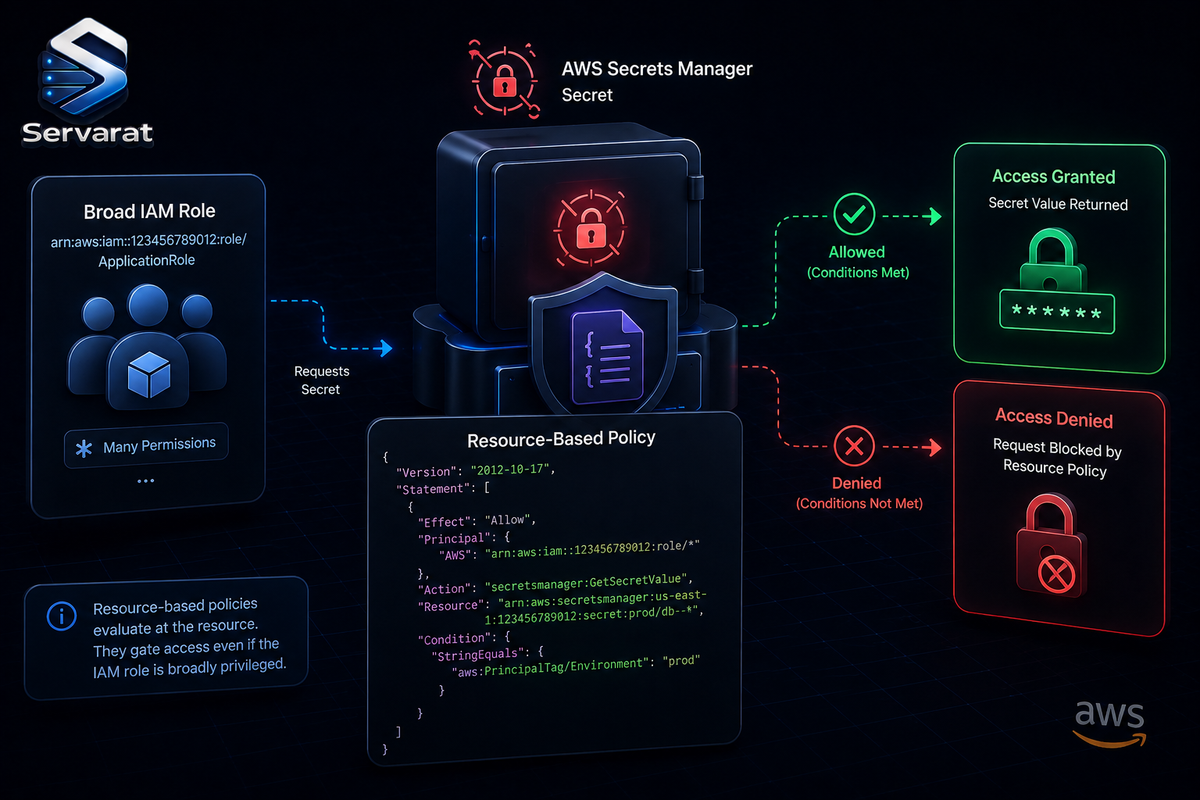
You've been handed an AWS account, and the identity you get is a role with broad permissions baked in that you didn't create, can't edit, and definitely can't run iam:CreatePolicy against to carve out something narrower. The task sounds trivial: store a database password in Secrets Manager with Terraform and make sure only the application can read it. If your instinct is "impossible without controlling IAM," you're thinking about least privilege in one dimension when there are two.
This situation is everywhere once you look: AWS Academy Learner Labs hand every student a pre-baked LabRole with a wide identity policy and no iam:CreateRole. Cross-account setups hand you a role assumed from an account you don't own. Vendor-managed environments, SaaS "bring your own AWS account" integrations, SCP-locked landing zones where a central platform team owns every IAM policy, all drop you in the same spot: an identity you can use and zero ability to narrow it at the IAM layer. The pattern that solves it for Secrets Manager is a resource-based policy attached directly to the secret, and this walks through building it end to end with Terraform, then proving it works with a positive and a negative test. Rotation is deliberately out of scope here; it deserves its own post.
The Dual-Layer Model: Why a Resource Policy Works
Every authorization decision in Secrets Manager evaluates two independent policy types for the same request:
- Identity-based policy, attached to the principal (user, role, federated identity). The "what can this identity do" policy. In our scenario this is
LabRole, broad, pre-created, out of reach. - Resource-based policy, attached to the resource. For Secrets Manager this is
aws_secretsmanager_secret_policy. The "who can touch this specific secret" policy, and the one lever we actually control.
AWS evaluates both for every request, and the logic is simple once internalized:
- An explicit
Denyin either layer denies the request outright. Nothing else matters. - If neither denies, the request is allowed only if at least one layer has a matching explicit
Allow. - Everything not explicitly allowed is implicitly denied.
Here's the part that makes the pattern possible: when a resource policy exists on a secret, AWS treats it as authoritative for that resource. A principal with broad secretsmanager:* in its identity policy is still denied if the secret's resource policy doesn't grant it access. So LabRole being allowed to call secretsmanager:GetSecretValue on * at the identity layer doesn't matter if the secret's resource policy doesn't also say "yes, this principal specifically, under these conditions."
You're not narrowing LabRole. You're building a gate around the secret that LabRole has to pass through regardless of how permissive its own policy is.
Request: LabRole calls secretsmanager:GetSecretValue on secret X
                    │
        ┌───────────┴────────────┐
        │                        │
  Identity Policy          Resource Policy
  (LabRole - broad,        (attached to secret X -
   not editable)            the lever we control)
        │                        │
        │   Allow (implicit,     │   Allow, scoped to LabRole ARN
        │   broad wildcard)      │   + VersionStage = AWSCURRENT
        │                        │
        └───────────┬────────────┘
                     │
        Both layers must permit, and an explicit
        Deny in either layer wins outright
                     │
              ┌──────┴──────┐
              │   Decision   │
              └─────────────┘
This is the mechanic behind compensating controls in cloud security: when you can't fix the root cause, add a second independent layer that constrains the blast radius. It's not an Academy-specific hack, it's the correct pattern any time you inherit an identity you can't shape, which is the same "authorization is not the whole story" theme I keep coming back to in the serverless metadata token-theft writeup.
Prerequisites and a Self-Check
You'll need Terraform >= 1.5 (the mainline secret_string pattern; on >= 1.11 I'll show the write-only alternative), AWS provider hashicorp/aws >= 5.0, AWS CLI v2 configured with your session credentials (Academy sessions expire after ~4 hours and need re-copying), and an environment with a pre-created role you can't modify.
⚠️ Academy's exact allow-list of permitted services isn't published anywhere official and varies by course and lab template. Don't assume, verify. Before writing any Terraform, confirm who you are and whether Secrets Manager is even reachable:
aws sts get-caller-identity
aws secretsmanager list-secrets --region us-east-1
The first should return an ARN containing assumed-role/LabRole (or voclabs, depending on the template). The second should return an empty SecretList: [] on a fresh account, not an AccessDeniedException. If the second fails, stop, this lab template doesn't expose Secrets Manager and no Terraform will fix that. All examples target us-east-1, the typical Academy default, configurable via the aws_region variable (but check, since Academy sometimes restricts regions).
Provider and Variables
Nothing exotic, but pin the version, resource policy behavior and block_public_policy support landed in specific provider releases and you don't want a terraform init on another machine silently picking up a version missing a field you rely on.
terraform {
  required_providers {
    aws = {
      source  = "hashicorp/aws"
      version = "~> 5.0"
    }
  }
  required_version = ">= 1.5"
}

provider "aws" {
  region = var.aws_region
}

variable "aws_region" {
  description = "AWS region for all resources"
  type        = string
  default     = "us-east-1"
}

variable "db_password" {
  description = "Secret value for the database password. Set via TF_VAR_db_password, never committed."
  type        = string
  sensitive   = true
}
db_password gets no default. Export it as an environment variable before running Terraform, keeping it out of your .tf files, shell history (a leading space stops most shells logging it), and version control:
export TF_VAR_db_password="$(openssl rand -base64 24)"
terraform apply
Resolving the Role ARN Dynamically
We need LabRole's full ARN for the resource policy, and that ARN includes the account ID, which you shouldn't hardcode: it changes every time Academy resets the lab, and hardcoding account IDs is a portability smell regardless. The aws_caller_identity data source gives the account ID of whatever credentials Terraform is currently using:
data "aws_caller_identity" "current" {}

locals {
  lab_role_arn = "arn:aws:iam::${data.aws_caller_identity.current.account_id}:role/LabRole"
}
⚠️ If your environment uses a differently named role (a cross-account assumed role, a vendor execution role), swap LabRole for that name here. Everything downstream stays identical; only this one string changes. That's what makes this pattern portable across the Academy, cross-account, and vendor-managed cases.
Creating the Secret Container
resource "aws_secretsmanager_secret" "db_password" {
  name                    = "app/production/db-password"
  description             = "Database admin password for the production app tier"
  recovery_window_in_days = 0

  tags = {
    Environment = "production"
    ManagedBy   = "terraform"
  }
}
Two details worth stopping on:
⚠️ recovery_window_in_days = 0 deletes the secret immediately on terraform destroy, with no 7-to-30-day soft-delete window. In a real account you'd think twice, soft-delete is a safety net against accidental deletion. But in an Academy lab that resets every ~4 hours, re-applying in a fresh session after a prior one left a secret pending-deletion fails with a name collision, because Secrets Manager won't create a secret with a name still reserved by a soft-deleted one. Zero recovery window frees the name immediately, which matters when iterating across short-lived sessions. In a stable production account, use the default recovery window instead, this is the one setting to flip back when you leave the lab.
No KMS configuration. There's no kms_key_id here. Secrets Manager encrypts at rest by default using the AWS-managed key aws/secretsmanager, and using that default requires zero extra IAM permissions, because AWS-managed keys don't need an explicit key-policy grant the way customer-managed KMS keys do. This is genuinely AWS-specific: both GCP Secret Manager and OCI Vault expect a provider- or customer-managed key with its own grants before secrets work at all. AWS gets you to "encrypted at rest, zero extra config" faster than either.
Writing the Value
resource "aws_secretsmanager_secret_version" "db_password" {
  secret_id     = aws_secretsmanager_secret.db_password.id
  secret_string = var.db_password
}
This is the mainline pattern and works everywhere, but be clear-eyed: ⚠️ secret_string writes the plaintext value into the Terraform state file as an attribute. Marking the variable sensitive = true only suppresses it from CLI output, it does nothing to protect the value once it's in terraform.tfstate. More on ranking the mitigations below.
On Terraform >= 1.11 there's a better option: secret_string_wo, a write-only attribute never persisted to state at all. Terraform sends it during apply and forgets it, tracking changes via a companion version counter:
resource "aws_secretsmanager_secret_version" "db_password_wo" {
  secret_id                = aws_secretsmanager_secret.db_password.id
  secret_string_wo         = var.db_password
  secret_string_wo_version = 1 # bump this integer to push a new value
}
I keep secret_string as the mainline example because many pipelines, Academy included, are pinned to older Terraform where secret_string_wo isn't available. On 1.11+, prefer it.
The Centerpiece: A Resource Policy That Restricts LabRole
This is where the least-privilege work actually happens. Build the policy with aws_iam_policy_document rather than hand-rolled JSON, it's less error-prone and Terraform catches structural mistakes at plan time that a raw string wouldn't.
data "aws_iam_policy_document" "db_password_resource_policy" {
  statement {
    sid    = "AllowLabRoleReadCurrentVersion"
    effect = "Allow"

    principals {
      type        = "AWS"
      identifiers = [local.lab_role_arn]
    }

    actions = [
      "secretsmanager:GetSecretValue",
      "secretsmanager:DescribeSecret",
    ]

    resources = [aws_secretsmanager_secret.db_password.arn]

    condition {
      test     = "StringEquals"
      variable = "secretsmanager:VersionStage"
      values   = ["AWSCURRENT"]
    }
  }
}

resource "aws_secretsmanager_secret_policy" "db_password" {
  secret_arn          = aws_secretsmanager_secret.db_password.arn
  policy              = data.aws_iam_policy_document.db_password_resource_policy.json
  block_public_policy = true
}
What this buys you, piece by piece:
- The
AllowgrantsLabRole, and onlyLabRoleby full ARN, the ability to callGetSecretValueandDescribeSecreton this one secret. Even thoughLabRole's identity policy might allow touching every secret in the account, this resource policy is the only thing betweenLabRoleand this specific secret. - ⚠️ The
secretsmanager:VersionStagecondition is what makes this genuinely restrictive rather than decorative. Secrets Manager labels versions with stages:AWSCURRENTis active,AWSPREVIOUSis whatever was current before the last update. Constraining toAWSCURRENTmeans this principal reads the live value but cannot roll back to an older one by requesting a previous stage. Without it, anyone who can callGetSecretValuecan also request--version-stage AWSPREVIOUSand read whatever the secret used to be, which is a real and commonly-missed leak. block_public_policy = trueruns your policy through Zelkova, AWS's automated reasoning engine, and rejects the apply outright if it would grantPrincipal: "*"or otherwise make the secret effectively public. Neither GCP nor OCI runs a formal-verification pass like this before accepting a policy. Leave it on by default, it only ever catches a mistake before production.
⚠️ One gotcha: Terraform will happily accept policy = "{}" at plan time (valid JSON), but the Secrets Manager API rejects it on apply. A resource policy needs at least one statement; there's no "empty but present" resource policy.
Optional: Restricting by VPC Endpoint
If your workload calls Secrets Manager exclusively through a VPC interface endpoint (com.amazonaws.<region>.secretsmanager), you can add a Deny for any request not transiting that endpoint. Genuinely stronger, it collapses the attack surface to "traffic through this one endpoint", but it requires the endpoint to already exist, which Academy VPCs frequently lack. Treat it as the advanced path:
variable "secretsmanager_vpc_endpoint_id" {
  description = "VPC endpoint ID for Secrets Manager, if one exists. Leave empty to skip."
  type        = string
  default     = ""
}

data "aws_iam_policy_document" "db_password_resource_policy_with_vpce" {
  source_policy_documents = [data.aws_iam_policy_document.db_password_resource_policy.json]

  statement {
    sid    = "DenyOutsideVpcEndpoint"
    effect = "Deny"

    principals {
      type        = "AWS"
      identifiers = [local.lab_role_arn]
    }

    actions   = ["secretsmanager:GetSecretValue"]
    resources = [aws_secretsmanager_secret.db_password.arn]

    condition {
      test     = "StringNotEquals"
      variable = "aws:sourceVpce"
      values   = [var.secretsmanager_vpc_endpoint_id]
    }
  }
}

resource "aws_secretsmanager_secret_policy" "db_password_vpce" {
  count = var.secretsmanager_vpc_endpoint_id != "" ? 1 : 0

  secret_arn          = aws_secretsmanager_secret.db_password.arn
  policy              = data.aws_iam_policy_document.db_password_resource_policy_with_vpce.json
  block_public_policy = true
}
This is an explicit Deny, not a second Allow, and a Deny always wins, so it carves out an exception on top of the existing grant. The count guard means the resource simply isn't created if you don't supply an endpoint ID, so the block can live in your module without breaking environments that lack one. Check whether your VPC already has an endpoint:
aws ec2 describe-vpc-endpoints --filters "Name=service-name,Values=com.amazonaws.us-east-1.secretsmanager" --query 'VpcEndpoints[].VpcEndpointId' --output text
Empty result, skip this section, the VersionStage condition is already doing real work on its own.
Testing: Prove the Policy Actually Does Something
Apply, then work both a positive and a negative test. This is the part that proves the resource policy is doing something rather than just existing.
Confirm the secret and its encryption:
aws secretsmanager describe-secret --secret-id app/production/db-password --region us-east-1 --query '{Name:Name, ARN:ARN, KmsKeyId:KmsKeyId, LastChangedDate:LastChangedDate}'
KmsKeyId should be empty or reference the default aws/secretsmanager alias, confirming encryption at rest without you configuring anything.
Confirm the resource policy attached:
aws secretsmanager get-resource-policy --secret-id app/production/db-password --region us-east-1 --query 'ResourcePolicy' --output text | jq .
You should see the Allow scoped to your LabRole ARN with the VersionStage condition intact. Empty result means the policy wasn't applied or was rejected, check terraform apply output for a Zelkova rejection.
Positive test, read from an EC2 instance running LabInstanceProfile (the instance profile wrapping LabRole that Academy provides for compute). From a shell on that instance:
aws secretsmanager get-secret-value --secret-id app/production/db-password --region us-east-1 --query SecretString --output text
Returns the plaintext you set via TF_VAR_db_password. No static credentials on the instance, it uses the instance profile's temporary credentials, and the resource policy explicitly grants LabRole read access to AWSCURRENT.
Negative test, this is the useful part, because in an Academy lab you don't have a second identity to test with, everyone is LabRole. Prove the condition is real by violating it directly. First push a new version so a previous one exists:
aws secretsmanager put-secret-value --secret-id app/production/db-password --secret-string "rotated-test-value" --region us-east-1
That creates a new AWSCURRENT and demotes the old value to AWSPREVIOUS. Now try to read the previous stage:
aws secretsmanager get-secret-value --secret-id app/production/db-password --version-stage AWSPREVIOUS --region us-east-1 --query SecretString --output text
It should fail, and the error names the exact mechanism:
An error occurred (AccessDeniedException) when calling the GetSecretValue operation:
User: arn:aws:sts::123456789012:assumed-role/LabRole/i-0abcd1234ef567890 is not authorized
to perform: secretsmanager:GetSecretValue on resource: app/production/db-password
because no resource-based policy allows the secretsmanager:GetSecretValue action
⚠️ That message is the dual-layer model made visible: LabRole's identity policy is broad enough that AWS doesn't complain about the identity side at all, the failure is specifically "no resource-based policy allows" this request, because the VersionStage condition doesn't match AWSPREVIOUS. The compensating control is working exactly as designed. If you have a genuine second principal (a role in another account), the same call against AWSCURRENT from that identity fails the same way, it's simply not named in the principals block.
Reading From Application Code
The CLI is fine for verification; real workloads use an SDK. The boto3 equivalent respects the same instance-profile credentials and the same resource policy:
import boto3
from botocore.exceptions import ClientError

def get_secret(secret_id: str, region: str = "us-east-1") -> str:
    client = boto3.client("secretsmanager", region_name=region)
    try:
        response = client.get_secret_value(SecretId=secret_id)
    except ClientError as e:
        raise RuntimeError(f"Unable to retrieve secret '{secret_id}': {e}") from e
    return response["SecretString"]

if __name__ == "__main__":
    db_password = get_secret("app/production/db-password")
    print(f"Secret retrieved successfully (length: {len(db_password)})")
No credentials configured anywhere, boto3 picks up the instance profile's temporary credentials automatically, the same identity chain as the CLI test. Run it from anywhere other than an instance carrying LabInstanceProfile and it fails with the same AccessDeniedException.
Security Considerations
A few things worth internalizing before taking this into a real environment:
Don't treat this as an Academy-only trick. The moment you can't edit an identity policy, a role owned by another team, a role in an account you don't administer, an SCP-locked environment, this pattern is your answer. And keep the resource policy as a second independent line of defense even when you do control the identity policy, never assume the identity side is narrow enough on its own.
Leave block_public_policy = true on by default. There's essentially no legitimate reason for a secret's resource policy to grant Principal: "*", and the check costs nothing.
⚠️ Watch for the confused-deputy problem if you extend this to service principals. Everything here grants access to an IAM role. If you later grant a resource-policy statement to an AWS service principal instead (via CloudFormation, EventBridge, etc.), add aws:SourceArn and/or aws:SourceAccount conditions. Without them, any customer's resource of that service type, in any account, could potentially trigger access to your secret. Not a concern for the LabRole example, but the natural next mistake once you grant to services instead of roles. This is the same class of trust-boundary failure I broke down in the Kubernetes CSI "authorization is not validation" analysis, a privileged component acting on behalf of a less-trusted requester without confirming the request is appropriate.
⚠️ Rank your state-exposure mitigations correctly. secret_string writes plaintext into terraform.tfstate. In descending order of how well each actually protects the value:
secret_string_wo(Terraform >= 1.11), the value is never written to state at all. Strongest, when your version supports it.- Separate-lifecycle pattern, Terraform manages only the container and resource policy; a CI/CD step or person writes the value afterward with
aws secretsmanager put-secret-value, outside Terraform's state entirely. Works on any version, the right call for teams not yet on 1.11. sensitive = true, the weakest. It suppresses the value from plan/apply output but does nothing about the state file. Anyone with read access to your state backend extracts it withterraform state showorterraform output -json. Don't mistake this flag for actual protection.
The underlying problem, Terraform state as a plaintext secret store, is universal across providers; only the mitigation names differ. Whichever you pick, the state backend itself must be encrypted and access-controlled (S3 with SSE and a locked-down bucket policy, or a managed backend), which is the same discipline covered in the Terraform and Ansible IaC hardening work.
CIS AWS Foundations Benchmark alignment. Two controls fall directly out of what we built: secrets must not be publicly accessible (covered by block_public_policy = true, verified automatically at apply rather than by manual audit) and secrets must be encrypted at rest (default in Secrets Manager, no opt-out, there's no "unencrypted secret" resource to accidentally create). This is the same benchmark-as-code thinking behind the Kubernetes CIS automation piece, checks enforced structurally instead of audited after the fact.
How This Differs From GCP and OCI
If you know the GCP or OCI secret models, this should feel meaningfully different, not just relabeled. GCP Secret Manager and OCI Vault both center on IAM-binding models: you grant a principal a role scoped to a secret (google_secret_manager_secret_iam_member on GCP, or a compartment-scoped Allow group ... to read secret-bundles in compartment ... on OCI). The grant lives entirely on the identity side, there's no separate "policy that lives on the secret itself" standing apart from IAM.
AWS's dual-layer model is the difference: the resource carries its own policy, evaluated alongside the identity's policy, not instead of it. That's the specific feature that makes the LabRole problem solvable at all. If AWS worked like GCP or OCI, an unmodifiable LabRole would be a dead end, no lever anywhere to narrow it. The resource-based policy is that lever.
Wrapping Up
We built a Secrets Manager secret from scratch with Terraform, the container, a securely-sourced value, and a resource policy that genuinely restricts an identity we don't control. The VersionStage condition, block_public_policy, and the aws_caller_identity lookup for a dynamic ARN are what turn "attach some JSON to the secret" into an actual least-privilege control, verified with a positive read from EC2 and a negative test that fails for exactly the reason we designed it to. What we didn't touch, on purpose, is rotation, keeping a secret's value fresh automatically with a Lambda function and aws_secretsmanager_secret_rotation is a large enough topic for its own post. That's next.
References
- Victor Silva: AWS Secrets Manager Terraform, Least-Privilege Access (source)
- Terraform Registry: aws_secretsmanager_secret_policy
- Terraform: Manage Sensitive Data With Write-Only Arguments
- AWS: Resource-Based Policies for Secrets Manager
- AWS: Permissions Policy Examples for Secrets Manager
- CIS AWS Foundations Benchmark



