
git rebase -i, Demystified

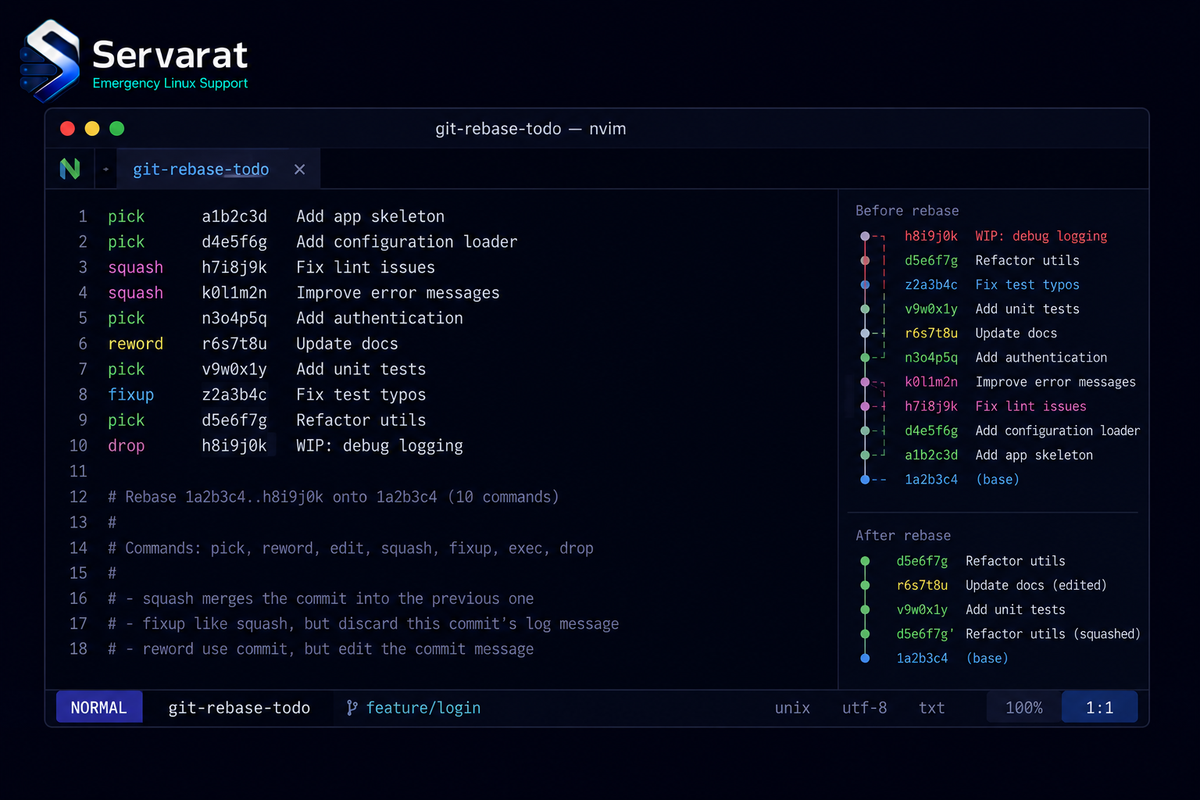
There's a persistent fear around git rebase -i that outlives most developers' junior years, and it's misplaced. Akrm al-Hakimi makes the case that the command is far less dangerous than its reputation, and he's right: interactive rebase is a text file you edit, it creates new commits rather than destroying old ones, and every mistake is recoverable from the reflog. Here's how it actually works, why it's safe, and a few operational habits worth adding once the fear is gone.
What It Actually Does
Run this:
git rebase -i HEAD~4
and Git opens a text file, the todo list for the last four commits:
pick a1b2c3d Add user model
pick e4f5g6h Fix typo in user model
pick i7j8k9l Add login endpoint
pick m0n1o2p WIP debugging login

# Commands:
# p, pick <commit> = use commit
# r, reword <commit> = use commit, but edit the commit message
# s, squash <commit> = use commit, but meld into previous commit
# f, fixup <commit> = like "squash" but discard this commit's message
# d, drop <commit> = remove commit
The key thing for anyone new to this: it's a plan, not an action. Nothing has happened yet. You edit the instructions, save, and only then does Git replay the commits according to what you wrote. Change your mind before or during, and git rebase --abort snaps you back exactly where you started.
Each line is an instruction for replaying that commit, and you mix them freely:
r a1b2c3d Add user model
pick e4f5g6h Fix typo in user model
pick i7j8k9l Add login endpoint
d m0n1o2p WIP debugging login
What this does: Git pauses on the first commit to let you reword its message, leaves the middle two untouched, and drops the WIP debugging commit entirely (deleting the line does the same thing as d). Four commits become three, with the surrounding history rewritten and the middle preserved.
That's the whole mechanic. Once that example makes sense, interactive rebase stops being intimidating and becomes a routine tool for shaping history before it's shared. If you already understand how Git stores objects internally, this fits neatly: rebase is just writing new commit objects and moving a branch pointer.
Why It's Hard to Actually Lose Work
Three independent safety nets, any one of which is usually enough:
1. You can bail at any time. git rebase --abort during an in-progress rebase returns the branch to its pre-rebase state exactly.
2. Rebase creates new commits, it doesn't edit old ones. This is the mental model that dissolves the fear. Rebase never mutates your existing commits. It builds new ones with the changes applied and moves the branch pointer to them. The originals stay in Git's object database, unreferenced but intact, until garbage collection eventually clears them weeks later. Right up until then, they're fully recoverable.
3. The reflog remembers everywhere your branch has pointed. This is the real backstop. Git journals every position your branch has held:
git reflog
Find the entry from before the rebase and reset to it:
git reset --hard HEAD@{4}
The entire rebase is undone. The worst realistic outcome of a botched rebase is a few minutes reading the reflog, not lost work. Al-Hakimi mentions wiping a coworker's branch history during an internship and recovering it exactly this way, which is the canonical "I thought I destroyed everything and hadn't" rebase story most people eventually collect.
⚠️ If even the reflog feels like too much under pressure, take the low-tech insurance before you start:
git branch backup-before-rebase
Now the pre-rebase state has a name. If anything goes sideways, git reset --hard backup-before-rebase and you're back. On a genuinely important rebase, making that branch first is a good habit regardless of how comfortable you are with the reflog. Delete it once the rebase is confirmed good.
Conflicts Are Easier Here, Not Harder
The part people dread most is conflicts, and the fear is backwards. When a replayed commit conflicts (usually from reordering commits, or rebasing onto an updated main), Git stops and prints the instructions: resolve it like a merge conflict, git add the resolved files, then git rebase --continue.
Conflicts during rebase are frequently easier than merge conflicts, because you resolve one commit at a time instead of collapsing an entire branch's divergence into a single conflicted state. You get smaller, more focused conflicts with clear context about which change caused them.
⚠️ One habit that pays off if you rebase the same branch onto a moving main repeatedly: turn on rerere (reuse recorded resolution).
git config --global rerere.enabled true
Git then records how you resolved each conflict and replays that resolution automatically the next time the identical conflict appears. For long-lived feature branches that you rebase often, it turns "resolve the same three conflicts every time" into "resolve them once."
The Fixup Workflow That Makes This Routine
The source demystifies the basics well; here's the habit that makes rebase a daily tool rather than an occasional cleanup. When you're working on a branch and realize commit three needs a small fix, don't make a "fix typo" commit you'll squash later by hand. Commit it as a fixup targeting the original:
git commit --fixup a1b2c3d
Then when you clean up before review, let Git do the squashing automatically:
git rebase -i --autosquash HEAD~5
--autosquash reorders the todo list so each fixup commit sits directly under its target, already marked fixup. You just save and quit. It turns history cleanup from manual line-shuffling into a mechanical step, and it's the workflow that makes a clean branch history cheap enough to actually maintain. Set it as the default so you never forget the flag:
git config --global rebase.autosquash true
This pairs naturally with the branch-management habits from git worktrees, and both are the kind of git fluency that separates a tidy, reviewable pull request from a wall of "wip" commits.
Pushing a Rebased Branch
Rebasing rewrites history, so after rebasing a branch you've already pushed, a normal git push is rejected: the remote history and yours have diverged. The correct tool is force-with-lease, never plain force:
git push --force-with-lease
⚠️ The distinction matters more than the source implies. --force overwrites the remote unconditionally, including any commits a teammate pushed while you were rebasing, silently destroying their work. --force-with-lease refuses the push if the remote moved since you last fetched, so it protects against exactly that. But know its sharp edge: --force-with-lease checks against your remote-tracking ref, so if you ran git fetch (updating that ref) between someone else's push and your force-with-lease, the lease check passes and you can still clobber their commit. The safe habit is force-with-lease without a bare git fetch immediately before it, or better, --force-with-lease combined with reviewing what you're about to overwrite. It's a safety net, not a guarantee.
When Not to Rebase
The one hard rule the demystification shouldn't skip:
⚠️ Rebase your own feature branches freely; do not rebase branches other people are building on. Rewriting history that others have already based work on forces every one of them into a painful recovery, because their commits now descend from commits that no longer exist. The safe boundary: rebase before or during review on a branch that's yours, force-with-lease to your own remote, and once a branch is shared and others are committing to it, switch to merge. "Rebase local and private, merge public and shared" is the rule that keeps rebase a convenience instead of a team incident.
Within that boundary, rebase liberally. A clean, readable branch history is worth the small effort, it makes review faster, git bisect more useful, and git log something you can actually reason about.
Bottom Line
git rebase -i opens a text file describing a plan you can abort at any time, creates new commits without touching the originals, and leaves a full recovery trail in the reflog. It's about as dangerous as editing a config file, provided you keep it to your own unshared branches. Add --autosquash and rerere to make it a routine part of shaping a branch, always push with --force-with-lease rather than --force, and never rewrite history someone else is building on. Do that and rebase stops being the scary command and becomes one of the more useful ones you own.



