File, Block, and Object Storage: Which to Run Where, and the Traps Between Them

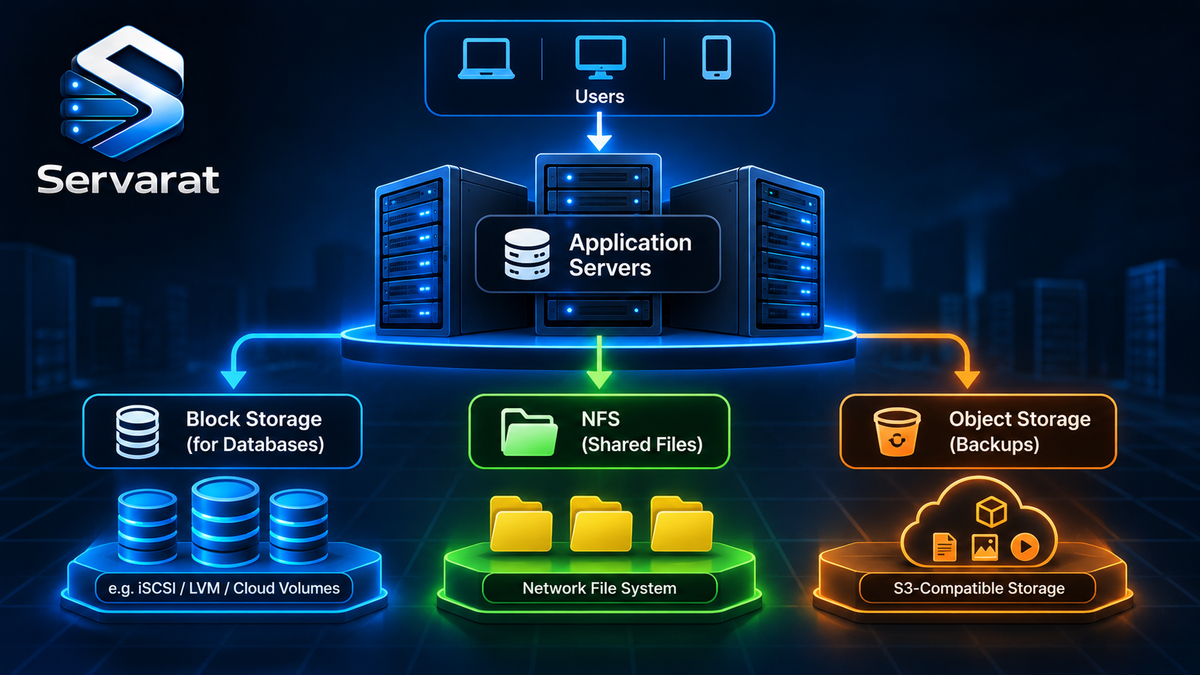
The three-way file-versus-block-versus-object comparison usually reads like a textbook: definitions, a feature table, a tidy "it depends." What that leaves out is the part you actually need when you're standing up storage for a real workload, which failure modes each one hands you, where the costs hide, and which to reach for on a given box. This is that version. The short answer to "which storage type" is almost always decided by one question, how does the application access the data, and everything else (performance, cost, scaling) follows from getting that answer right. Credit to Reshma Haridas for the source breakdown; what follows is the operator's read on top of it.
The One Distinction That Decides Everything
Before the three definitions, the mental model that makes the choice obvious: the three types differ in who owns the filesystem.
- File storage: the storage system owns the filesystem. You get files and directories over a network, and something else manages the structure.
- Block storage: you own the filesystem. You get a raw volume and put whatever filesystem you want on it (ext4, XFS, or none at all if the app manages blocks directly).
- Object storage: nobody owns a filesystem. There is no filesystem. You get objects by key over an API, and the concept of "modify byte 4000 of this file" doesn't exist.
Get that straight and the use cases stop needing memorization. A database wants to manage its own on-disk layout, so it wants block. A team sharing documents wants the storage to handle the directory structure, so they want file. A pile of backup images that are written once and read rarely wants cheap, infinite, API-addressed storage, so object. Everything below is detail on those three.
File Storage: Shared, Familiar, and Easy to Saturate
File storage organizes data into a directory hierarchy you reach by path (/documents/projects/2026/report.pdf), served over the network with NFS or SMB. It's the default for anything multiple servers need to read from the same place, and it's easy precisely because every OS and app already speaks filesystem.
A minimal NFS export for sharing a directory across Linux servers, the classic "several app servers, one set of common files" case:
bash
echo '/srv/shared 10.0.0.0/24(rw,sync,no_subtree_check,root_squash)' | sudo tee -a /etc/exports && sudo exportfs -raMount it on the clients:
bash
sudo mount -t nfs 10.0.0.5:/srv/shared /mnt/sharedThe failure mode nobody warns you about: a hung NFS server hangs every client that mounted it, often with processes stuck in uninterruptible D state that you can't even kill -9. A hard mount (the default) blocks forever waiting for the server; a soft mount can corrupt data on timeout. On a fleet, one NFS box becoming unresponsive can cascade into every server that depends on it. Mitigate with nconnect, sane timeouts, and never putting latency-sensitive workloads behind NFS.
The second trap is metadata operations, not size. A directory with ten million tiny files isn't slow because it's big; it's slow because every stat, readdir, and permission check is a round trip. Workloads that churn metadata (mail spools, session directories, CMS upload trees) pressure NFS far more than raw throughput does. On a cPanel fleet this is exactly why shared-docroot-over-NFS setups feel sluggish under load even when the pipe isn't full.
Use file storage for: shared application directories across multiple servers, team document shares, CMS file trees, home directories. If you run NextCloud or similar self-hosted file sync, that's file storage with a web layer on top, and the same metadata-pressure rules apply.
Block Storage: Raw Volumes for Things That Manage Their Own Disk
Block storage hands a server a raw, addressable volume, it shows up as a block device (/dev/sdb, /dev/vdb), and you format it or let an application own it directly. The storage system moves blocks by address and has no idea what files live on them. Delivered over iSCSI or Fibre Channel in a SAN, or as a managed volume from a cloud or hypervisor.
Attaching and preparing a block volume is the everyday sysadmin flow:
bash
sudo mkfs.xfs /dev/vdb && sudo mkdir -p /var/lib/mysql-data && sudo mount /dev/vdb /var/lib/mysql-data && echo '/dev/vdb /var/lib/mysql-data xfs defaults,noatime 0 2' | sudo tee -a /etc/fstabOn Proxmox, this is what you're carving out when you give a VM a disk, the guest sees a block device and formats it. For flexibility, LVM on top of the block volume lets you resize and snapshot:
bash
sudo pvcreate /dev/vdb && sudo vgcreate data-vg /dev/vdb && sudo lvcreate -L 100G -n db-lv data-vgThe performance reality the source understates: block storage does not guarantee low latency by itself. A cloud block volume on cheap tier HDD-backed storage can be slower than a local NVMe file share. Performance is the medium (NVMe vs SSD vs HDD), the provisioned IOPS, and the workload pattern (random vs sequential, read vs write). "We put the database on block storage" tells you nothing about whether it's fast; "we put it on a provisioned-IOPS NVMe volume sized to measured peak" does. Size volumes to measured workload, not guessed.
Block is also the type that needs the most care around durability. A single block volume is a single point of failure, you need snapshots, replication, or RAID underneath, because unlike object storage, nothing is replicating it for you by default. On Proxmox, Ceph gives you distributed, replicated block storage so a node loss doesn't lose the volume, which is the right answer for a cluster that can't tolerate a disk taking down a VM.
Use block storage for: database data directories (MySQL, PostgreSQL, MongoDB), VM boot and data disks, anything doing frequent random read/write, and persistent volumes for stateful containers, where each pod gets its own block-backed PVC.
Object Storage: Infinite, Cheap, and Not a Filesystem
Object storage keeps data as objects (data + metadata + a unique key) inside buckets, reached by API, not path. There is no directory tree; the slashes in media/2026/product.jpg are just characters in the key that consoles render as folders. S3 and Azure Blob are the reference services; MinIO and Ceph RGW are the self-hosted equivalents.
Interacting with it is API calls, not mounts. With rclone (which speaks S3, Backblaze, Contabo, and dozens more) or s3cmd:
bash
rclone copy /var/backups/db-dump.sql.gz contabo-s3:backups/db/ --s3-storage-class STANDARDThe conceptual trap that breaks naive ports: you cannot modify part of an object. There's no "seek to offset, write 4KB." To change one byte you re-upload the whole object (or create a new version). Anything that expects to update a file in place, a database, a log file being appended to by a normal logger, a filesystem, cannot run on object storage directly. This is why "just put the database on S3" is a category error, not a tuning problem.
The cost trap that surprises people on the bill, not the architecture diagram: object storage's cheap capacity price is only half the story. Retrieval fees, per-request charges, minimum storage durations, and egress can dominate total cost, especially on archive tiers (Glacier and friends) where pulling data back is expensive and slow by design. A backup you write once and pray you never restore is perfect for archive tier; a "cold" dataset you actually query monthly can cost more on archive than on standard once retrieval adds up. And egress is the one that funds cloud providers, moving data out of S3 to the internet is where the meter spins, which is why a self-hosted MinIO or a flat-egress provider like Contabo or Backblaze can be dramatically cheaper for backup-heavy workloads that get restored or served often.
Use object storage for: backups and DR copies, media (images, video, served via CDN), logs shipped for later analysis, data lakes, and long-term archives. Your DR backup target is the textbook case, write-once, geographically separate, cheap per GB, restored rarely.
The Comparison That's Actually Opinionated
| Factor | File | Block | Object |
|---|---|---|---|
| You get | Files over a network | A raw volume | Objects via API |
| Who owns the filesystem | Storage system | You | Nobody (there isn't one) |
| Reach it by | Path (/a/b/c) | Block address (device) | Key via HTTP API |
| Protocols | NFS, SMB | iSCSI, Fibre Channel | S3/HTTP API |
| Modify in place? | Yes | Yes | No, replace the whole object |
| Default durability | Backend-dependent | Single volume, you replicate | Replicated by the service |
| Biggest trap | Metadata ops + hung-server cascades | Latency is not guaranteed | Retrieval/egress fees |
| Run it for | Shared docroots, CMS trees | Databases, VM disks, stateful pods | Backups, media, logs, archives |
| Self-hosted option | NFS server, GlusterFS | Ceph RBD, LVM/iSCSI | MinIO, Ceph RGW |
How to Actually Decide
Start from the workload, never the product. The deciding question in order:
- Does the app need to modify data in place? If yes (database, anything appending to files), object storage is out. You're choosing file or block.
- Does one server own the data, or do many share it? One owner wanting its own filesystem and performance → block. Many servers needing the same files → file.
- Is it write-once / read-rarely, large, and API-reachable? → object, and pick the tier by how often you'll actually read it back.
And the honest meta-point: most real architectures use all three, and that's correct, not indecision. A single app commonly runs its database on a block volume, shares config and uploads across app servers over NFS, and ships media and backups to object storage. Matching each data type to how it's accessed is the whole skill. The e-commerce shape: orders in PostgreSQL on block, product documents on a shared NFS mount, product images and nightly backups in object storage behind a CDN.
Whatever you pick, apply the storage-layer hardening each type needs: encryption at rest, access policies scoped tight (an over-permissioned S3 bucket is one of the most common cloud leaks), and for object storage specifically, confirm buckets aren't public by default. The storage decision is also a security-surface decision, a world-readable bucket or an NFS export with no_root_squash open to the wrong subnet undoes a lot of careful work elsewhere.
Bottom Line
File, block, and object aren't competing products to rank; they're three answers to "who manages the filesystem," and the workload picks for you. Databases and VM disks want block, with latency and durability you provision rather than assume. Shared files want NFS/SMB, watch the metadata pressure and the hung-server blast radius. Backups, media, and logs want object storage, cheap per GB but read the retrieval and egress fees before the bill reads them to you. Most serious architectures run all three, each matched to how its data is actually touched, and the operator's job is getting that match right the first time rather than migrating storage layers under load later.