
Copybara: Google's Tool for Moving Code Between Repositories

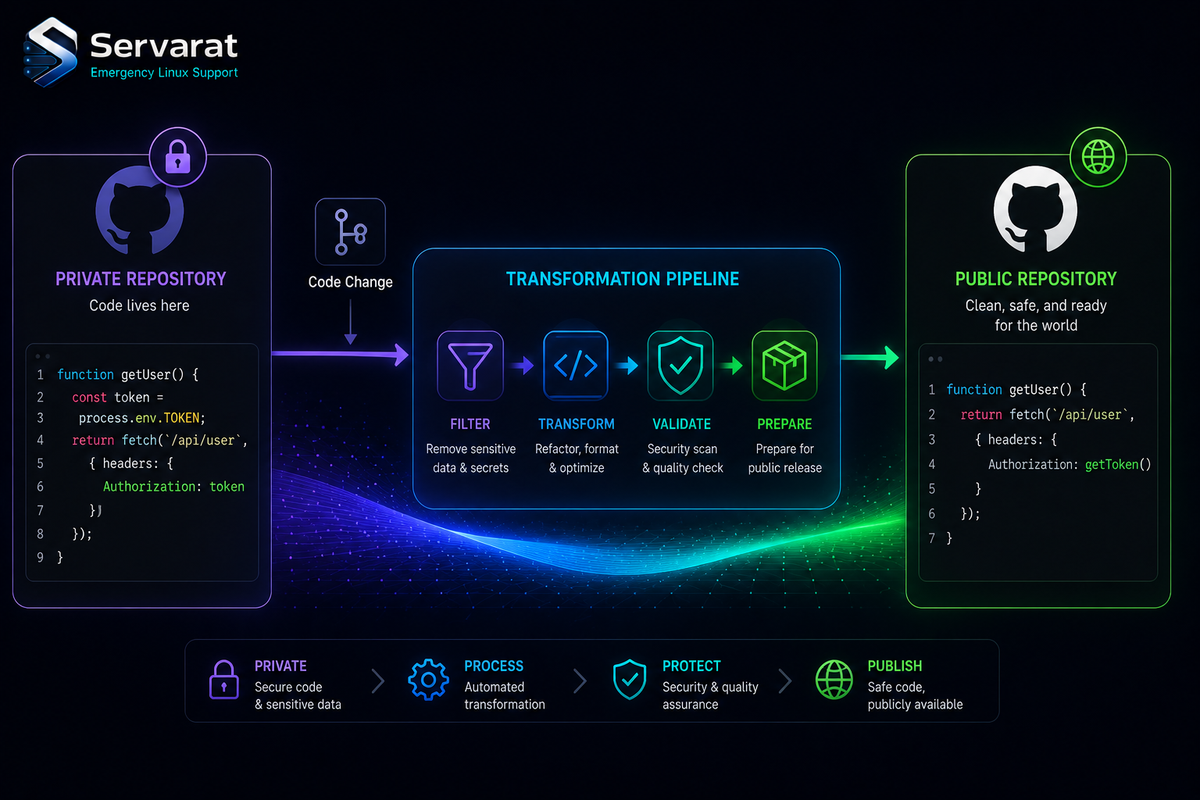
If you've ever maintained a private repository alongside a public mirror — internal infra code you want to open-source part of, or a confidential project with a public-facing subset — you know the sync problem gets ugly fast. Manual cherry-picking, scrubbing internal paths by hand, forgetting which commits already made it across. Copybara is Google's answer to exactly this, the tool that powers a lot of their internal-monorepo-to-public-GitHub flow, and it's open source and actively maintained (latest release tagged June 29, 2026).
It's Java, configured in Starlark (Bazel's config language), and built around one job: transforming and moving code between repositories, repeatably.
The Core Idea
Copybara moves code between repos while transforming it in flight. The canonical use case is keeping a confidential repo and a public repo in sync, but the model is more general than that. A few things it's built for:
- Importing a subset of a private repo into a public one (stripping what shouldn't ship).
- Pulling code from a public repo back into a private one.
- Taking a contribution made in a non-authoritative repo (say, a PR on your public mirror) and moving it into the authoritative source of truth, resolving conflicts the same way any out-of-date change would be.
The key architectural decision: you pick one repo as authoritative, so there's always a single source of truth. Contributions can happen anywhere and releases can be cut from anywhere, but one repo is canonical. That constraint is what keeps the whole thing sane instead of turning into a bidirectional-sync nightmare.
Why the Stateless Design Matters
This is the part worth understanding, because it's what makes Copybara usable by a team or a CI service rather than one person on one laptop. Copybara is effectively stateless — it stores its state in the destination repo, as a label in the commit message. That label records what's already been migrated.
The payoff: several people (or an automated service) can run the same config against the same repos and get identical results, because the state isn't sitting in someone's local checkout — it's in the destination history where everyone can see it. There's no "works on my machine" drift in what's been synced, and no separate state database to maintain or corrupt. If you've dealt with the pain of tools that keep sync state locally, this is the design that sidesteps it. It's the same instinct behind treating your migration config as source code, which I'll come back to.
A Config Example
Copybara workflows live in a copy.bara.sky file. Here's the shape of one, straight from the project:
core.workflow(
    name = "default",
    origin = git.github_origin(
      url = "https://github.com/google/copybara.git",
      ref = "master",
    ),
    destination = git.destination(
        url = "file:///tmp/foo",
    ),

    # Copy everything but don't remove a README_INTERNAL.txt file if it exists.
    destination_files = glob(["third_party/copybara/**"], exclude = ["README_INTERNAL.txt"]),

    authoring = authoring.pass_thru("Default email <default@default.com>"),
    transformations = [
        core.replace(
                before = "//third_party/bazel/bashunit",
                after = "//another/path:bashunit",
                paths = glob(["**/BUILD"])),
        core.move("", "third_party/copybara")
    ],
)
Read it top to bottom and the model is clear: an origin (where code comes from), a destination (where it goes), a glob controlling which files move and which are preserved, an authoring rule for how commit authorship is handled, and a list of transformations applied in flight. Here it's rewriting a Bazel path with core.replace and relocating everything under third_party/copybara with core.move.
Running it is two commands:
(mkdir /tmp/foo ; cd /tmp/foo ; git init --bare)
copybara copy.bara.sky
That transformations list is the real power. core.replace and core.move are the basics, but the point is that the scrubbing you'd otherwise do by hand — rewriting internal paths, stripping confidential files, renaming references — becomes declarative config that runs the same way every time.
Transformations Are Where the Value Is
The reason Copybara beats a shell script full of sed and git filter-branch is that the transformations are first-class, composable, and versioned alongside the sync itself. You define, in one place, exactly how private code becomes public code: which paths get rewritten, which files never cross the boundary, how commit metadata is handled. Then anyone running that config produces the same transformed output.
⚠️ This is also where the security discipline lives, and it's the part to get right before you point this at anything real. When you're syncing a private repo to a public one, the transformation config is the thing standing between "internal-only" and "on the public internet." A missing exclude glob, a secret hardcoded in a file you forgot to filter, an internal hostname in a config — Copybara will faithfully and repeatably publish all of it. The tool does exactly what you tell it, which means a mistake in the config is a mistake that ships every sync, automatically. Before running a private→public workflow against real infrastructure code, audit the destination_files globs and transformations the same way you'd audit anything that pushes to a public endpoint, and ideally run it against a scratch destination first to eyeball what actually comes out. The stateless, automated design that makes Copybara powerful also means a leak, once configured, repeats on every run until you catch it.
Getting It Running
There are a few paths, depending on how much you want to deal with Bazel:
Snapshot releases (easiest). Grab a pre-built binary from the releases page. ⚠️ These ship automatically with no manual testing or compatibility guarantees, so treat them as bleeding-edge rather than stable. Note they need Java 21+ to run (the class files are version 65.0).
Build from source. Install JDK 11 and Bazel, clone, and build:
git clone https://github.com/google/copybara.git
bazel build //java/com/google/copybara
For an executable uberjar:
bazel build //java/com/google/copybara:copybara_deploy.jar
Docker (experimental). If you'd rather not put Bazel and a JDK on the host — which, for a one-purpose tool, is a reasonable call — build and run it containerized:
docker build --rm -t copybara .
docker run -it -v "$(pwd)":/usr/src/app copybara help
The container takes command args or environment variables (COPYBARA_SUBCOMMAND, COPYBARA_CONFIG, COPYBARA_WORKFLOW, COPYBARA_SOURCEREF, COPYBARA_OPTIONS), which makes it clean to drive from CI.
⚠️ One thing to watch with the Docker route: sharing git and SSH credentials into the container. The project's own example mounts your real ~/.ssh and gitconfig read-write into the container:
docker run -v ~/.gitconfig:/root/.gitconfig:ro -v ~/.ssh:/root/.ssh -v ${SSH_AUTH_SOCK}:${SSH_AUTH_SOCK} -e SSH_AUTH_SOCK -v "$(pwd)":/usr/src/app -it copybara
Mounting your entire SSH directory into a container hands that container every key you own. For a tool you're running against your own repos that's a calculated risk, but prefer mounting a dedicated deploy key over your whole ~/.ssh, and use the SSH agent socket (as shown) rather than copying private keys in where you can. On a CI runner especially, scope the credentials to exactly the repos the sync touches.
Where It Fits
Copybara is squarely a "you have this specific problem" tool. If you maintain code that has to live in two places and stay in sync — the private/public split most obviously — it turns an error-prone manual chore into repeatable, reviewable config. Git is the only fully supported repo type (Mercurial read support exists but is experimental), and the architecture is extensible enough to bolt on custom origins and destinations.
If you don't have that problem, it's overkill — you don't reach for a Bazel-configured Java tool to move a few files once. But the moment you're hand-syncing a public mirror of a private repo, or scrubbing internal references out of open-source releases by hand, that's the signal Copybara was built for you.
The broader idea worth taking from it, even if you never run it: your sync-and-transform logic belongs in version control as code, reviewed and repeatable, not as tribal knowledge in someone's shell history. That's the same principle behind keeping your whole infrastructure defined as reviewable config — the thread running through what's new with Terraform and Ansible and the config-as-source-code discipline generally. Copybara just applies it to the unglamorous but real problem of getting code from one repo to another without leaking what shouldn't cross the line. And if you find the git-internals angle interesting, it pairs well with what git worktrees actually do and the deeper dive on treating object storage as a git backend — all three are about understanding git as machinery rather than magic.



