Reduce Bloated Kubeflow Docker Images 89%: Audit, Multi-Stage, Optimize

The Pipeline Image That Got Out of Hand
I took over an existing Kubeflow pipeline from another ML engineer. First thing I checked: image size. 3.17 GB.
The DevOps team agreed that was unacceptable for a pipeline running on every model retrain. The goals were simple: reduce the size significantly without breaking the pipeline.
This is what I learned, including things I wish I'd known before I started.
The Starting Point: 3.17 GB of Unnecessary Weight
The requirements.txt file looked like this:
# training
scikit-learn
numpy
pandas
pandera
matplotlib
seaborn
boto3
python-dotenv

# (optional)
pyarrow
joblib
s3fs

# kubeflow
kfp
kfp-kubernetes
kubernetes
kubeflow
kubeflow-training

# mlflow
mlflow

# API / Serving
flask
flask-cors

# feast-feature-store
feast
feast[redis]
feast[postgres]

torch
And the Dockerfile:
FROM python:3.11-slim

# Install system dependencies
RUN apt-get update && apt-get install -y git && apt-get clean

# Set working directory
WORKDIR /app

# Copy entire project
COPY . .

# Install dependencies
RUN pip install --no-cache-dir -r requirements.txt

# Install your project as a package
RUN pip install --no-cache-dir .
Build result: 3.17 GB. Build time: 797 seconds (13 minutes).
$ docker images

IMAGE                    ID              DISK USAGE    CONTENT SIZE
kubeflow_pipeline:v1   09e88c766290        9.47GB        3.17GB

[+] Building 797.2s (12/12) FINISHED
Step 1: Audit Packages and Dependencies
Before changing the Dockerfile, look at the build history. See which layers are actually consuming space:
docker history kubeflow_pipeline:v1 --no-trunc --format "table {{.Size}}\t{{.CreatedBy}}"
Output:
SIZE      CREATED BY
319kB     RUN /bin/sh -c pip install --no-cache-dir . # buildkit
5.98GB    RUN /bin/sh -c pip install --no-cache-dir -r requirements.txt # buildkit
10.3MB    COPY . . # buildkit
8.19kB    WORKDIR /app
138MB     RUN /bin/sh -c apt-get update && apt-get install -y git && apt-get clean # buildkit
0B        CMD ["python3"]
⚠️ Key takeaway: If your Docker image is huge, don't start with the Dockerfile. Start with optimizing packages and dependencies. The pip install layer ate 5.98 GB.
How to Find Unused Packages
Method 1: grep for imports
grep -R "import numpy" .
Output shows where it's used:
./src/model_development/_09_evaluation.py:import numpy as np
This tells you whether a package is actually imported. But don't rely on grep alone—some packages like kfp-kubernetes aren't imported directly in .py files but are needed for:
- Pipeline compilation
- Kubernetes execution
- SDK behavior
Method 2: Validation method (the real test)
Remove a package from requirements.txt, rebuild, and run the pipeline. If you see errors like:
- Component not found
- Kubernetes configuration issues
- Pipeline execution failed
Then you know the package is required. I discovered this way that kfp-kubernetes was non-negotiable, even though grep found no direct imports.
What I Removed and Why
torch (700 MB to 2 GB alone)
- Your pipeline does data preprocessing, model evaluation, and orchestration—not GPU training
- If you need GPU packages, use a separate training image, not the orchestration pipeline
matplotlib and seaborn
- Data visualization belongs in notebooks or a separate analysis step
- Both carry heavy dependencies; removing them saves significant space
kubeflow and kubeflow-training
kfpandkfp-kubernetesalready provide everything needed to define, compile, and run pipelines- The kubeflow and kubeflow-training packages are higher-level SDKs for training operators (PyTorchJob, TFJob) that aren't part of your orchestration
flask and flask-cors
- These are web frameworks for API servers
- A Kubeflow pipeline container runs a job and exits; it's not a server
Deduplicate feast
- Before:
feast,feast[redis],feast[postgres]on separate lines - After:
feast[redis,postgres]on one line - Multiple lines of the same package cause conflicts and redundant installs
Optimized requirements.txt
numpy
pandas
scikit-learn
joblib
pandera
python-dotenv
s3fs
boto3
botocore
kfp
kfp-kubernetes
kubernetes
mlflow
feast[redis,postgres]
pyarrow
fsspec
Build result after cleanup: 410 MB (down from 5.98 GB). Build time: 402 seconds (down from 797).
$ docker images

IMAGE                    ID              DISK USAGE    CONTENT SIZE
kubeflow_pipeline:test   09e88c766290      1.8GB         410MB

[+] Building 402.9s (12/12) FINISHED
Step 2: Multi-Stage Docker Build
After removing unused dependencies, separate build artifacts from runtime. Even though this is "just" a base image for a pipeline, multi-staging is genuinely useful.
The idea: compile in one stage, copy only what's needed into a clean stage, discard the rest.
# Stage 1: Build
FROM python:3.11-slim AS builder

WORKDIR /install
COPY requirements.txt .
RUN pip install --prefix=/install --no-cache-dir -r requirements.txt

# Stage 2: Runtime (lighter)
FROM python:3.11-slim

WORKDIR /app

COPY --from=builder /install /usr/local

COPY setup.py .
COPY src/ ./src/
COPY _feast/ ./_feast/
COPY _kubeflow/ ./_kubeflow/
COPY _mlflow/ ./_mlflow/

RUN pip install --no-cache-dir .
Stage 1 is temporary. It installs dependencies into a separate /install folder and gets discarded after the build.
Stage 2 starts with a clean Python environment and only copies the installed packages from Stage 1. No build tools, no cache, no junk. Then it copies your project folders and runs pip install . to ensure the project is globally recognized.
Result: 353 MB (down from 410 MB). Build time: 197 seconds (down from 402).
$ docker images

IMAGE                    ID              DISK USAGE    CONTENT SIZE
kubeflow_pipeline:v2   09e88c766290        1.59GB        353MB

[+] Building 197.4s (12/12) FINISHED
Step 3: .dockerignore to Control Build Context
The line COPY . . doesn't just copy files to the image. It sends your entire project directory to the Docker daemon—the build context. Without a .dockerignore file, this includes:
.git(history of every commit)- Virtual environments (
venv/,.venv/) - Environment files (
.env) - Cache files (
__pycache__/)
All of it gets uploaded and copied even if unused.
Verify .dockerignore Is Working
docker build --no-cache --progress=plain -t test .
Good output (small build context):
=> => transferring context: 249B
Bad output (large context being sent):
Sending build context to Docker daemon 847MB
If you see the bad output, files you meant to ignore are leaking. Recheck your .dockerignore.
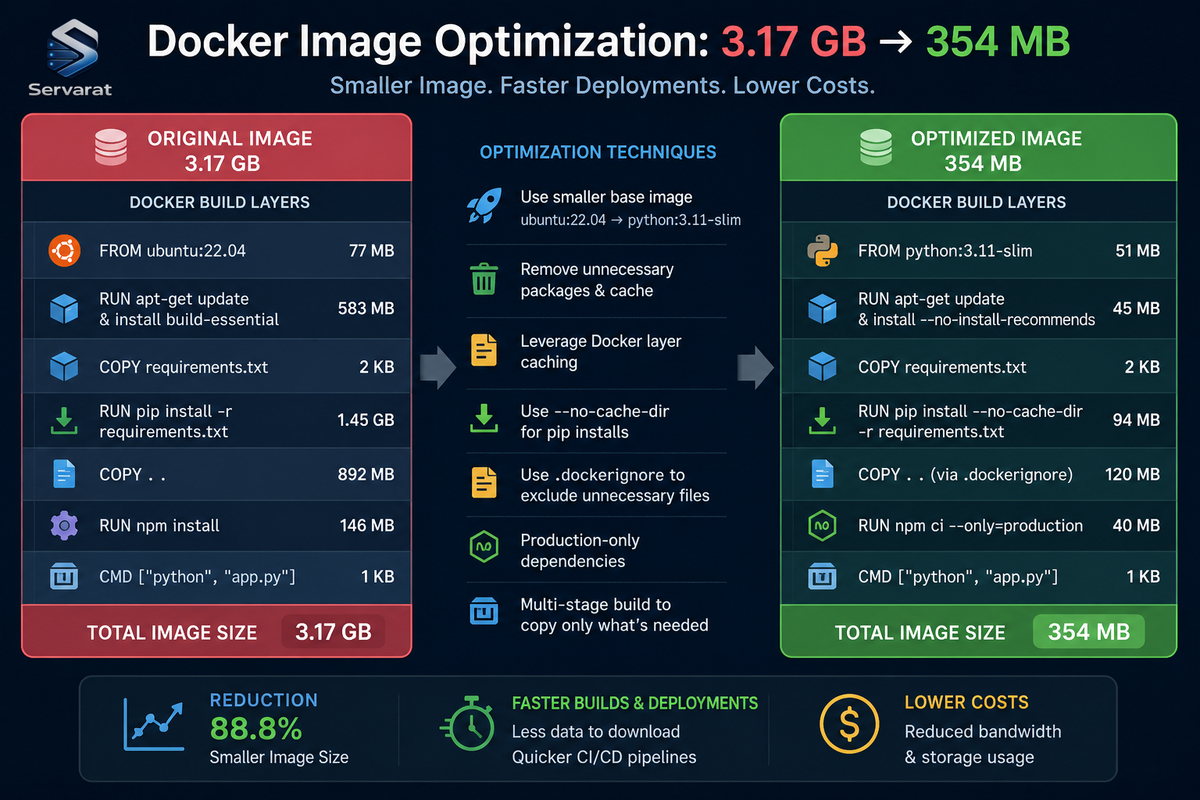
Results: 89% Reduction in Size
| What Improved | Before | After |
|---|---|---|
| Image Size | 3.17 GB | 354 MB (↓ 89%) |
| Build Time | 13 minutes | 3 minutes (↓ 75%) |
| Dependencies | Unused + duplicate packages | Minimal required |
| Dockerfile | Single-stage | Multi-stage |
| Build Context | Large | Optimized with .dockerignore |
Real-World Impact
Reduced build time: 13 minutes down to 3 minutes. On a CI/CD system running 50 retrains a day, that's hours saved per day.
Faster pulls: New EKS nodes pull images much faster. Cold starts go from minutes to seconds.
Registry storage costs: Every MB matters when you're storing dozens of pipeline image versions.
Cleaner production: Smaller attack surface, fewer dependencies to keep patched, faster garbage collection on nodes.
Key Lessons
⚠️ Only include what your pipeline actually needs at runtime. Image optimization is a collaborative effort. Data scientists know what the pipeline actually does. Developers know what the dependencies do. DevOps knows where the waste lives. You need all three perspectives.
Don't just remove packages based on a hunch. Use validation: change it, rebuild, run it, verify it still works. That's how you discover non-obvious dependencies like kfp-kubernetes.
Multi-stage builds aren't mandatory for pipelines, but they're genuinely useful. You pay a small Dockerfile complexity cost and get both smaller images and faster builds.
The .dockerignore file seems like overhead until you realize you've been shipping gigabytes of build artifacts every time you push.
Conclusion
By combining package auditing, multi-stage Docker builds, and .dockerignore optimization, I reduced the Kubeflow pipeline image from 3.17 GB to 354 MB—an 89% reduction. Build time dropped from 13 to 3 minutes.
The technique generalizes beyond Kubeflow. Any image that starts bloated usually gets that way through the same patterns: unused dependencies, build artifacts in the runtime image, and large build contexts. Find and fix those three things, and you fix most image obesity.