OWASP DockSec: AI-Powered Docker Security That Actually Makes Sense

The Problem DockSec Solves: Vulnerability Noise
You run Trivy on your container image. It reports 200+ CVEs. You stare at a list of vulnerability IDs, CVSS scores, and version numbers. Which ones actually matter for your application? Which can you ignore? Which are exploitable in your specific environment?
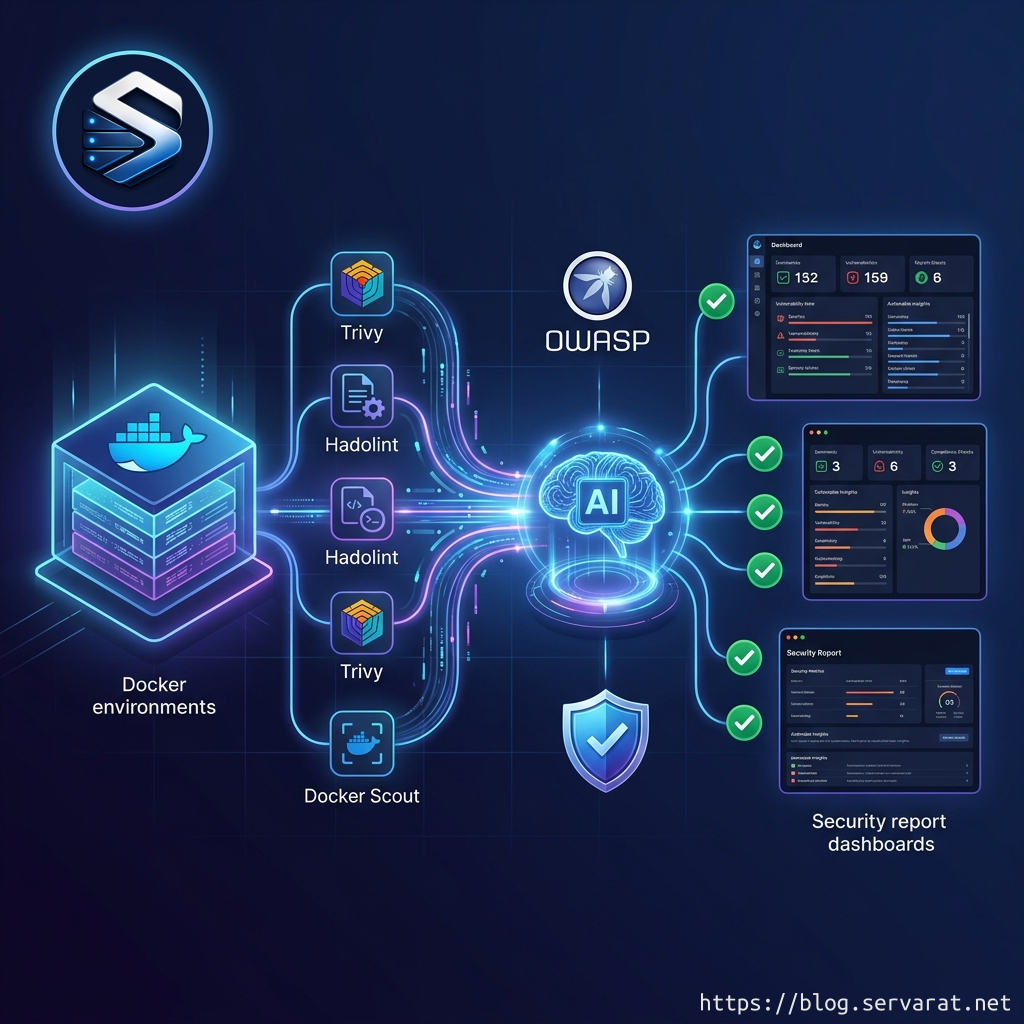
This is the gap DockSec fills. It runs your existing security scanners (Trivy, Hadolint, Docker Scout), then uses AI to:
- Prioritize what actually affects your setup
- Explain vulnerabilities in plain English, not jargon
- Suggest specific, line-by-line Dockerfile fixes
- Generate professional security reports for your team
Think of it as having a security expert sitting next to you reviewing your Dockerfiles in real time.
What DockSec Is
DockSec is an OWASP Incubator Project that bridges the gap between complex security scan results and actionable developer fixes. It integrates industry-standard scanners (Trivy, Hadolint, Docker Scout) with advanced AI to provide context-aware security analysis.
Officially OWASP-backed: DockSec is proud to be an OWASP Incubator Project, recognized by the Open Web Application Security Project for its contribution to application security.
Community adoption: Downloads are approaching 18,000, and pull requests stand at 90.
Lead developer: Advait Patel, with growing community contributions since OWASP recognition.
How It Works: Scan → Analyze → Report
Step 1: Local scanning
DockSec runs three industry-standard scanners on your machine:
- Trivy: Scans for known CVEs in base images and dependencies
- Hadolint: Checks Dockerfile best practices and security issues
- Docker Scout: Analyzes image structure and supply-chain risks
Step 2: AI correlation
Your scan results get sent to an AI (your choice of provider) that:
- Removes false positives and low-impact findings
- Prioritizes vulnerabilities by real-world exploitability
- Correlates findings across all three scanners
- Explains what each vulnerability means for your specific setup
Step 3: Actionable reports
You get a professional security report showing:
- Which vulnerabilities actually matter
- Why they matter (in plain English)
- Specific Dockerfile changes to fix them
- Interactive reports for your team
Key Features
Multi-LLM Support
Multiple LLM provider support (OpenAI, Anthropic Claude, Google Gemini, and Ollama (local models))
This means:
- Use OpenAI's GPT for best accuracy
- Use Anthropic Claude for privacy-focused deployments
- Use Google Gemini for Google Cloud environments
- Use Ollama for completely local, air-gapped scanning
Privacy by Default
All scanning happens locally. Only scan results (not your code) are sent to the AI provider when using AI features.
Your Dockerfile never leaves your machine. Only the aggregated security findings are sent to the LLM.
Fast Scan Mode (No AI Needed)
Need results without an API key? Run with --scan-only to get raw Trivy/Hadolint output immediately.
CI/CD Integration
Integrate DockSec into your GitHub Actions workflow with built-in actions, plus support planned for GitLab CI and Jenkins.
Installation & Usage
Install via pip:
pip install docksec
Scan a Dockerfile:
docksec Dockerfile
Scan Dockerfile + Docker image:
docksec Dockerfile -i myapp:latest
Scan image only:
docksec --image-only -i myapp:latest
Fast scan without AI (no API key needed):
docksec Dockerfile --scan-only
With specific LLM provider:
docksec Dockerfile --provider anthropic
# Set ANTHROPIC_API_KEY environment variable
Real-World Context: Why This Matters
The container security landscape has a gap. Traditional scanners (Trivy, Hadolint) do their job well—they find vulnerabilities. But they don't prioritize or explain. Security teams are left manually triaging hundreds of findings.
Container security as a discipline has been growing faster than the tooling available to most of the organizations that need it, and the OWASP adoption of DockSec is a signal that the community has identified the triage gap as a problem worth solving at the infrastructure level.
DockSec's approach is pragmatic: don't replace existing tools, complement them with AI-powered analysis that reduces noise and speeds up decision-making.
Why OWASP Recognition Matters
"OWASP recognition and adoption as an OWASP incubator project was a turning point," Patel explains. "Before that it was a personal project people found through GitHub. After OWASP, enterprise teams started taking it seriously because it now sits inside a trusted, vetted ecosystem."
For infrastructure teams, this means:
- Vetted by security experts
- Community trust (thousands of developers using OWASP tools)
- Enterprise-ready (organizations adopt OWASP projects with confidence)
- Long-term sustainability (backed by a global nonprofit)
- Vendor-neutral (OWASP ensures it stays open and community-first)
Roadmap: What's Coming
The project roadmap includes expanded detection coverage, additional compliance benchmark integrations, and deeper CI/CD platform support across the GitHub Actions, GitLab CI, and Jenkins ecosystems.
Expected soon:
- GitLab CI native integration
- Jenkins plugin
- Compliance framework mapping (CIS Docker Benchmark, PCI-DSS, etc.)
- Extended detection rules
For Infrastructure Engineers: Practical Use Cases
Container deployment pipeline: Add DockSec to your GitHub Actions to catch security issues before deployment:
- name: Run DockSec AI Scanner
  uses: OWASP/DockSec@main
  with:
    dockerfile: 'Dockerfile'
    openai_api_key: ${{ secrets.OPENAI_API_KEY }}
Base image hardening: Scan your base images regularly to catch new vulnerabilities:
docksec --image-only -i myorg/base-image:latest
Pre-deployment checks: Run DockSec locally before pushing images:
# Dev machine: comprehensive scan with AI
docksec Dockerfile -i myapp:dev

# Fast mode: quick validation
docksec Dockerfile --scan-only
Team reporting: Generate professional reports for security reviews and compliance audits.
Privacy & Security Considerations
Local first: All scanning happens on your machine. Your Dockerfile never touches external servers.
Configurable AI providers: Choose based on your data policies:
- OpenAI → Best accuracy, sends scan results to OpenAI
- Anthropic Claude → Privacy-focused, Anthropic has strong data handling policies
- Google Gemini → Google Cloud-native deployments
- Ollama → Completely local, no external calls at all
Vulnerability reports only: Only aggregated security findings are sent to the LLM, not your entire Dockerfile or application code.
Community & Contributing
DockSec is actively developed and welcomes contributions. For questions or discussions, please join the #project-docksec channel on OWASP Slack.
The project uses standard GitHub workflows: issues, pull requests, discussions. Security vulnerabilities should be reported via GitHub's private vulnerability reporting feature.
Comparison to Alternatives
Trivy alone: Fast vulnerability scanning, but leaves triage to you.
Hadolint alone: Good for linting Dockerfiles, but doesn't analyze image vulnerabilities.
Docker Scout: Commercial/proprietary, integrated into Docker Desktop.
DockSec: Combines all three, adds AI-powered triage and actionable recommendations, completely open source, OWASP-backed.
Getting Started Today
- Install:
pip install docksec - Set API key: Export
OPENAI_API_KEY(or your provider of choice) - Scan:
docksec Dockerfile -i your-image:latest - Review: Open the generated report and start fixing
For teams without API access, use --scan-only mode to get raw results immediately.
References
- DockSec GitHub: https://github.com/OWASP/DockSec
- OWASP DockSec Project: https://owasp.org/www-project-docksec/
- DockSec on PyPI: https://pypi.org/project/docksec/
- SecurityWeek: Open Source DockSec Uses AI to Cut Through Vulnerability Noise
- Cloud Native Now: OWASP Has Adopted DockSec and the Cloud Security Community Is Taking Notice