
KVM Virtualization: How Linux Becomes a Hypervisor

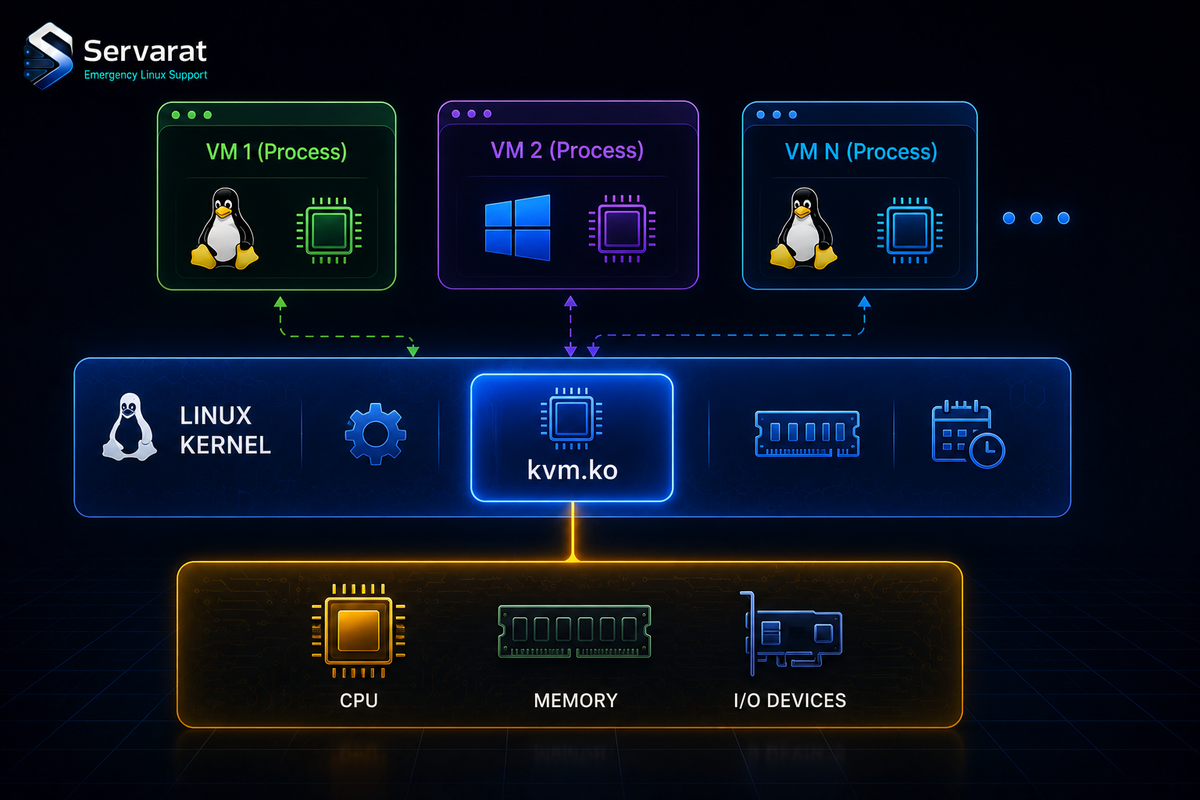
KVM is the virtualization layer underneath most of the Linux world you already touch — Proxmox, oVirt, OpenStack, and every "KVM VPS" you've ever rented all sit on it. It's built into the kernel, it's been production-grade for well over a decade, and understanding what it actually does (versus what QEMU and libvirt do on top of it) is the difference between debugging a VM problem and guessing at it. Here's the real architecture, the module layout, and the operational bits that matter.
What KVM Actually Is
KVM is a set of kernel modules that expose your CPU's hardware virtualization extensions to user space through /dev/kvm. That's it. It turns the Linux kernel into a hypervisor by letting a user-space process (almost always QEMU) run guest code directly on the CPU at near-native speed, with the kernel handling the privileged trap-and-emulate work.
⚠️ One thing the beginner guides get muddy: the Type-1 vs Type-2 label. You'll see KVM called "Type-1 (bare-metal)" and also "Type-2 (hosted)," and both camps have a point, which is why the distinction is mostly useless here. KVM runs inside a general-purpose Linux kernel (looks Type-2), but that kernel is the hypervisor talking straight to hardware with no host OS beneath it (looks Type-1). The honest answer: KVM makes the taxonomy break down, so don't anchor decisions on which label someone slapped on it. What matters is that guest vCPUs are scheduled as ordinary Linux processes/threads and get hardware-accelerated execution — that's the performance story, and the label isn't.
The Architecture, Layer by Layer
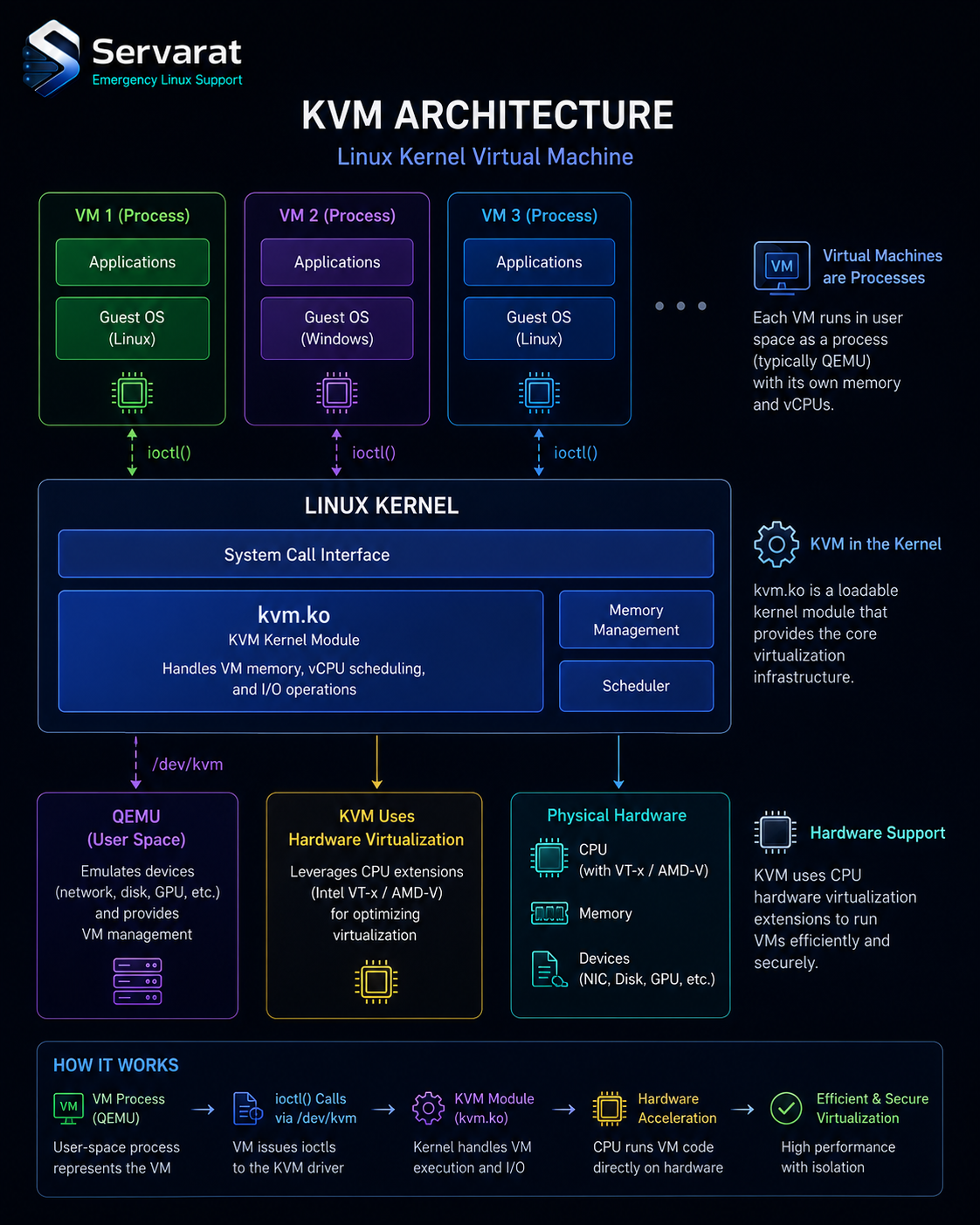
The stack people conflate as "KVM" is really three layers:
The kernel + KVM modules. The kernel already does scheduling, memory management, and isolation. KVM plugs in and lets VMs ride that machinery — a guest's vCPUs are threads, guest RAM is a normal memory mapping, so the CPU scheduler and OOM killer treat a VM like any other process. This is why top on a KVM host shows your QEMU processes eating CPU: that's literally what a running VM is.
Hardware extensions. KVM requires Intel VT-x or AMD-V. No extensions, no KVM — you fall back to pure emulation, which is orders of magnitude slower. Verify yours are present and enabled:
grep -Eoc '(vmx|svm)' /proc/cpuinfo
A non-zero count means the CPU supports it (vmx = Intel, svm = AMD). ⚠️ CPU support present in /proc/cpuinfo doesn't mean it's enabled — virtualization is frequently off in BIOS/UEFI by default. Confirm the module actually loaded:
lsmod | grep kvm
You want kvm plus kvm_intel or kvm_amd. If the arch-specific module is missing, it's almost always disabled in firmware. On a host you can also sanity-check with:
kvm-ok
(from the cpu-checker package on Debian/Ubuntu — it tells you plainly whether acceleration can be used.)
The modules themselves. kvm.ko is the arch-independent core; kvm-intel.ko or kvm-amd.ko is the vendor-specific half. They expose /dev/kvm, and QEMU opens that to get hardware acceleration. Without QEMU (or another VMM like Cloud Hypervisor / Firecracker), KVM does nothing on its own — it's an enabling layer, not a complete stack. That split is the thing beginners miss: KVM accelerates, QEMU emulates the machine, libvirt manages it. When a VM won't boot, knowing which of those three is responsible is half the fix.
Full Virtualization vs VirtIO
Full virtualization runs an unmodified guest — the guest thinks it's on real hardware, QEMU emulates the devices, KVM accelerates the CPU. Works with any OS, including Windows, no guest changes needed.
Paravirtualization via VirtIO is where the real performance lives, and it's not optional if you care about I/O. Emulating a real NIC or SATA controller means the guest driver talks to a fake device that QEMU painstakingly imitates — slow. VirtIO replaces those with paravirtual devices the guest knows are virtual, so guest and host cooperate instead of the host pretending to be a Realtek card.
⚠️ The practical rule: always use virtio for disk and network on Linux guests, and install the VirtIO driver ISO on Windows guests before you'll get usable disk/net performance. A VM on emulated e1000/SATA versus virtio-net/virtio-blk is a night-and-day throughput difference, and it's the single most common reason someone's self-built VM "feels slow." This is exactly the kind of thing Proxmox defaults to for you, and getting it wrong by hand is easy — one of several reasons I lean toward a management layer, more below.
Where KVM Fits (and What to Actually Run)
The use cases are the obvious ones — server consolidation, cloud/VPS backends, dev/test throwaway environments, snapshot-based DR, VDI. All real, all things KVM does well. The more useful question for someone running infrastructure is what you put on top of KVM, because raw qemu-system-x86_64 command lines are not how anyone sane runs this at scale:
- libvirt + virsh/virt-manager — the standard management layer.
virshfor scripting,virt-managerfor a GUI. Right for a handful of VMs on a single host. - Proxmox VE — KVM (plus LXC) with a web UI, clustering, live migration, storage integration, and backup built in. For anything past a couple of VMs or more than one host, this is where I'd point you, and it's what most of my own virtualization runs on. The Proxmox network config gotchas and Hetzner-on-Proxmox networking guide cover the parts that actually trip people up once you're there.
- OpenStack / oVirt — datacenter-scale orchestration. Overkill unless you're genuinely running a cloud.
⚠️ A snapshot caveat the source glosses over: KVM/qcow2 snapshots are not backups. A qcow2 internal snapshot lives in the same file as the disk — lose the file, lose both. And a running-state snapshot of a database VM can capture torn writes if you don't quiesce first. Snapshots are for "I'm about to do something risky, let me roll back in 5 minutes," not disaster recovery. For real DR you want proper backups (Proxmox Backup Server, or virsh-driven dumps to separate storage), which ties into the broader VM security and hardening picture — a snapshot on the same host protects you from nothing that takes the host down.
Live migration is the genuinely nice KVM capability worth knowing: with shared storage (or ZFS/Ceph replication) you can move a running VM between hosts with sub-second cutover, which is what makes rolling Proxmox kernel updates painless. That's a real operational win, not a marketing bullet — I leaned on it heavily during a Proxmox cluster upgrade.
Bottom Line
KVM is the acceleration layer, QEMU builds the virtual machine, libvirt or Proxmox manages the fleet — keep those three straight and most KVM confusion evaporates. Check that VT-x/AMD-V is actually enabled in firmware (not just present in /proc/cpuinfo), use VirtIO for disk and network or accept bad I/O, and don't mistake a snapshot for a backup. For one or two VMs, libvirt is fine; past that, run Proxmox and let it handle the VirtIO defaults, live migration, and backup integration you'd otherwise wire up by hand.



