
Cloudflare Tunnel Alternatives: Picking the Right One for Your Setup

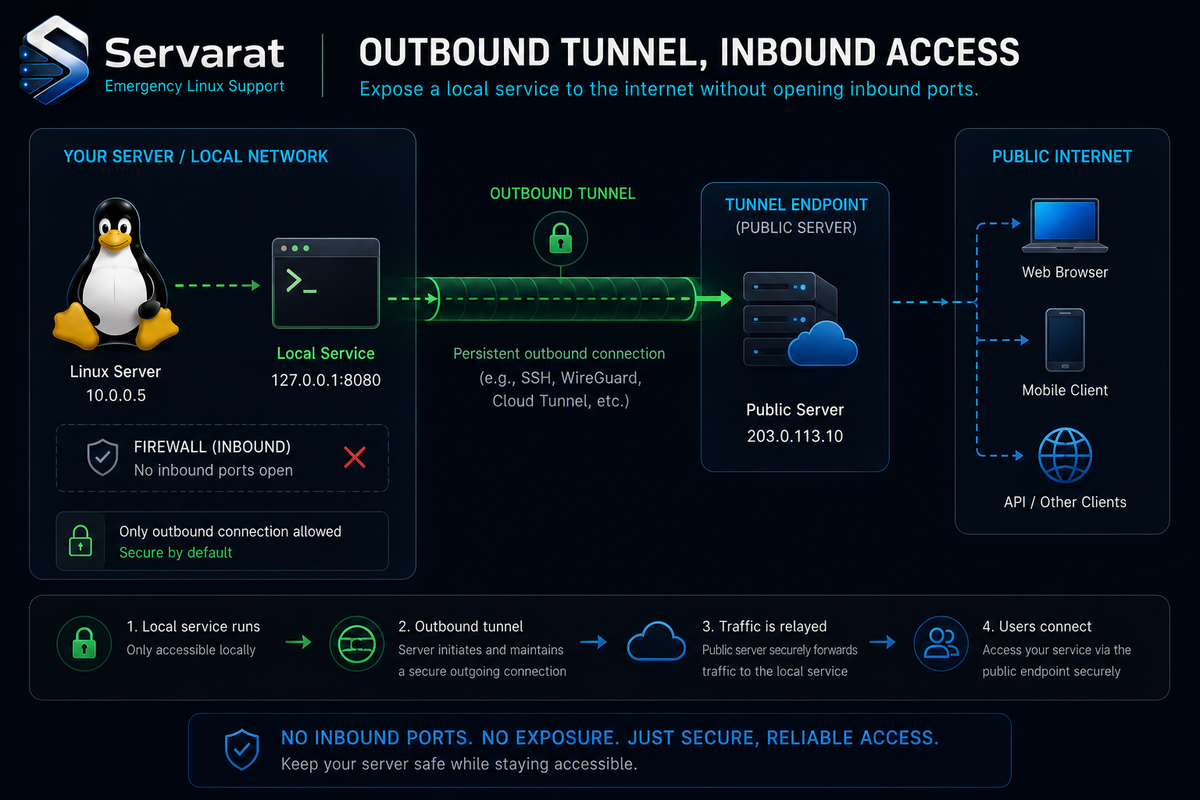
The appeal of a tunnel is that it flips the usual exposure model. Instead of poking a hole in your firewall and accepting inbound traffic, the tunnel client opens an outbound connection to a relay, and public requests come back down that pipe. No open ports on the origin, no inbound firewall rules, nothing for a port scanner to find on your box. Cloudflare Tunnel popularized this for a lot of people, and for good reason — it slots neatly into Cloudflare Access, DNS, and Zero Trust policies.
But "outbound-only" isn't unique to Cloudflare, and the convenience comes with a tradeoff worth naming up front: your traffic transits someone else's edge. For a public marketing site that's a non-issue. For an internal admin panel, a self-hosted password manager, or anything touching data you'd rather not route through a third party's network, it's a real architectural decision. That's the lens this comparison uses — not just "which makes a URL fastest," but who controls the relay, what protocols you get, and whether the thing can run entirely on infrastructure you own.
Here are five solid alternatives, what each is actually good at, and where each one bites.
1. LocalXpose — Best for Webhook and API Debugging
LocalXpose is a managed tunneling and reverse-proxy service aimed at developers who need a public endpoint now. It covers HTTP, HTTPS, TCP, TLS, and UDP, which is a broader protocol spread than a lot of HTTP-only tools.
Its real differentiator is traffic inspection: you can see incoming requests and replay them. If you've ever burned an afternoon trying to reproduce a webhook from a payment processor or a third-party integration, replay-on-demand is the feature that earns its keep. Custom domains and multiple tunnels from one config make it workable for microservice setups that need several public endpoints at once.
⚠️ The catch is the model: LocalXpose runs on managed relay infrastructure. You don't self-host the relay, so your traffic transits their network and you're trusting their uptime and their handling of what passes through. For webhook testing and sharing a dev environment, that's a fine trade. For exposing anything sensitive long-term, it's the thing to weigh.
Pricing: Free tier to start; paid plans add custom domains, higher limits, and production features.
2. Tailscale Funnel — Best If You Already Run Tailscale
Tailscale Funnel works differently from the rest because it's built on Tailscale's WireGuard-based mesh VPN. Funnel is the piece that lets you take a service already reachable inside your tailnet and expose it to the public internet.
The advantage is the security model. Tailscale builds encrypted device-to-device connections wherever it can, and you manage devices, ACLs, and network permissions from one control plane instead of bolting a tunnel tool onto a separate networking stack. If your team already lives in Tailscale for remote access, Funnel is the natural way to publish a service without adding new infrastructure.
⚠️ The cost is conceptual overhead. If you just want "give me a URL for localhost:3000," Funnel asks you to think about tailnets, nodes, and ACLs first. That's the right model for a team building secure networking, and the wrong one for a five-minute demo. Match it to whether you're building a network or just forwarding a port.
Pricing: Generous free tier for personal use and small teams; paid plans for org-level admin, security, and compliance.
3. Inlets — Best for Kubernetes and Cloud-Native
Inlets is for teams that want the outbound-tunnel convenience without handing the relay to a vendor. You run your own tunnel server — typically a small cloud VM — and connect services from your local machine or private network to it.
Because the relay is yours, you own the security posture, the availability, and the network config end to end. That matters for compliance-bound environments where "our traffic transits a third party" is a finding waiting to happen. Inlets leans cloud-native and works well with Kubernetes and containerized workloads, which is why it shows up in DevOps and platform-team stacks rather than quick-demo workflows.
⚠️ The tradeoff is operational: you provision and maintain a server. That's more work than a tool that hands you a URL out of the box, and the server is now yours to patch, monitor, and keep alive. You're trading convenience for control — a good deal if control is the requirement, overhead if it isn't.
Pricing: Commercial licensing plus the cost of running your own cloud server. You pay, but you own the whole path.
4. FRP (Fast Reverse Proxy) — Best Free Self-Hosted Workhorse
FRP is the open-source heavyweight of this list. Fully self-hosted, it exposes services behind NAT and firewalls through a relay you control, with support for TCP, UDP, HTTP, and HTTPS — so it handles plenty beyond web traffic.
Self-hosting both ends means full control over traffic, auth, and deployment, with no third-party relay in the path at all. It's highly configurable: routing, authentication, and network behavior all bend to your requirements. For a homelab or a self-hosting setup where you already run a cheap VPS as an entry node, FRP is frequently the answer.
⚠️ It asks more of you in networking knowledge than any managed option. Initial setup and ongoing maintenance are more involved, and a misconfigured frps exposed on a public VPS is its own risk — lock down the dashboard, set a strong token, and don't run it wide open. ⚠️ Standard hardening applies: put the FRP server behind a firewall that only allows the bind/control ports you actually use, enable TLS between client and server, and treat the entry-node VPS as part of your attack surface, because it is.
Pricing: Free and open source. Your only cost is the infrastructure for the relay server.
5. Tunnelmole — Best Lightweight Open-Source Option
Tunnelmole is the minimal, get-out-of-my-way option. Open source, lightweight, and built to hand you a public URL for a local app with almost no setup. For testing, demos, and sharing work in progress, it's quick and transparent — you can read the source, contribute, or self-host the components.
⚠️ Being lightweight is also the limit: it doesn't bring the advanced networking, security integrations, or infrastructure control of the heavier options. For local development that's exactly right; for anything with real security or scaling requirements, you'll outgrow it. It's a sharp tool for a narrow job, not a platform.
Pricing: Free and open source. Use the hosted service where available or self-host and pay only for your own infrastructure.
Worth Knowing: A Few This List Skips
The five above are a good spread, but a self-hosting audience will notice some obvious omissions. Briefly:
- Pangolin — a newer self-hosted tunneled-reverse-proxy with a built-in UI and identity/access controls, increasingly popular as a fully self-owned Cloudflare Tunnel replacement.
- rathole — a Rust reverse-tunnel in the FRP mold, valued for being fast and tiny; a good fit if FRP feels heavier than you need.
- Plain WireGuard — if you only need yourself (or your team) to reach a service, not the public, a direct WireGuard tunnel to a VPS with a reverse proxy in front is often simpler and more private than any of these, with no relay logic at all.
None of those is strictly better; they just cover gaps — particularly if your priority is owning the entire path with zero third-party relay.
How to Actually Choose
Strip away the feature lists and the decision usually comes down to one question: how much of the path do you need to own?
- You want a URL in thirty seconds for testing → Tunnelmole or LocalXpose. LocalXpose if you also want request inspection and replay for webhook work.
- You already run Tailscale and care about security → Tailscale Funnel. The mesh model and single control plane are the whole point.
- You're on Kubernetes / cloud-native and want a relay you control → Inlets.
- You want maximum control, zero third-party relay, and don't mind running infrastructure → FRP (or rathole if you want lighter, Pangolin if you want a UI and access controls).
- You only need private access, not public exposure → skip tunnels entirely and use WireGuard direct.
⚠️ One security point that applies to all of them: the moment you expose a self-hosted service publicly, the tunnel is no longer your only control. Put authentication in front of anything sensitive (the tunnel forwards traffic; it doesn't authenticate your users), keep the exposed service patched, and prefer the options that let you layer access control — Tailscale's ACLs, Cloudflare Access, Pangolin's identity layer — over a bare forwarded port. A tunnel hides your origin's IP and closes your inbound ports; it does not make an unauthenticated admin panel safe to put on the internet.
Bottom Line
Cloudflare Tunnel is still a strong default, especially if you're already in the Cloudflare ecosystem. But it's one option in a healthy field now, and the right pick depends entirely on your priorities. Want simplicity? Tunnelmole or LocalXpose. Want security-first networking? Tailscale Funnel. Want to own the infrastructure? Inlets or FRP. The honest filter is ownership of the path and the sensitivity of what you're exposing — decide those two things first, and the tool picks itself.



