
Centralized Logging with journald and rsyslog

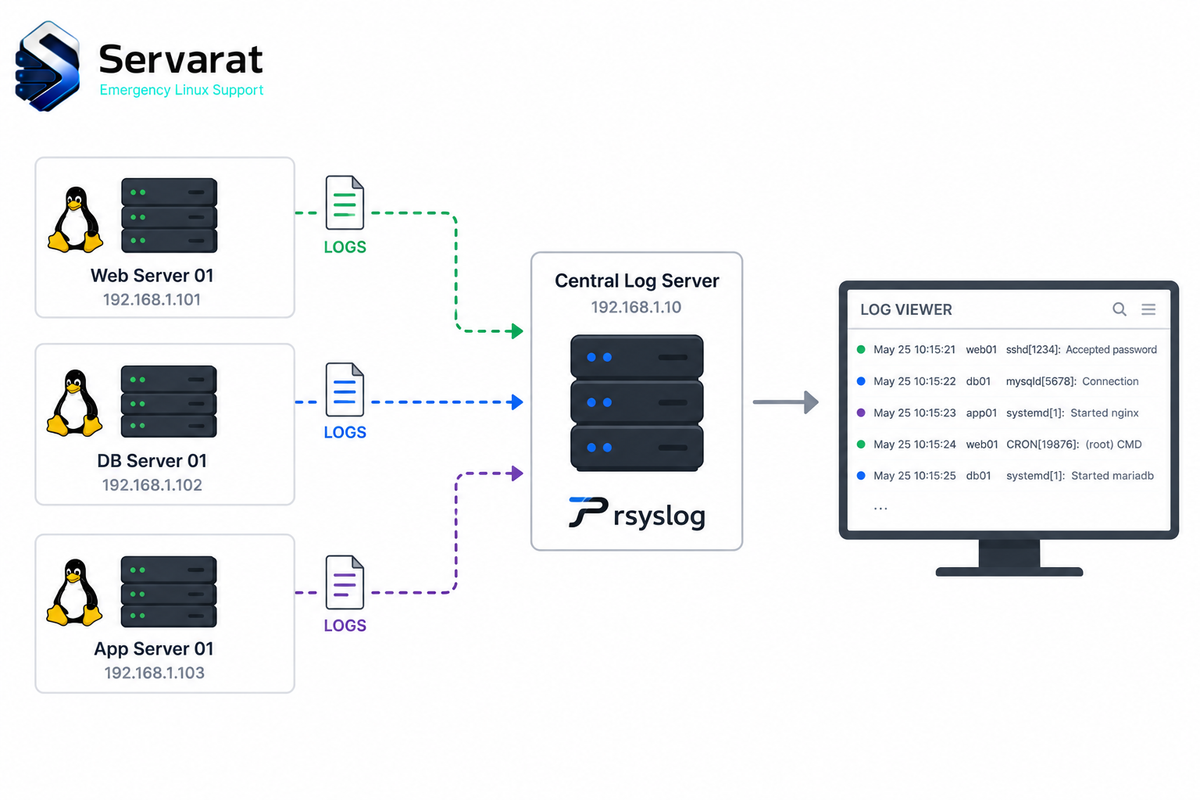
Logs that never leave the machine that made them are logs you lose exactly when you need them. A failed disk, an accidental rm, or an attacker with root, and the records you were about to review are gone. Past a handful of servers it's also just impractical: correlating an event across twenty boxes means running the same search twenty times.
Centralized logging fixes both. Each system keeps writing locally and ships a copy to a central server as events happen. This walks through building that with journald and rsyslog, plus the configuration details that decide whether the pipeline actually holds up: retention, rate limiting, per-host separation, and the TLS the tutorials tend to leave as a footnote.
For hardening the pipeline once it's running (making the logs tamper-resistant, detecting log silence, append-only attributes), see building tamper-resistant logging on Linux. This piece is the plumbing; that one is the armor.
The Division of Labor
Four pieces, clear roles:
| Component | Role |
|---|---|
journald |
Records log messages locally |
journalctl |
Reads and searches the local journal |
rsyslog |
Forwards local messages to the central server |
| Central rsyslog | Receives and stores logs from every client |
Prerequisites
One system as the central server, at least one client, root/sudo on both, rsyslog installed everywhere, network connectivity, and TCP 514 reachable on the server. Commands below use TCP because UDP syslog silently drops messages under load, and audit logs are the last thing you want dropping.
Step 1: Confirm Both Services Are Running
systemctl status systemd-journald
systemctl status rsyslog
Both should report Active: active (running). Inactive means not started; failed means it tried and errored. Fix either before going further.
Step 2: Make the Journal Persistent
By default on many systems the journal lives in memory and dies at reboot, which is a poor property for forensic evidence. Creating the directory switches journald to disk:
sudo mkdir -p /var/log/journal
sudo systemctl restart systemd-journald
Confirm:
journalctl --disk-usage
If it reports disk usage, you're persistent.
Step 3: Retention, and the Rate Limit Nobody Mentions
Retention lives in /etc/systemd/journald.conf. A reasonable production baseline:
[Journal]
Storage=persistent
Compress=yes
Seal=yes
SystemMaxUse=2G
RuntimeMaxUse=200M
MaxRetentionSec=30day
RateLimitIntervalSec=30s
RateLimitBurst=10000
SystemMaxUse caps disk, MaxRetentionSec ages logs out, Compress shrinks older files.
Seal=yes is worth understanding rather than copying blindly. It enables Forward Secure Sealing, which periodically signs the journal with a rotating key so tampering with past entries becomes detectable. ⚠️ It's detection, not prevention: an attacker with root can still delete or overwrite the journal, FSS just means you can prove it happened afterward. It also requires generating a sealing key with journalctl --setup-keys to be genuinely useful, and the verification key must be stored off the machine, otherwise the attacker who compromises the box gets the key that validates the seal. Seal without off-host key storage is theater.
⚠️ The rate limit is the gotcha that bites people and the source guides never mention. journald rate-limits by default (roughly 10,000 messages per 30 seconds per service on many distros), and when a service exceeds it, journald silently drops messages and logs a "Suppressed N messages" note. During exactly the kind of event you care about, a brute-force flood, an application error storm, an attack in progress, your log volume spikes and journald starts discarding the evidence. Raise RateLimitBurst on hosts that legitimately generate high volume, or set RateLimitIntervalSec=0 to disable rate limiting entirely on a dedicated logging-sensitive box. Just size your storage accordingly, since removing the limit removes the thing protecting your disk.
Apply:
sudo systemctl restart systemd-journald
Step 4: Hand journald's Messages to rsyslog
journald has the logs; rsyslog needs them. In /etc/systemd/journald.conf:
ForwardToSyslog=yes
⚠️ Many distributions already pipe journald into rsyslog via the imjournal input module, in which case enabling ForwardToSyslog=yes gives you every message twice. Check what rsyslog is already loading before flipping this:
grep -rE 'imjournal|imuxsock' /etc/rsyslog.conf /etc/rsyslog.d/ 2>/dev/null
If imjournal is loaded, leave ForwardToSyslog alone. Duplicate entries aren't just noise, they skew any rate-based alerting you build on top and waste storage at scale.
sudo systemctl restart systemd-journald && sudo systemctl restart rsyslog
Step 5: The Central Server
Enable the TCP listener in /etc/rsyslog.conf:
module(load="imtcp")
input(type="imtcp" port="514")
Validate the config before restarting, because a syntax error takes rsyslog down and then you have no logging at all:
sudo rsyslogd -N1
Open the port. Ubuntu/Debian:
sudo ufw allow from 192.168.1.0/24 to any port 514 proto tcp
RHEL-family:
sudo firewall-cmd --permanent --add-rich-rule='rule family="ipv4" source address="192.168.1.0/24" port port="514" protocol="tcp" accept'
sudo firewall-cmd --reload
⚠️ Note I scoped both rules to a source subnet rather than the ufw allow 514/tcp you'll see in most guides. An open 514 accepts syslog from anyone who can route to it, which means anyone can flood your log server with garbage, fill its disk, and bury real events under noise. Restrict to the networks your clients actually live on. And never expose an unencrypted 514 to the internet, use a private network, a VPN/WireGuard tunnel, or TLS.
sudo systemctl restart rsyslog
sudo ss -lntp | grep ':514'
Separate incoming logs by host
By default, remote messages land in the same file as local ones, which gets unusable fast. Give each host its own tree. In /etc/rsyslog.d/10-remote.conf:
template(name="RemoteHost" type="string" string="/var/log/remote/%HOSTNAME%/%PROGRAMNAME%.log")

ruleset(name="remoteRuleset") {
    action(type="omfile" dynaFile="RemoteHost")
    stop
}

module(load="imtcp")
input(type="imtcp" port="514" ruleset="remoteRuleset")
The stop matters: without it, remote messages also flow into the default local rules and you get them twice.
⚠️ Then rotate them, or the central server fills up. Create /etc/logrotate.d/remote:
/var/log/remote/*/*.log {
    weekly
    rotate 12
    compress
    missingok
    notifempty
    sharedscripts
    postrotate
        /usr/bin/systemctl kill -s HUP rsyslog.service >/dev/null 2>&1 || true
    endscript
}
A central log server that stops accepting logs because its disk filled is worse than no central log server, because you think you have coverage.
Step 6: Client Forwarding
Add to the client's rsyslog config:
*.* @@192.168.1.100:514
*.* forwards every facility and priority. @@ is TCP, single @ is UDP. Use TCP.
⚠️ Plain TCP still drops messages if the server is unreachable, because rsyslog's default in-memory queue is small and discards on overflow. For anything you care about, add a disk-assisted queue so logs survive a server outage or network blip instead of evaporating:
action(type="omfwd" target="192.168.1.100" port="514" protocol="tcp" queue.type="linkedlist" queue.filename="fwdqueue" queue.maxdiskspace="1g" queue.saveonshutdown="on" action.resumeRetryCount="-1")
That spools to disk when the target is down, retries forever, and survives a restart. It's the difference between "we forward logs" and "we don't lose logs."
sudo systemctl restart rsyslog
Step 7: Verify
Don't wait for a real event:
logger "centralized logging test"
Local:
journalctl -n 10 | grep "centralized logging test"
Central server:
sudo grep -R "centralized logging test" /var/log/remote/ /var/log/syslog /var/log/messages 2>/dev/null
If it's in the local journal but not on the server, the break is downstream of journald. If it's in neither, start at journald.
Step 8: Secure It Properly
The central server holds logs from everything, which makes it a high-value target and a single point of both failure and compromise. Treat it accordingly.
⚠️ TLS is not optional past a private trusted segment. Unencrypted syslog on the wire means anyone on-path can read your logs (they contain usernames, IPs, sometimes secrets that shouldn't be logged but are) and, worse, inject forged entries. An attacker who can spoof syslog can write a fake narrative into your evidence. TLS with mutual cert auth solves both. ⚠️ Get the CA right on both ends before you deploy, if client and server don't chain to the same CA the connection simply won't establish, and the failure mode is silent log loss rather than a loud error.
The rest of the hardening:
- Restrict access to the server and its log files. Fewer people who can modify them means more trust during an investigation.
- Immutable storage for compliance or forensic use, so written logs can't be altered without evidence.
- Separate the logging network from application traffic, both to reduce exposure and to keep log volume off production paths.
- Back up the log server and test restores. A backup you've never restored is a backup on paper.
⚠️ And keep NTP synchronized everywhere. Nothing wastes investigation time like correlating events across servers whose clocks disagree, and a skewed timeline can make an attack sequence look like unrelated noise. This matters most in exactly the scenario centralized logging exists for, the multi-host correlation I walked through in catching a Linux compromise early, where the whole detection depends on events lining up in the right order.
Troubleshooting
- Journal gone after reboot:
/var/log/journalmissing, orStorage=isn't persistent. - Logs never arrive: forwarding rule, then rsyslog running, then firewall. In that order.
- Missing entries: check the local journal first. Present locally but absent centrally means the break is after journald. Absent in both, suspect journald rate limiting (see Step 3).
- Duplicates: overlapping rules, or
ForwardToSyslog=yesalongsideimjournal. - Wrong timestamps: NTP.
- Collection stops: full disk on either end. Check retention and rotation before it happens, not after.
Best Practices
- Persistent journald storage on every host.
- Forward from every system, not just the ones you consider critical. The compromised box is rarely the one you expected.
- TLS for remote forwarding anywhere outside a trusted segment.
- Disk-assisted queues so a server outage doesn't cost you logs.
- Restrict access to the log server and its files.
- Monitor disk on clients and server.
- Rotate before storage becomes a problem.
- NTP everywhere.
- Test forwarding after every config change.
Bottom Line
The pipeline itself is straightforward: journald records, ForwardToSyslog or imjournal hands off to rsyslog, @@ ships it over TCP, the server writes it per-host. The parts that decide whether it's real are the ones tutorials skim: journald's rate limit silently dropping the flood you most need to see, duplicate ingestion from doubled-up inputs, an unscoped firewall rule inviting garbage, a memory queue that discards logs the moment the server hiccups, and unencrypted 514 letting anyone forge entries into your evidence. Get those right and you've got a log server you can actually trust when something goes wrong.



