
Catching a Linux Compromise Early: Behavioral Detection and auditd

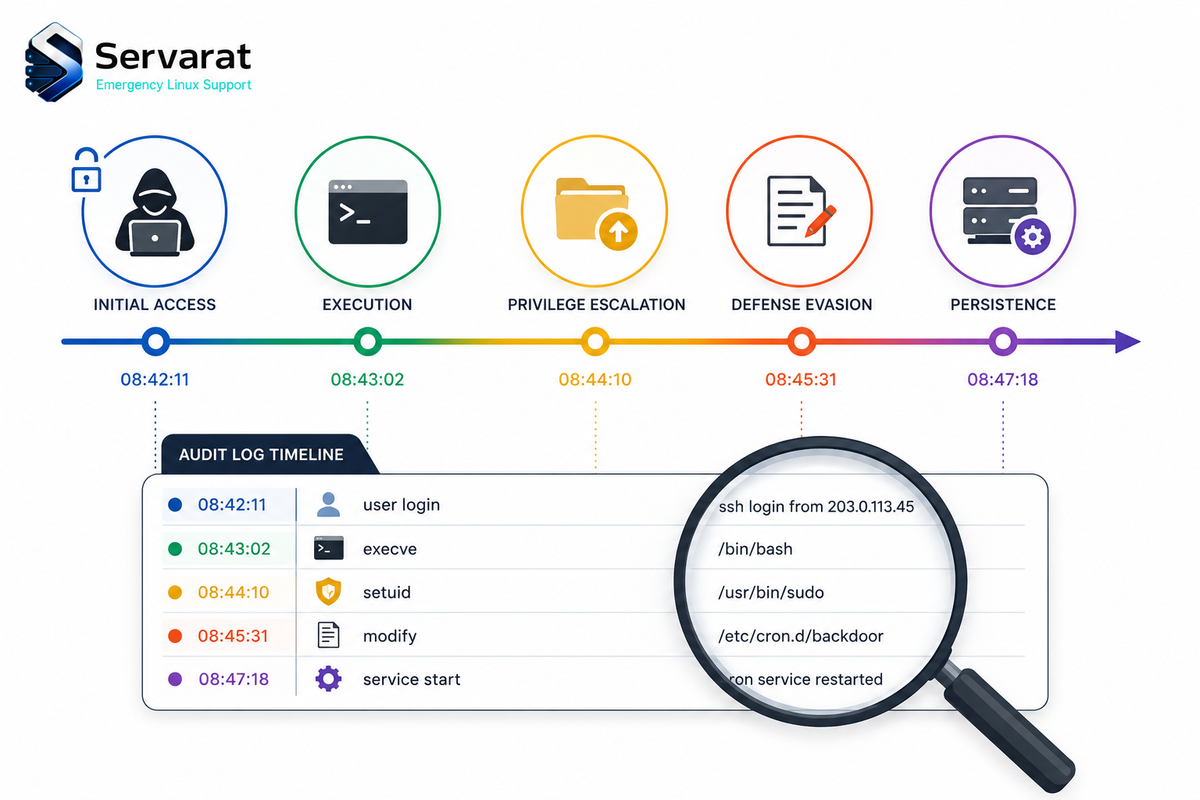
There's a gap between what Linux logs by default and what you need to actually detect a compromise. Most environments have logging switched on, which feels like coverage right up until you're pulling logs after an incident and finding fragments: a login here, a process there, no narrative of how access was gained, what ran, or how far the attacker moved. You end up reconstructing a timeline instead of reading one.
That gap is why dwell time on Linux averages over 10 days before detection. Attackers who understand what Linux logs by default, and what it doesn't, operate comfortably inside that window. This covers what to actually monitor, how to close the critical gaps with auditd, the behavioral indicators at each attack phase, and where default logging leaves you blind.
Why Default Logging Isn't Enough
Linux generates plenty of log data. It just doesn't generate the right data for security. /var/log/auth.log records authentication but not what happened after auth succeeded. /var/log/syslog captures service events but not process behavior. Application logs are application-specific and rarely cross-reference system activity.
The result: you can often confirm a login happened from an unusual IP. What you can't confirm from default logs is what commands ran, what files were touched, whether privilege escalation was attempted, or whether a cron job was modified.
The in-memory problem
The starkest example is a kernel exploit that never touches disk. Take Copy Fail (CVE-2026-31431), the page-cache privilege escalation affecting virtually every mainstream kernel since 2017 and now in CISA's KEV catalog. It operates entirely in memory. No files written, no filesystem changes. The only log entry a compromised box might produce is routine kernel noise:
kernel: [142.341205] [Firmware Bug]: TSC frequency mismatch detected
That's it. Logging is active, monitoring is running, and the attacker has root. Standard log analysis finds nothing because there's nothing standard log analysis is looking for. This is exactly why behavioral detection matters: monitor what processes do, not what files they create. Log the syscall transitions, the process ancestry, the timing, because the file artifacts won't be there. The same holds for the whole page-cache LPE family, DirtyClone and pedit COW included, none of which leave a file trail to grep for.
Phase 1: Initial Access
SSH anomalies
Start here, because SSH is the initial vector in most Linux server compromises. /var/log/auth.log is your primary source.
grep "Accepted" /var/log/auth.log
grep -E "Failed|Accepted" /var/log/auth.log | grep -v "invalid user" | awk '{print $1,$2,$3,$9,$11}' | sort
grep "Accepted" /var/log/auth.log | awk '{print $9, $11}' | sort | uniq -c | sort -rn
Three patterns that warrant immediate investigation: successful auth from a location the account has never used; successful password auth on an account that has only ever used keys; and a service account, normally never interactive, showing an SSH session.
The second is the sharp one. If an account's authorized_keys has valid entries but someone logs in with a password, either the credentials were compromised separately or the auth config changed under you. This is the flip side of the key-hygiene work in finding unauthorized SSH keys before attackers do, watch the keys and watch how people authenticate against them.
Web application exploitation
Web server logs are often the first sign of access via a vulnerable app:
grep -E "eval|base64|wget|curl|bash|/etc/passwd|/proc/self" /var/log/nginx/access.log
grep -E "\.php\?cmd=|exec\(|system\(" /var/log/apache2/access.log
ps aux | grep -E "www-data|nginx|apache" | grep -v "grep"
A web server process spawning bash, curl, or wget is not normal. A web app process making outbound connections to non-whitelisted destinations is a strong exploitation signal.
Phase 2: Post-Exploitation Enumeration
An attacker landing with a low-priv shell starts enumerating immediately. LinPEAS automates this in under 60 seconds, scanning SUID binaries, sudo config, writable cron jobs, kernel version against known CVEs, credentials in config files, and dozens more vectors. The behavioral fingerprint is distinctive.
auditd rule for high-frequency find:
auditctl -a always,exit -F arch=b64 -S execve -F exe=/usr/bin/find -k enum_find
After a few minutes:
ausearch -k enum_find --start recent | awk '{print $NF}' | sort | uniq -c | sort -rn
Baseline on a normal system is fewer than 5 find executions per non-root process in any 30-second window. A spike to 100+ is anomalous by definition, and because LinPEAS is one script rather than a human, the timing compression (dozens of find calls from the same PID within seconds) is exactly what makes it detectable.
Sensitive-file read watches:
auditctl -w /etc/sudoers -p r -k sudoers_read
auditctl -w /etc/passwd -p r -k passwd_read
auditctl -w /etc/shadow -p r -k shadow_read
auditctl -w /etc/crontab -p r -k crontab_read
The correlation is the tell: the same PID reading all of these within a short window is automated enumeration.
ausearch -k sudoers_read -k passwd_read -k shadow_read --start recent
Phase 3: Privilege Escalation
setuid transitions
When an attacker exploits a SUID binary, the process transitions from the user's UID to root's. The setuid syscall is the mechanism:
auditctl -a always,exit -F arch=b64 -S setuid -S setgid -k priv_escalation
auditctl -a always,exit -F arch=b64 -S setreuid -S setregid -k priv_escalation
ausearch -k priv_escalation --start recent
UID transitions are expected from sudo, su, passwd. Unexpected processes doing them, web app processes, backup agents, anything that doesn't normally touch privilege boundaries, are worth chasing.
sudo monitoring
auditctl -a always,exit -F arch=b64 -S execve -F path=/usr/bin/sudo -k sudo_exec
ausearch -k sudo_exec --start recent | grep -E "bash|sh -i|/bin/sh"
apache2 → sudo → bash as a parent-child chain isn't a sysadmin running a command. It's a kill chain.
sudoers and authorized_keys writes
auditctl -w /etc/sudoers -p wa -k sudoers_change
auditctl -w /etc/sudoers.d/ -p wa -k sudoers_change
auditctl -w /root/.ssh/authorized_keys -p wa -k ssh_persistence
auditctl -w /home -p wa -k ssh_persistence
Any write to an authorized_keys file outside a config-management run (Ansible, Puppet) warrants immediate investigation. Key injection is clean persistence, no binary on disk, no process running, and it's invisible without exactly this monitoring.
Phase 4: Persistence
Cron
auditctl -w /etc/cron.d/ -p wa -k cron_change
auditctl -w /etc/crontab -p wa -k cron_change
auditctl -w /var/spool/cron/ -p wa -k cron_change
auditctl -w /opt/backup/backup.sh -p wa -k cron_script_change
Cron changes outside patch windows or change management are suspicious, and an entry that suddenly runs a script in /tmp, /dev/shm, or any user-writable directory is an immediate indicator. This is the detection side of the persistence techniques I broke down in cron job abuse and Linux persistence, watch the cron directories and the scripts they call, not just the crontab.
SUID bit changes
inotifywait -m -r -e attrib /usr/bin /usr/local/bin /usr/sbin 2>/dev/null | grep --line-buffered "ATTRIB" | while read line; do echo "[ALERT] Attribute change: $line" | logger -t suid_monitor; done
New SUID binaries outside package-manager operations are always worth examining, whether a developer left one from testing or an attacker set it as persistence.
systemd services
auditctl -w /etc/systemd/system/ -p wa -k systemd_change
auditctl -w /lib/systemd/system/ -p wa -k systemd_change
find /etc/systemd/system /lib/systemd/system -newer /var/log/syslog -name "*.service" 2>/dev/null
Persistence via new systemd units is a documented TTP across multiple ransomware groups. New .service files created after a system's build date deserve scrutiny.
Phase 5: Lateral Movement
Outbound SSH (pivot indicator)
A Linux box making high-volume outbound SSH to non-private IPs is a strong signal it's compromised and being used as a scanning relay:
auditctl -a always,exit -F arch=b64 -S connect -k outbound_connect
ss -tnp | grep ESTABLISHED | grep -v "127.0.0.1\|10\.\|192\.168\.\|172\."
netstat -tn | grep ":22" | awk '{print $5}' | cut -d: -f1 | sort | uniq -c | sort -rn
A single sshd process connecting to dozens of unique external IPs is the compromised-host-scanning-for-victims pattern.
/proc for covert channels
ss -tlnp
cat /proc/net/tcp | awk '$4 == "0A" {print $2, $3}'
cat /proc/net/tcp6 | awk '$4 == "0A" {print $2, $3}'
A covert C2 channel hiding as a legitimate service shows up in /proc/net/tcp even if a rootkitted netstat is installed. Cross-referencing the two is a quick sanity check, and it ties directly into the deeper problem of kernel module rootkits laundering what your tools see, where /proc is more trustworthy than userspace binaries but still not immune to a sophisticated LKM.
What to Alert On First
Treat every auditd event as equal and you'll train analysts to ignore alerts faster than you'd think. A working strategy explicitly decides which signals wake someone up and which go to a dashboard nobody checks.
Critical, extremely low false-positive:
www-data/nginx/apache2spawningbashorsh(web app exploitation, almost never legitimate)- New
authorized_keysentry outside a change-management window (clean, durable SSH persistence) - setuid event on a non-standard binary
- Root cron job script modified
- auditd service stopped or rules cleared (active defense evasion, respond now)
High, needs context:
- New sudoers entry (could be legit admin change)
- 50+
findcalls from same PID in 30s (automated enum, or a package manager) - Service account with an interactive SSH session
- New systemd service (or a legit software install)
- Outbound connection to non-private IP from sshd (or legit backup/monitoring)
Medium, baseline first:
- sudo at unusual hours
- New cron entry for an existing user
- Read of
/etc/shadowby a non-root process
Build a Baseline Before You Alert
Deploy rules without knowing normal and you'll spend the first month tuning out false positives until the team stops reading alerts, which is worse than no rules. A dev server, a CI runner, and a production web server have completely different profiles. sudo running 200 times a day is normal on an Ansible control node and alarming on a web server. find executing constantly is expected from a package manager mid-update and not from a user account at 3am.
Collect two weeks of baseline before enabling high-severity alerts:
ausearch -k sudo_exec --start today | wc -l
ausearch -k priv_escalation --start today | wc -l
ausearch -k cron_change --start today | wc -l
ausearch -k ssh_persistence --start today | wc -l
What you're building is a sense of routine for that specific host. A production web server that has never modified authorized_keys in six months deserves an alert the moment it does. A config-management server that updates keys daily does not. Same event, opposite meaning depending on context. Alerts on deviations from baseline catch anomalies; alerts on raw event volume catch noise.
Correlation: Why Single Events Mislead
Individual events are weak signals. Sequence is what matters. A sudo invocation, an outbound SSH connection, a find command, each is probably fine alone. The picture changes completely when all three fire from the same account within five minutes, in order:
09:14  SSH login from new source IP
09:15  High-frequency find executions from same PID
09:16  Reads on /etc/sudoers and /etc/shadow
09:18  setuid transition on non-standard process
09:19  Write to /root/.ssh/authorized_keys
None of those alone is a confirmed compromise. Together they map cleanly to Initial Access → Enumeration → Privilege Escalation → Persistence, LinPEAS followed by an escalation attempt and an SSH backdoor. It only becomes obvious when you correlate, not when you review one line at a time. Build SIEM rules around timing windows and process ancestry: a routine event becomes high-confidence when correlated with two others in a short window from the same PID or user.
High-Value SIEM Correlation Rules
Rule 1, web server spawning shell:
IF process.parent.name IN ["apache2","nginx","httpd","php-fpm"]
AND process.name IN ["bash","sh","dash","python","perl","ruby"]
THEN ALERT: Critical, Web Application Exploitation
Rule 2, new device + authorized_keys change:
IF ssh_login.new_source_ip = TRUE
AND authorized_keys.write_event WITHIN 30 minutes
THEN ALERT: High, Possible Compromise with SSH Persistence
Rule 3, privilege escalation chain:
IF setuid_event.user != root
AND file_write_event.path IN ["/etc/sudoers","/root/.ssh/authorized_keys"]
AND process.name = "bash" WITHIN 10 minutes
THEN ALERT: Critical, Active Privilege Escalation Chain
Rule 4, automated enumeration:
IF process.syscall = "execve"
AND process.name = "find"
AND count(events) > 50 WITHIN 30 seconds
AND process.user != root
AND process.parent.name NOT IN ["apt","dpkg","ansible"]
THEN ALERT: High, Automated Enumeration Pattern
Rule 5, outbound scanning:
IF network.direction = outbound
AND network.dest_port = 22
AND count(unique_dest_ips) > 20 WITHIN 60 seconds
AND process.name IN ["sshd","ssh"]
THEN ALERT: Critical, Host Used as SSH Scanning Relay
A Practical Detection Stack
You don't need a SIEM to start. Priority order:
1. auditd, the foundation. Persistent rules in /etc/audit/rules.d/security.rules:
-a always,exit -F arch=b64 -S execve -F path=/usr/bin/sudo -k sudo_exec
-a always,exit -F arch=b64 -S setuid -S setgid -k priv_escalation
-w /etc/sudoers -p wa -k sudoers_change
-w /root/.ssh/authorized_keys -p wa -k ssh_persistence
-w /etc/crontab -p wa -k cron_change
-w /etc/systemd/system/ -p wa -k systemd_change
2. aureport for daily review:
aureport --auth --summary
aureport --syscall --summary
aureport --file --summary
3. Process-tree correlation. When an alert fires, the first question is the parent process. /proc/<pid>/status and ps --forest tell you within seconds whether sudo was a legit admin session or a web server process that has no business running a shell.
4. Forward logs off the host. ⚠️ This is the one that saves the investigation. Logs stored only locally can be modified or deleted by an attacker with root. Forward to remote syslog or centralized logging the moment events are generated, or your forensic evidence is one truncate away from gone.
What Detection Won't Catch
Every strategy has a ceiling, and knowing yours is as important as building it.
⚠️ auditd can be disabled. Root can stop the service, flush rules, or edit /etc/audit/audit.rules. If detection depends entirely on local auditd and the attacker hits root before you get an alert, the evidence trail is gone. Mitigation: ship logs to an immutable remote destination in real time, and alert immediately if auditd stops on any monitored host.
⚠️ Local logs can be wiped. Root can truncate auth.log, clear bash history, wipe wtmp and lastlog. Anyone who understands Linux forensics will. Remote forwarding is the only defense.
⚠️ Rootkits hide activity. LKM rootkits intercept syscalls and hide processes, files, and connections, so ps, ls, netstat, top can all return clean results on a compromised host. /proc is more reliable than userspace tools but sophisticated rootkits can intercept procfs reads too. Runtime kernel-integrity monitoring (eBPF sensors, AIDE for file integrity) catches what standard logging misses, which is the whole argument for locking the kernel down rather than trying to detect the rootkit.
⚠️ Containers and cloud complicate the model. Host auditd may not capture in-container activity depending on namespace config. Cloud instances have extra logging layers (CloudTrail, Cloud Audit Logs) that auditd doesn't. Container runtime tools (Falco, Sysdig) monitor syscall behavior at a layer that survives restarts and doesn't depend on config inside the container.
⚠️ In-memory attacks leave no file artifacts. Copy Fail demonstrated this at scale: kernel LPE with no file changes and no new processes beyond the exploiting binary. Behavioral detection at the syscall level (setuid transitions, unexpected privilege changes) beats file-based detection for this entire class.
After Detection: Immediate Response
⚠️ Detection is only useful if it triggers response before the attacker finishes. And the order matters, capture volatile state before you start killing things or isolating, because a reboot or a hasty kill destroys memory-resident evidence you can't get back. This mirrors the forensic discipline in why Linux servers get compromised, and how to remediate.
Preserve first:
ps auxf > /tmp/process_snapshot_$(date +%s).txt
ss -tnp > /tmp/network_snapshot_$(date +%s).txt
lsmod > /tmp/modules_$(date +%s).txt
ausearch --start today > /tmp/audit_today.txt
⚠️ Then contain. This one is a firewall-lockout risk, it drops all outbound traffic, so make sure your management channel is explicitly allowed before you run it or you'll cut yourself off from the box:
iptables -I OUTPUT -j DROP
iptables -I OUTPUT -d <management_ip>/32 -j ACCEPT
Kill identified sessions (after snapshotting):
who -a
pkill -9 -t pts/1
Credential rotation, in priority order: root password and all sudo users immediately; every SSH key that existed on the box at compromise time (assume all burned); service-account passwords for anything running on the host; application/database credentials stored in on-host config files.
Verify persistence is gone before declaring clean:
crontab -l -u root; crontab -l
ls -la /etc/cron.d/ /etc/cron.hourly/ /etc/cron.daily/
find /root /home -name ".bashrc" -o -name ".bash_profile" | xargs grep -l "curl\|wget\|bash\|nc\|ncat"
cat /root/.ssh/authorized_keys
find /tmp /dev/shm -type f 2>/dev/null
⚠️ A system is not clean until every persistence mechanism is verified, not just the one that fired the alert. Attackers routinely plant several. And for a root-level or kernel compromise, the honest call is usually rebuild over clean, assume every secret on the box is burned and restore from known-good rather than trusting you found everything.
Bottom Line
Detection on Linux isn't about collecting the most data, it's about the right data, at the right granularity, in a place the attacker can't erase. The gaps in default logging are predictable and closable: layer auditd over the critical syscalls and files, baseline each host before alerting, correlate on sequence and process ancestry rather than single events, and forward everything off-box in real time. The unpredictable part is whether those rules are in place before the compromise, so put them in now, start with the ten highest-confidence signals, and expand from there.



