
Building a Secure GitOps Pipeline for Kubernetes

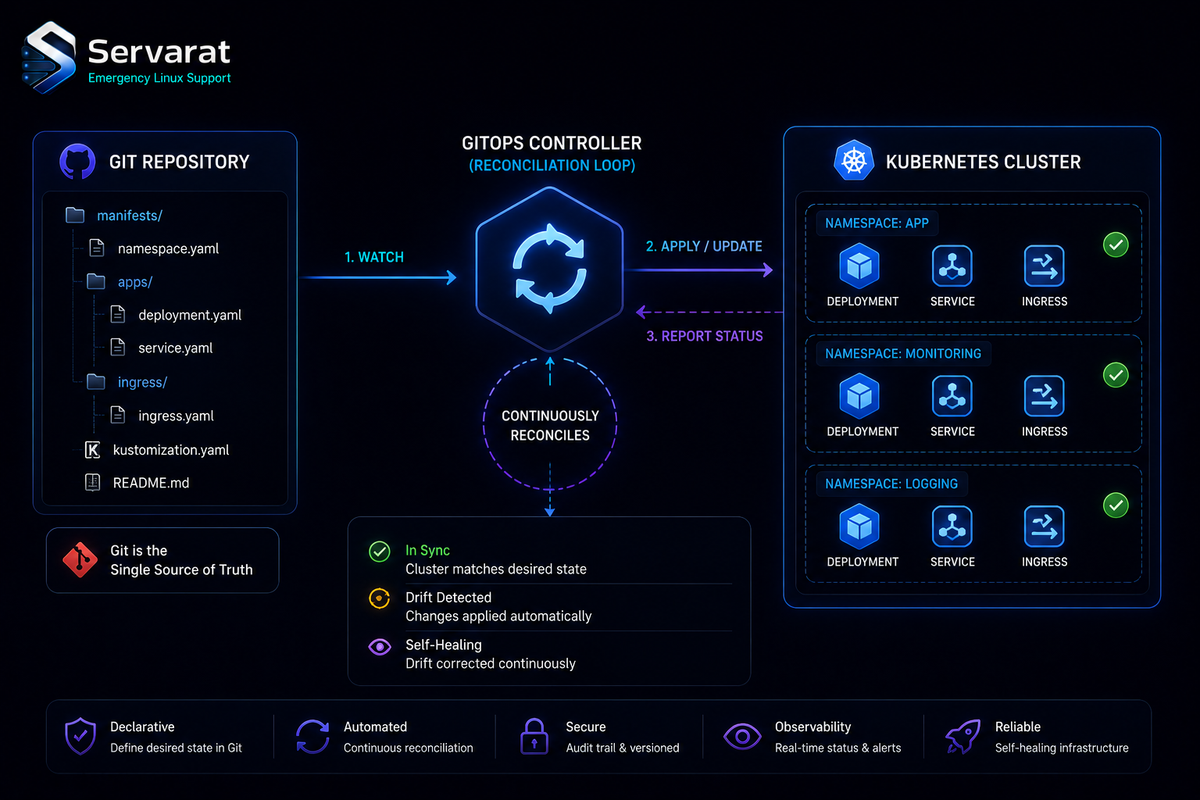
The core move in GitOps is making Git the desired-state control plane and letting a controller reconcile the cluster to match it, continuously. Traditional CI/CD pushes to the cluster; GitOps pulls. That single inversion is where most of the security benefit comes from, and it's the part worth understanding before the tooling. Here's the model, the pipeline layout, and the security decisions that actually matter, plus a couple of things the usual writeups get wrong.
Why Pull Beats Push
Traditional pipelines deploy directly to the cluster, which means your CI system holds cluster credentials — often broad ones, because scoping them per-app is annoying. That CI system is internet-facing, runs third-party actions, and is a prime target. Compromise it and you've compromised the cluster.
GitOps flips it: CI builds and tests but never touches the cluster. A controller inside the cluster watches Git and pulls approved changes. The cluster credentials never leave the cluster. Your CI system, if popped, can poison an image or a PR — bad, but caught by review and scanning — but it can't kubectl apply to prod because it has no cluster access to begin with.
⚠️ This is the security argument, and it's real, but it relocates the risk rather than eliminating it. The GitOps repo and the controller's permissions become the new crown jewels. Someone who can merge to your GitOps repo can deploy anything; a controller with cluster-admin is a single compromised component away from full cluster takeover. The pull model is only as good as how tightly you guard those two things — covered below.
Pipeline Layout
Five components, and the separation between them is the point:
Source repo — app code, Dockerfile, tests. GitHub/GitLab/Bitbucket.
CI pipeline — runs tests, builds the image, scans it, pushes to the registry, outputs the digest. ⚠️ CI does not deploy. If your CI has a kubectl apply step, you're not doing GitOps, you're doing push-based CD with extra steps.
Container registry — ECR, Artifact Registry, ACR, or self-hosted. Immutable tags/digests, image scanning on push.
GitOps config repo — deployment manifests and per-environment config, separate from app code. Typical shape:
gitops-repo/
├── apps/
│   └── sample-app/
│       ├── deployment.yaml
│       └── kustomization.yaml
└── environments/
    ├── dev/
    └── prod/
GitOps controller — Argo CD or Flux, running in a dedicated namespace with minimal permissions, watching the config repo and reconciling.
⚠️ Keep the source repo and the GitOps config repo separate. Mixing them means a CI run that updates code can also mutate deployment manifests in the same commit, which collapses the review boundary GitOps exists to create. Two repos, two review gates.
The Digest Thing the Source Got Wrong
Every GitOps guide says "deploy by digest, not tag," and it's correct — tags are mutable, so sample-app:latest or even sample-app:v1.2.3 can be overwritten to point at a different image, which defeats the whole "Git is the source of truth" premise. A digest is content-addressed and immutable.
But the syntax matters and the source example mangled it. A digest reference is sha256: followed by the hash, not some arbitrary string:
spec:
  template:
    spec:
      containers:
        - name: sample-app
          image: myregistry.io/sample-app@sha256:abcd1234ef567890...
The @sha256: is the part that makes it immutable. Pin that, and the manifest in Git points at exactly one image that can never silently change under you. This is the same supply-chain reasoning behind software bills of materials — you can't have provenance if the thing you deployed can be swapped after the fact.
Security by Stage
Security isn't a final step, it's per-stage. What actually matters at each:
CI — least-privilege credentials, real secret management (not env vars in the pipeline config), dependency scanning before build. The registry push credential should be write-scoped to one repo, not an org-wide token.
Images — scan and sign (cosign/sigstore), deploy by digest. Signing plus digest-pinning means only verified, tamper-proof images reach the cluster, and you can enforce signature verification at admission.
Git — branch protection, mandatory review, secret scanning. The GitOps repo is now a deployment mechanism, so treat a merge to it with the same seriousness as a production kubectl apply — because that's exactly what it is. This is the direct payoff of the six GitHub security settings applied to the repo that controls your cluster.
Cluster — RBAC, namespace isolation, admission policy. Segmentation caps blast radius. This is where the Kubernetes CIS benchmark automation work pays off — GitOps deploys the manifests, but the CIS controls (Pod Security Admission, RBAC least-privilege, etcd encryption) are what contain a bad one.
Controller — this is the one people under-think. ⚠️ Scope the controller's RBAC to only the namespaces and resource types it actually manages — never cluster-admin. Argo CD's AppProject and Flux's per-Kustomization service accounts exist for exactly this. Enable audit logging on every action it takes. And put SSO in front of the Argo CD UI/API with RBAC on who can sync what — a wide-open Argo CD dashboard is a cluster-admin console with a web login, and it's been the entry point in real breaches. (The ArgoCD ServerSideDiff secret-extraction issue is a good reminder that even read-only access to the controller can leak more than you'd expect.)
The Workflow End to End
- Developer pushes code → CI triggers.
- CI runs tests, builds the image, scans it, pushes to the registry, outputs the digest.
- A PR updates the deployment manifest in the GitOps repo to the new
@sha256:digest. Reviewed, merged. - The controller detects the Git change, applies manifests, monitors health, and reverts any out-of-band drift.
- Every deploy is a commit — traceable, auditable, and rolled back by reverting the commit.
⚠️ The drift-reversion is a double edge worth knowing: the controller will fight your emergency kubectl edit during an incident, snapping the resource back to what's in Git. That's correct behavior — it's the whole point — but during a live incident you either commit the fix to Git or temporarily pause reconciliation (argocd app set --sync-policy none / suspend the Flux Kustomization), or you'll be wrestling the controller while prod burns. Know the pause command before you need it.
Secrets: The Gap the Source Skipped Entirely
⚠️ You cannot commit plaintext secrets to the GitOps repo — Git is the source of truth, and a Secret manifest in Git is a credential in version history forever. This is GitOps's most common footgun and the source didn't mention it once. The three real options:
- Sealed Secrets (Bitnami) — encrypt secrets to a controller-held key; the encrypted
SealedSecretis safe to commit, the controller decrypts in-cluster. Simplest to adopt. - External Secrets Operator — keep secrets in a real secret manager (Vault, AWS/GCP Secrets Manager) and sync references. Best for teams already running a secrets backend.
- SOPS + age/KMS (Flux has native integration) — encrypt values in-repo, decrypt at reconcile.
Pick one before you put anything sensitive in the repo, not after. Retrofitting secret management after you've leaked a token into Git history means rotating everything and rewriting history.
Bottom Line
GitOps is worth it for Kubernetes delivery, but the security story isn't "GitOps is secure" — it's "GitOps moves the trust boundary to the Git repo and the controller, and you have to guard those two like production access, because they are." Keep CI and CD separate, deploy immutable digest-pinned signed images, scope the controller's RBAC to nothing more than it needs, put SSO in front of it, and solve secrets management before your first real deploy. Do that and you get auditable, revertible, drift-corrected delivery. Skip the controller-permissions and secrets parts and you've built a very auditable way to hand someone your cluster.



