Best Linux Distros for Developers in 2026

The best distro for developers isn't the one topping DistroWatch. It's the one that matches what you build and where it deploys. Pick wrong and you'll spend the first week of every project fighting your own environment instead of writing code — and you'll still hit "works on my machine" the moment CI runs on something different.
DistroWatch rankings and community polls measure curiosity, not production readiness. A polished rolling distro like CachyOS can sit near the top of those charts for months. Ask working DevOps engineers what's actually in their CI pipelines and you'll hear Ubuntu LTS, Debian Stable, or something RHEL-family. That gap between internet popularity and what survives a production workload is the whole point of this guide.
What matters when you choose: package freshness versus stability, how closely the distro mirrors your deployment target, and the default security model. Almost everything above the package layer — runtimes, version managers, your code — is portable. So pick for the layers that aren't.
The Comparison Table
Map your use case before you install anything. Package freshness cuts both ways: Arch hands you GCC 14 the day it lands, Debian Stable ships an older GCC for two years. Neither is wrong; it depends on what you're building and where it runs.
| Distro | Best Use Case | Package Freshness | Container Fit | Cost |
|---|---|---|---|---|
| Ubuntu 24.04 / 26.04 LTS | General dev, CI/CD, cloud | Stable, 5-yr LTS cycle | Excellent | Free |
| Fedora 44 | Cutting-edge toolchains, RHEL upstream | Very fresh, 6-mo cycle | Excellent | Free |
| Debian 13 (Trixie) | Server-side apps, long-lived projects | Conservative, rock-solid | Excellent | Free |
| Arch Linux | Full control, custom minimal setups | Rolling, bleeding-edge | Good (manual) | Free |
| Pop!_OS (COSMIC) | ML / NVIDIA GPU workloads | Fresh, NVIDIA-ready | Excellent | Free |
| Rocky Linux 9 / 10 | RHEL-parity dev, enterprise CI | Conservative, RHEL-aligned | Excellent | Free |
| NixOS | Reproducible builds, multi-project teams | Declarative, rollback-safe | Good (learning curve) | Free |
| openSUSE Tumbleweed | Rolling dev with stability testing | Rolling, OBS-tested | Good | Free |
| Kali Linux | Security research, pen-test tooling | Rolling, Debian Testing base | Possible (not recommended) | Free |
| AlmaLinux 9 / 10 | RHEL-compatible enterprise workloads | Conservative, binary-compatible | Excellent | Free |
If production is RHEL, develop on Rocky/AlmaLinux (binary-compatible) or Fedora (the upstream that feeds CentOS Stream, which feeds RHEL). Fedora gives you roughly a year's preview of what's heading into the RHEL ecosystem.
⚠️ Never run a rolling release (Arch, Tumbleweed) on a machine doing production or client-facing work. Continuous updates can break a kernel module, a Docker network driver, or your display stack at the worst possible time. Keep rolling distros on dedicated dev workstations only.
Setup by Distro
Step 0 — Update first
Run a full update before touching the toolchain, or you'll hit dependency conflicts where a new dev tool expects a library the system hasn't pulled yet.
Ubuntu 24.04 / 26.04 LTS:
sudo apt update && sudo apt upgrade -y && sudo apt install -y curl wget git build-essential software-properties-common
Rocky / AlmaLinux 9 / 10 · RHEL 9 / 10:
sudo dnf update -y && sudo dnf groupinstall -y "Development Tools" && sudo dnf install -y curl wget git
Fedora 44:
sudo dnf update -y && sudo dnf install -y @development-tools curl wget git
Arch Linux:
sudo pacman -Syu --noconfirm && sudo pacman -S --noconfirm base-devel curl wget git
Step 1 — Git and SSH
Set identity, default branch, and editor before you clone anything, and set up key auth now instead of fighting HTTPS token expiry mid-sprint.
git config --global user.name "Your Name"
git config --global user.email "you@example.com"
git config --global init.defaultBranch main
git config --global core.editor vim
ssh-keygen -t ed25519 -C "you@example.com"
cat ~/.ssh/id_ed25519.pub
Paste that public key into GitHub/GitLab under Settings → SSH Keys, then confirm before cloning:
ssh -T git@github.com
Step 2 — Docker Engine from the official repo
The distro-bundled Docker is often 6–12 months behind, which matters when Compose or BuildKit features are involved. Always use Docker's repo.
Ubuntu:
curl -fsSL https://download.docker.com/linux/ubuntu/gpg | sudo gpg --dearmor -o /usr/share/keyrings/docker-archive-keyring.gpg
echo "deb [arch=amd64 signed-by=/usr/share/keyrings/docker-archive-keyring.gpg] https://download.docker.com/linux/ubuntu $(lsb_release -cs) stable" | sudo tee /etc/apt/sources.list.d/docker.list
sudo apt update && sudo apt install -y docker-ce docker-ce-cli containerd.io docker-compose-plugin
Rocky / RHEL:
sudo dnf config-manager --add-repo https://download.docker.com/linux/rhel/docker-ce.repo && sudo dnf install -y docker-ce docker-ce-cli containerd.io docker-compose-plugin && sudo systemctl enable --now docker
Add yourself to the docker group so you don't need sudo for every command:
sudo usermod -aG docker $USER
⚠️ Adding a user to the docker group is root-equivalent — anyone in it can mount the host filesystem into a container and escalate. Fine on a personal workstation; on shared or production-adjacent machines, prefer rootless Docker or sudo per command. Log out and back in for the group change to apply, then test with docker run hello-world.
Step 3 — Language runtimes via version managers
Don't install Python, Node, or Ruby from the system package manager for active dev — it locks you to one version and switching per-project gets painful. These work on any distro.
curl https://pyenv.run | bash
pyenv install 3.12.3 && pyenv global 3.12.3
curl -o- https://raw.githubusercontent.com/nvm-sh/nvm/v0.39.7/install.sh | bash
nvm install 22 && nvm use 22 && nvm alias default 22
curl --proto '=https' --tlsv1.2 -sSf https://sh.rustup.rs | sh -s -- -y
⚠️ Those three are all curl | bash into your shell. Convenient, but it's the same pattern supply-chain attacks ride. For anything beyond a throwaway box, download, read, then run.
Step 4 — Fedora 44 extras
Fedora ships DNF5 and SELinux enforcing by default. The SELinux part is correct for production parity but trips people up. Enable RPM Fusion, then confirm SELinux isn't silently blocking your dev ports before you lose an hour to a phantom network bug.
sudo dnf install -y https://mirrors.rpmfusion.org/free/fedora/rpmfusion-free-release-$(rpm -E %fedora).noarch.rpm https://mirrors.rpmfusion.org/nonfree/fedora/rpmfusion-nonfree-release-$(rpm -E %fedora).noarch.rpm
getenforce && sudo ausearch -m avc -ts recent | tail -20
sudo firewall-cmd --permanent --add-port=8080/tcp && sudo firewall-cmd --reload
Step 5 — Rocky / AlmaLinux RHEL-parity
If you deploy to RHEL, develop here. Enable EPEL and CRB first — without CRB you'll hit missing build deps on a large chunk of dev packages.
sudo dnf install -y epel-release && sudo dnf config-manager --set-enabled crb && sudo dnf update -y
sudo dnf groupinstall -y "Development Tools" && sudo dnf install -y git curl wget vim tmux htop python3 python3-pip
Go ships old in EPEL, so install it manually:
wget https://go.dev/dl/go1.22.3.linux-amd64.tar.gz && sudo rm -rf /usr/local/go && sudo tar -C /usr/local -xzf go1.22.3.linux-amd64.tar.gz
What Bites You in the First 30 Days
These aren't edge cases. They're the issues that generate 11 PM Slack messages the week someone new joins.
Docker permission denied after install
You ran usermod -aG docker $USER but never logged out, so the group isn't active. sudo docker works, so nobody notices — until a CI script that runs without sudo fails.
groups $USER
newgrp docker
docker ps
pyenv install fails on missing build deps
pyenv install runs a few minutes then dies on a C compiler error. The system is missing SSL, zlib, and readline headers, and pyenv doesn't list them as prerequisites.
sudo apt install -y build-essential libssl-dev zlib1g-dev libbz2-dev libreadline-dev libsqlite3-dev libffi-dev liblzma-dev tk-dev
pyenv install 3.12.3
SELinux silently blocks your dev server on Rocky
Server starts, localhost curl works, but another machine gets "connection refused" even with firewalld port 8080 open. SELinux is blocking the bind and the denial is sitting in the audit log nobody checks. Same pattern that causes compliance failures in production — you just hit it on dev first.
sudo ausearch -m avc -ts recent
sudo semanage port -a -t http_port_t -p tcp 8080
sudo firewall-cmd --permanent --add-port=8080/tcp && sudo firewall-cmd --reload
Arch kernel update breaks a DKMS module
Daily pacman -Syu pulls a new kernel, you reboot, and VirtualBox or a VPN module won't load because it wasn't rebuilt. AUR helpers don't always trigger the DKMS rebuild.
dkms status
sudo dkms autoinstall
pacman -Q linux linux-headers
nvm not found after shell restart
nvm installs fine, works once, then nvm: command not found next session. The installer appended init lines to ~/.bashrc but you use zsh.
echo 'export NVM_DIR="$HOME/.nvm"' >> ~/.zshrc
echo '[ -s "$NVM_DIR/nvm.sh" ] && \. "$NVM_DIR/nvm.sh"' >> ~/.zshrc && source ~/.zshrc
Docker build fails on Fedora over cgroup v2
Builds that pass on Ubuntu fail on Fedora with OOM kills or weird JVM heap errors. Fedora defaults to cgroup v2, and older base images and early Java 8/11 don't handle v2 memory limits. Upgrade the base image if you can; otherwise switch Docker's cgroup driver.
docker info | grep "Cgroup Version"
echo '{"exec-opts": ["native.cgroupdriver=cgroupfs"]}' | sudo tee /etc/docker/daemon.json && sudo systemctl restart docker
Validation Script
Run this after setup. Confirms the toolchain is reachable, Docker works without sudo, and SSH is in place. About 15 seconds.
#!/bin/bash
# Dev environment validation
PASS=0
FAIL=0

check() {
  if eval "$2" >/dev/null 2>&1; then
    echo "[PASS] $1"; ((PASS++))
  else
    echo "[FAIL] $1"; ((FAIL++))
  fi
}

echo "=== Dev Environment Check ==="
check "Git installed" "git --version"
check "Docker daemon running" "docker info"
check "Docker without sudo" "docker ps"
check "Python 3 available" "python3 --version"
check "Node.js available" "node --version"
check "SSH key exists" "test -f ~/.ssh/id_ed25519.pub"
check "Port 22 SSH service" "ss -tlnp | grep :22"
echo "Results: $PASS passed, $FAIL failed"
[ "$FAIL" -eq 0 ] && echo "Environment ready." || echo "Fix failing items before starting work."
Save it, then:
chmod +x validate-dev-env.sh && bash validate-dev-env.sh
Don't Forget the Workstation Is an Attack Surface
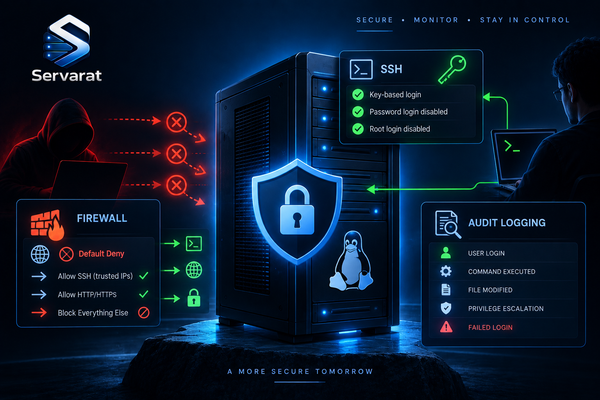
The most overlooked box in any security audit is the developer's own machine — the one holding production SSH keys in ~/.ssh and cloud credentials in ~/.aws, running the same outdated package for eight months because "it works." A compromised dev laptop with Docker socket access and plaintext cloud keys is a production incident in waiting.
Minimum hardening, any distro:
sudo sed -i 's/^#*PasswordAuthentication yes/PasswordAuthentication no/' /etc/ssh/sshd_config && sudo systemctl restart sshd
chmod 700 ~/.ssh && chmod 600 ~/.ssh/id_ed25519 && chmod 644 ~/.ssh/id_ed25519.pub
sudo aa-status 2>/dev/null || getenforce
find ~/ -maxdepth 3 -perm -o+w -type f 2>/dev/null
⚠️ Disabling PasswordAuthentication will lock you out if your key isn't already working. Confirm key-based login in a second session before you restart sshd. Distros with AppArmor (Ubuntu, Debian) or SELinux (Fedora, Rocky, RHEL) give you mandatory access control that limits what a compromised process can reach — leave it enforcing, don't disable it to make a problem go away.
Maintenance That Keeps It From Drifting
An environment that worked at setup rots over time: packages fall behind, disk fills with Docker layers, keys age. Quick cadence to stay clean.
Immediate action:
- Docker won't start after an OS update →
journalctl -u dockerright away - Root partition over 90% →
docker system prune -af - SSH refused on a remote box → verify sshd running and port 22 open
- Repeated SELinux AVC denials → investigate before disabling anything
Weekly: review available updates (don't auto-apply on rolling releases), remove unused Docker images, check disk across all mounts.
Monthly: update runtimes (nvm install --lts, rustup update), prune dangling Docker volumes, apply kernel updates and confirm DKMS rebuilt on Arch, scan stale ~/.ssh/known_hosts entries.
Quarterly: re-run the validation script in a clean shell, rotate SSH keys and revoke old ones from GitHub/GitLab/servers, confirm your LTS still has security support (ubuntu-support-status), audit Compose files for unpinned :latest tags.
Bottom Line
There's no single best distro. Ubuntu LTS is the safest default — most tools assume it, most CI runners use it, and the support ecosystem is unmatched. Fedora wins when you want fresh toolchains or you're targeting RHEL. Rocky and AlmaLinux win when you deploy straight into RHEL and need binary compatibility.
Modern tooling behaves nearly identically across Ubuntu, Fedora, and Rocky thanks to Docker, nvm, pyenv, and rustup, so the real differentiators are the security model, package freshness, and how closely the distro mirrors production. Let those drive the decision — not a popularity chart. Run the validation script against your current setup; if anything comes back FAIL, fix it before the next project starts.