I Ran OWASP CVE Lite CLI on a Real TypeScript App. Here's What It Actually Told Me.


Most dependency scanners are good at one thing: handing you a wall of CVE IDs and walking away. You get the what's broken. What you almost never get is the what do I run to fix it — the part you actually have to figure out yourself at 11pm before a push, package by package, version by version.
That gap is the whole reason CVE Lite CLI exists. So I pointed it at one of my own projects to see whether the pitch holds up outside a README.
The setup
I ran it against the frontend for my servarat.net rescue hub — a TypeScript app built on Vite and React, the kind of dependency tree that quietly accumulates transitive baggage while you're busy shipping features. Nothing about the project had been audited in a while, which made it an honest test rather than a staged demo.
The whole thing is npx-based. No global install, no account, no config file, and nothing about my code or lockfile leaves the machine — it reads the lockfile locally and queries OSV for advisory data. I ran it straight from the VSCode integrated terminal at the project root:
npx cve-lite-cli . --verboseFirst run pulls the package; after that it's cached and rescans are near-instant.
The baseline: what npm audit gives you
Before the scan, I grabbed the npm audit output as a reference point.
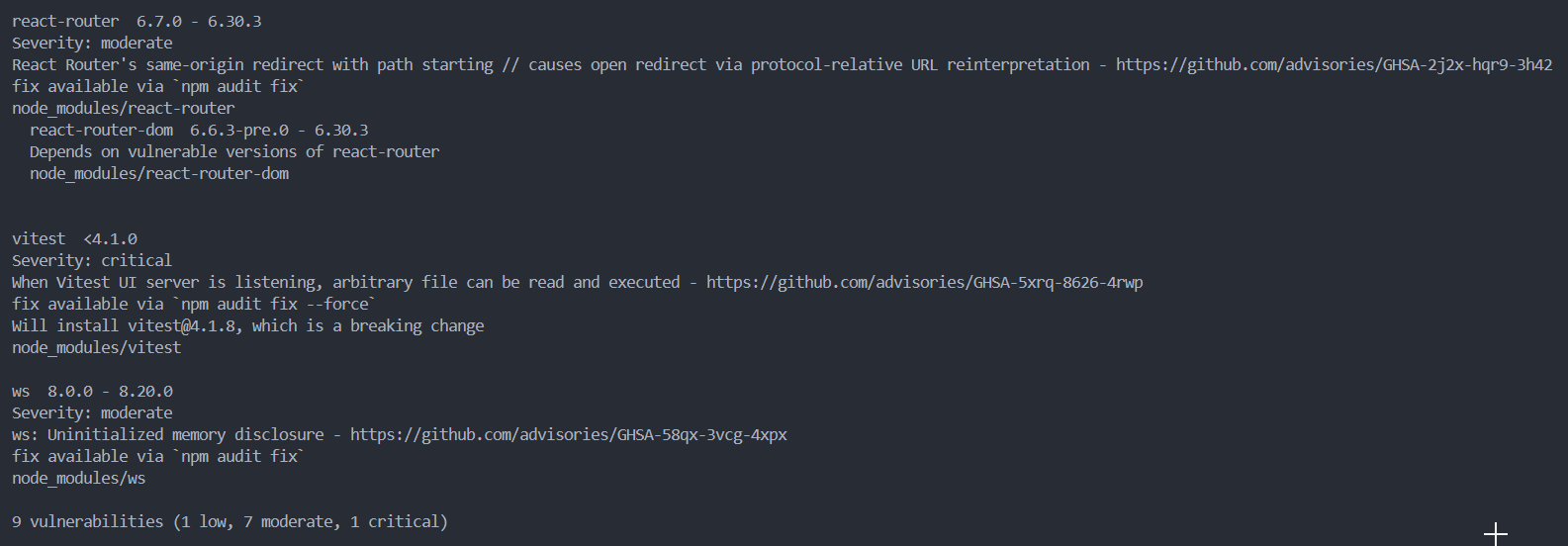
It does its job. It tells you which packages are vulnerable, links the advisories, and — to be fair — it does offer a fix path: npm audit fix, or npm audit fix --force for the ones that need a breaking change. For the critical vitest finding it even names the target, warning it'll install vitest@4.1.8 as a breaking change.
The problem isn't that it gives you nothing. It's that npm audit fix is a blunt instrument. It's all-or-nothing: run it and it bumps whatever it can within semver; add --force and it applies breaking upgrades across the board, with no per-package say in what moves and what doesn't. There's no clean separation between "this transitive issue just needs a lockfile refresh" and "this one needs the parent package bumped." You either trust it to rewrite your tree wholesale, or you go package by package with npm ls and a browser tab open to each advisory. For a couple of findings that's tolerable. For more, it's the reason audit results sit ignored for months.
One thing to call out before the comparison: npm audit here counts 9 vulnerabilities, while CVE Lite finds 8. That's expected, not a bug in either — npm audit draws on the GitHub Advisory Database, CVE Lite queries OSV. Different advisory sources, slightly different totals. Worth knowing if you run both.
That's the bar CVE Lite is trying to clear: not "find the problems," but "tell me precisely what to run, package by package."
Reading the CVE Lite output
The scan came back with 8 vulnerable packages across 8 CVEs:
| Critical | High | Medium | Low |
|---|---|---|---|
| 1 | 0 | 6 | 1 |
Not a dumpster fire, which is its own kind of useful signal. The first thing the tool does well is separate what I can act on from what I can't, immediately. Three of those packages are directly fixable in my project. The other five come through other dependencies — transitive issues I didn't introduce and can't patch with a single direct install. Most scanners blur that line. CVE Lite puts it in the first three lines of the summary, and as you'll see, it doesn't just flag the transitive ones — it works out the right way to actually move them.
The part that matters: copy-and-run commands
Here's where the tool earns its name. For the three packages I own directly, it printed ready-to-run commands:
npm install vitest@4.1.0
npm install postcss@8.5.10 vite@6.4.2
No looking anything up. No working out whether the safe version is 8.5.10 or 8.6. The command is right there, scoped to my package manager. That sounds like a small thing until you've done the manual version of it forty times.
It's also honest about the catch. Two of those — vitest and vite — are flagged as breaking major bumps (3.x → 4.x and 5.x → 6.x), and the tool says so rather than pretending an upgrade is free. It even tells you when a target version still carries known advisories of its own, so you're not chasing a "fix" that isn't one — which is exactly why it admits the full plan only clears 7 of the 8 findings rather than rounding up to a clean sweep. That kind of candor is rare in tooling that's usually optimized to make its numbers look good.
The transitive part most tools fumble
This is the bit that made me sit up. You can't fix a transitive dependency by installing it directly — it isn't in your package.json, it's pulled in by something that is. The naive advice ("upgrade react-router to 6.30.4") is wrong, because nothing in your manifest installs react-router directly; react-router-dom does. CVE Lite knows this, and it splits the transitive findings into two cases that need genuinely different actions.
The first case: the fix is already inside your allowed version range, and the lockfile just needs to catch up. For brace-expansion and a ws pulled in through jsdom, the parents already permit the patched versions, so the fix is a lockfile refresh:
npm update brace-expansion && npm update jsdomThe second case: the range doesn't allow the fix, so you have to bump the parent package itself. For the vulnerable react-router, that means upgrading its parent rather than chasing the child:
npm install react-router-dom@6.30.4That distinction — "your range already covers it, just refresh" versus "you need to move the parent" — is exactly the reasoning you'd otherwise do by hand with npm ls and a furrowed brow. Having the tool encode it is the difference between a scanner that reports transitive risk and one that actually resolves it.
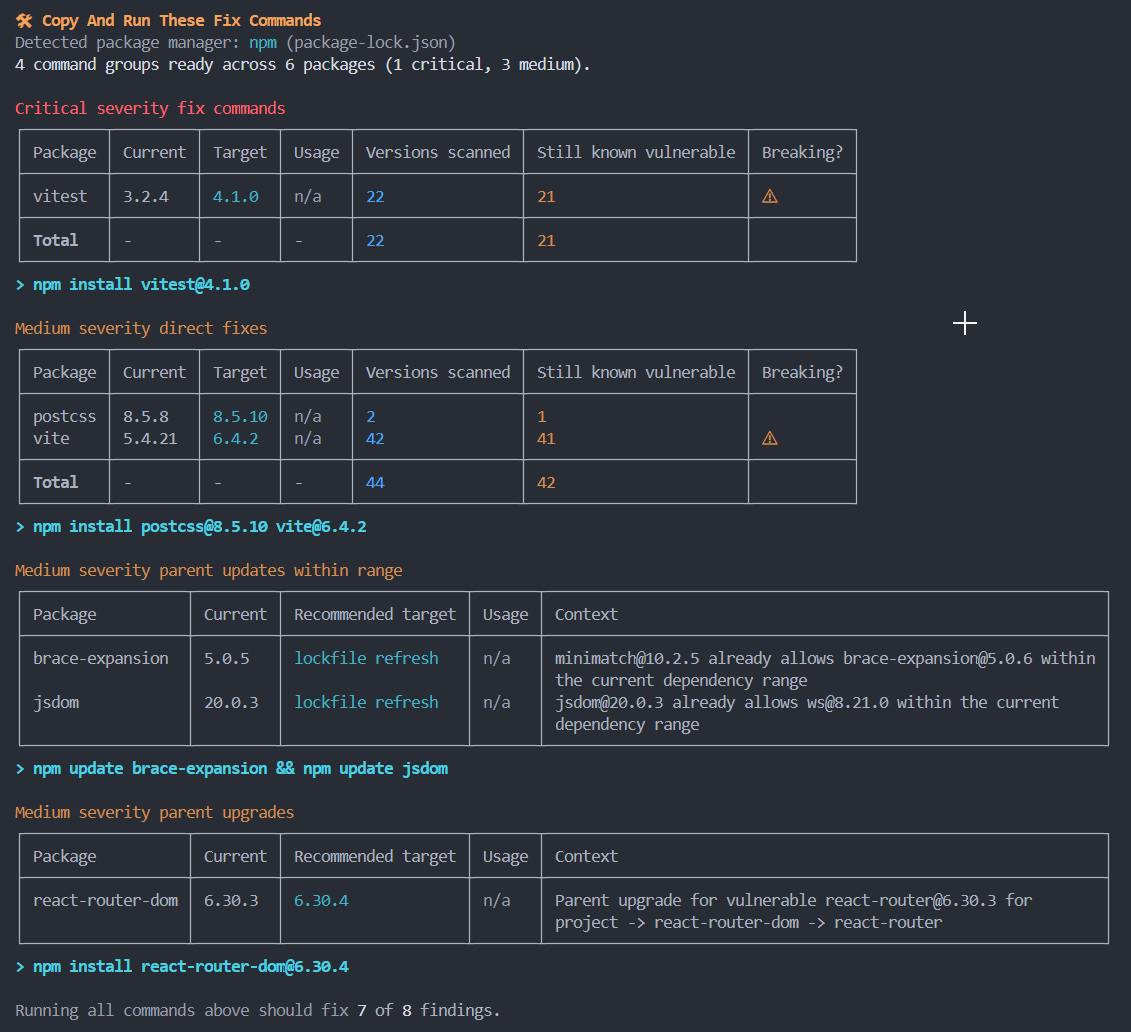
Read that against the npm audit screenshot above and the contrast is the whole story. Same project, same tree — one tool says "9 problems, run audit fix and hope," the other lays out four scoped commands and tells you exactly which parent to move for each transitive hit.
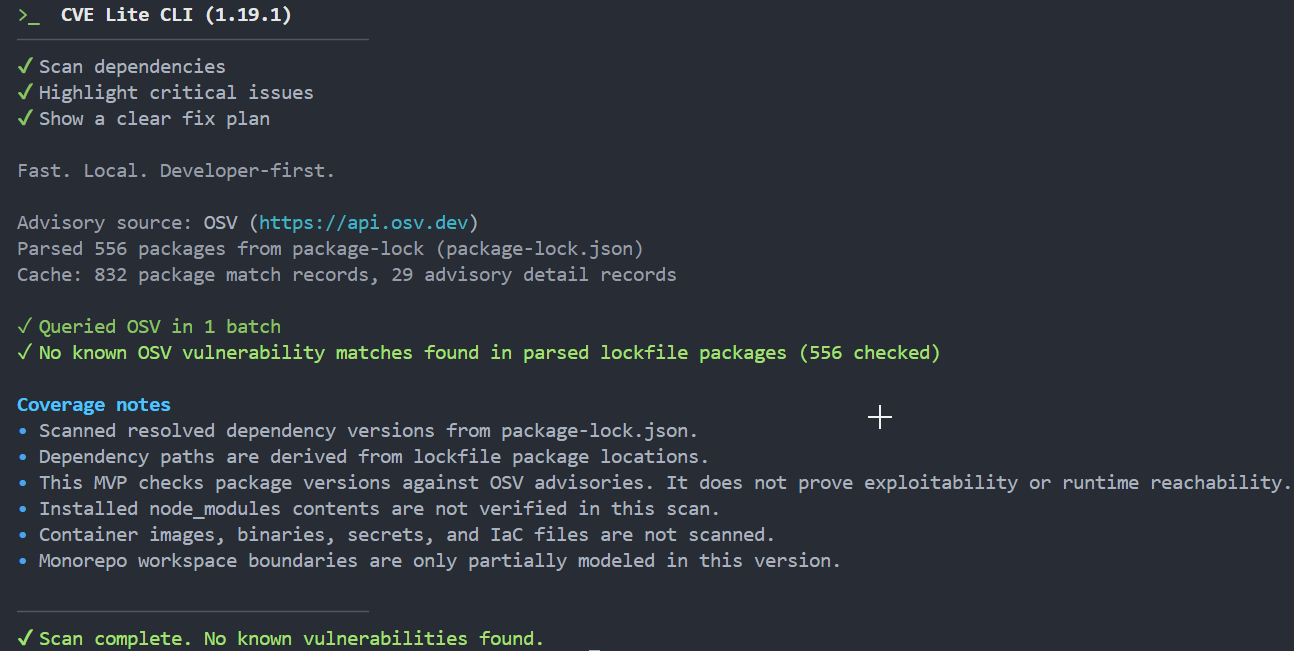
After fixing all findings:
A judgment call the tool helps you make
Worth pausing on what these packages actually are, because severity counts alone overstate the panic. The one critical, vitest, is a test runner — it never ships to the browser, so a vulnerability in it is a developer-machine concern, not a production exposure. The only finding that touches code actually running in a user's browser is react-router — an open-redirect issue, and it's cleared by a patch-level bump of its parent. Everything else is build- or test-chain: vite, postcss, and esbuild on the build side, and even ws, which only appears because jsdom (a test dependency) drags it in. Nothing on fire, in other words, and the one production-facing bug is a low-effort patch.
CVE Lite doesn't make that risk judgment for you, and it's upfront about that: it matches versions against advisories, it doesn't prove exploitability or that the vulnerable code path is even reachable. But by splitting direct from transitive, surfacing severity cleanly, and telling you which findings are build-time versus runtime by where they sit in the tree, it hands you the structure to make the call in seconds instead of squinting at a flat list.
If you want it to go further, --usage runs static analysis to flag whether a vulnerable package is actually imported in your source, and --only-used filters out everything that isn't. It's opt-in because it's slower than a pure lockfile scan, but it's the noise-cutting feature most local scanners simply don't have.
The OWASP angle
CVE Lite CLI isn't a weekend project that happens to be on npm. It's an OWASP Incubator Project, which means the security community has formally taken it under the foundation's wing — peer-reviewed, vendor-neutral, no commercial platform lurking behind a free tier. For a tool you're about to wire into your dependency workflow, that provenance is worth a moment's attention. It's the difference between "some scanner I found" and "a scanner the people who write the threat models think is worth standardizing."
Local, offline, and quietly fast
The design choice I appreciated most is that it's built to run where you work, not at the end of a pipeline. There's an offline mode — sync the advisory database once with cve-lite advisories sync, then scan with --offline and zero outbound calls during the scan. That's aimed at air-gapped and restricted-network shops, but it's just as handy when you want a scan that doesn't depend on a third-party API being up. There's also --report for a self-contained HTML dashboard if you'd rather hand a colleague a page than a terminal dump.
So, is it worth it?
For a JS/TS project, yes — as the fast check you run right before you push, not as a replacement for continuous monitoring or full SBOM management. It won't catch malicious packages before they hit advisory databases, it won't scan container images or secrets, and it won't prove a vulnerability is exploitable. It's not trying to. What it does is collapse the distance between "you have a problem" and "here's the command that fixes it," and it does that better than anything else I've run locally.
The honest test of a security tool is whether you'll keep using it. This one fits in the gap where I actually make decisions — the terminal, before the commit — instead of nagging me from a dashboard I've already learned to ignore. That's the whole game.
If you want to try it on your own project:
npx cve-lite-cli .No install, nothing leaves your machine, and you'll have your answer in seconds.