
Digital Certificates and the Chain of Trust

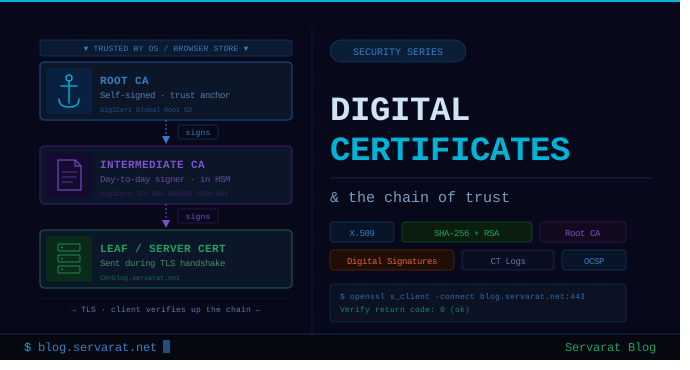
Digital Certificates and the Chain of Trust
When a browser opens an HTTPS connection, the server hands over a public key. Before a single byte of encrypted application data flows, the client has to answer one question: is this public key actually trustworthy? The mechanism that answers it — X.509 certificates, digital signatures, and a hierarchy of certificate authorities — is the foundation that every TLS connection on the public internet rests on.
X.509 — the certificate format
X.509 is the ITU-T standard that defines the structure of a digital certificate. It's the format used by virtually every TLS certificate you'll meet in the wild — HTTPS, S/MIME, code signing, IPsec, OpenVPN, mTLS for service meshes.
An X.509 certificate is a binary (DER) or PEM-encoded document containing, among other fields:
- Subject — who the certificate is issued to (
CN, Subject Alternative Names, organization) - Issuer — the CA that signed it
- Validity period —
notBeforeandnotAftertimestamps - Public key — the cryptographic material being attested to
- Signature algorithm — e.g.
sha256WithRSAEncryption,ecdsa-with-SHA384 - Signature — the issuer's signature over everything above
- Extensions — SANs, Key Usage, EKU, AIA, CRL distribution points, SCTs
Dump any cert with:
openssl x509 -in certificate.pem -noout -text
Digital signatures — the trust primitive
A digital signature on a certificate is constructed in two operations:
- The CA computes a cryptographic hash (e.g. SHA-256) over the certificate's
tbsCertificate(To-Be-Signed) section. - The CA encrypts that hash with its private key. The result is the signature.
The certificate is then distributed with the signature attached. Anyone holding the CA's public key — pulled from the CA's own certificate — can verify the signature without the CA's involvement.
Common signature algorithms today:
| Algorithm | Notes |
|---|---|
sha256WithRSAEncryption |
RSA-2048 / 4096 with SHA-256. Most prevalent. |
ecdsa-with-SHA256 / SHA384 |
ECDSA on P-256 / P-384. Smaller, faster, increasingly default. |
Ed25519 |
Modern EdDSA. Common in SSH; rare in WebPKI. |
⚠️ SHA-1 signatures have been distrusted in browser trust stores since 2017. Any chain still using SHA-1 will fail validation in modern clients. MD5 has been dead for far longer — if you find one, treat it as a finding.
The verification process
When a client receives a leaf certificate, it walks through this verification:
- Hash the certificate body locally using the algorithm declared in the cert.
- Decrypt the signature using the issuing CA's public key — the result should be the original hash.
- Compare hashes. Match → the certificate hasn't been tampered with and was signed by the holder of the issuer's private key. Mismatch → reject.
- Validate the issuer's certificate the same way, using its issuer's public key.
- Repeat until reaching a certificate the client already trusts — the root.
That recursive process is what people mean by "chain of trust."
The chain itself
A typical public TLS chain has three certificates:
Root CA  ──signs──▶  Intermediate CA  ──signs──▶  Leaf (your server)
   ▲                                                    ▲
trust anchor                                       presented at TLS
(in local trust store)                             handshake
Why intermediates exist: if the root CA's private key signed leaf certs directly, every revocation or key compromise would force every client on earth to update their root store. Intermediates let CAs rotate keys, segment risk, and delegate signing without ever touching the root. Roots live offline in HSMs; intermediates do the day-to-day signing work.
Inspect the full chain a server presents:
openssl s_client -connect example.com:443 -servername example.com -showcerts </dev/null
⚠️ The server must serve the leaf + all intermediates. Browsers may patch a missing intermediate via AIA fetch, but mobile clients, older Java/Android stacks, and many command-line tools won't. Always include the full chain in your fullchain.pem (Let's Encrypt's certbot does this by default — most other tooling doesn't).Root certificates — where trust bottoms out
The chain has to terminate somewhere. That somewhere is the root certificate — self-signed, where issuer and subject are the same entity, and the cert is signed with its own private key.
Self-signing carries no cryptographic trust on its own. What makes a root trusted is its presence in the client's trust store.
Root stores are maintained by:
- Microsoft — Windows, .NET (Microsoft Trusted Root Program)
- Apple — macOS, iOS, Safari
- Mozilla — Firefox, Thunderbird; the NSS bundle is reused by most Linux distros
- Google — ChromeOS and Chrome on Android; also the new Chrome Root Store shipping with Chrome on desktop
- Linux distros — typically the
ca-certificatespackage, sourced from Mozilla NSS
Inclusion in a root store is a multi-year process gated by audit (WebTrust), policy (CA/B Forum Baseline Requirements), and technical compliance (key ceremonies, validation methods, CAA enforcement).
When you trust a website, you're not really trusting the website. You're trusting that:
- Your OS/browser vendor vetted the root CA properly.
- The root CA hasn't issued an intermediate to a party who shouldn't have one.
- The intermediate hasn't issued a leaf to someone impersonating the site.
That's a lot of transitive trust. Certificate Transparency logs and CAA DNS records exist to add accountability on top of the model — every publicly trusted cert issued today must appear in CT logs, which lets domain owners detect mis-issuance.
Practical — inspecting roots and chains on Linux
View the system trust store on Debian/Ubuntu:
ls /etc/ssl/certs/ | wc -l
trust list --filter=ca-anchors | less   # p11-kit, more detail
Inspect a server's actual served chain:
openssl s_client -connect blog.servarat.net:443 \
  -servername blog.servarat.net -showcerts </dev/null \
  | awk '/-----BEGIN/,/-----END/'
Verify a chain manually:
openssl verify -CAfile root.pem -untrusted intermediate.pem leaf.pem
Check what CAs are authorized to issue for a domain:
dig CAA servarat.net +short
Watch CT logs for unexpected certificates issued for your domains:
Set up monitoring at crt.sh or via a CT log monitor. If a cert appears that you didn't request, that's an incident.
Hardening notes
- Use ECDSA P-256 for new certs where client compatibility allows — smaller, faster, no known weaknesses.
- Enable OCSP stapling on the web server (
ssl_stapling onin Nginx) to avoid the privacy and latency cost of clients fetching OCSP themselves. - Use short-lived certificates. Let's Encrypt's 90 days is healthy; the industry is moving toward even shorter (Google has proposed 90→47 days for public TLS).
- Pin via CAA, not HPKP. HTTP Public Key Pinning is dead — CAA records in DNS are the modern replacement for restricting which CAs can issue for your domain.
- Monitor CT logs for your zones. Unexpected issuance is the earliest detection signal for a CA compromise or social-engineered re-issuance.
- Keep
ca-certificatesupdated on all production systems. Stale root bundles break TLS to the modern internet (Let's Encrypt's ISRG Root X1 cross-sign expiry in 2021 was a real outage for many).



