Virtual Machine Security: Weaknesses & Hardening

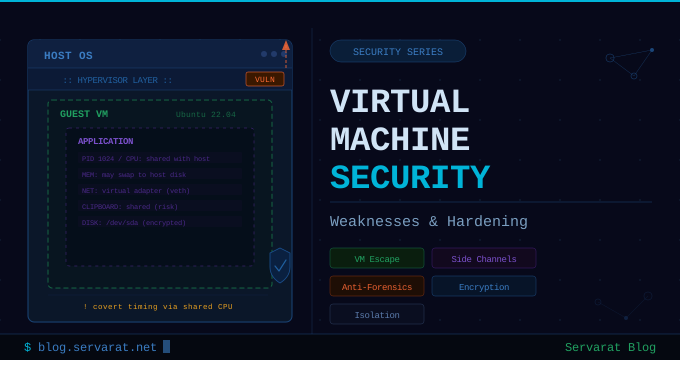
Virtual machines offer a layer of isolation, but they are not a security boundary you can fully trust. Understanding where that isolation breaks down — and how to tighten it — is essential for anyone running sensitive workloads inside a hypervisor.
Weaknesses
Host-to-Guest and Guest-to-Host Compromise
The trust relationship between host and guest runs in both directions, and both can be exploited:
- Host compromise → Guest compromise: A fully compromised host gives an attacker control over the hypervisor itself, meaning all guest VMs are exposed regardless of their individual security posture.
- Guest escape → Host compromise: Hypervisor vulnerabilities can allow a malicious guest to break out of its sandbox entirely.
A well-known example is VENOM (CVE-2015-3456), a vulnerability in the virtual floppy disk controller present in QEMU, Xen, and KVM. It allowed an attacker with guest access to execute arbitrary code on the host — a full VM escape.
A separate class of vulnerability involves VM tools and guest additions. VMware has had privilege escalation vulnerabilities in its tooling that allowed a standard guest user to gain admin/root access within the VM, without escaping to the host. The attack surface grows whenever you install software that bridges the guest/host boundary.
Information Leakage
VMs are not memory-isolated from the host in the way physical machines are from each other:
- Swap/paging: Guest memory can be paged out to the host's disk. Sensitive data — encryption keys, credentials, session tokens — can end up in the host's swap space or pagefile, persisting long after the guest has shut down.
- VM snapshots and saved states: Suspend, hibernate, and snapshot operations serialize RAM to disk. If those files are unencrypted, they become a goldmine for forensic attackers or anyone with physical access to the host.
Malware VM Detection and Anti-Forensics
Sophisticated malware actively checks whether it's running inside a virtual machine. Detection techniques include inspecting CPU flags, CPUID responses, registry keys (on Windows), timing discrepancies, and the presence of hypervisor-specific drivers or processes.
When a VM is detected, the malware may:
- Remain dormant and benign during analysis
- Delete itself entirely to prevent examination
- Execute a different, less suspicious code path
This is a significant concern for malware analysis sandboxes and defeats the assumption that a VM provides a clean, observable environment.
Covert Timing Channel Attacks
Host and guest VMs share physical CPU resources. This creates a side-channel vector known as a covert timing channel: one process can modulate its use of shared CPU resources (cache, execution units) to signal information to another process — potentially across VM boundaries.
Real-world variants include:
- Flush+Reload and Prime+Probe cache-based attacks
- Spectre/Meltdown class vulnerabilities, which exploit speculative execution across privilege and VM boundaries
These attacks are difficult to fully mitigate at the software level and represent a fundamental limitation of shared-hardware virtualization.
Reduced Isolation via Convenience Features
The following features all create deliberate channels between guest and host — and each one is a potential attack vector:
| Feature | Risk |
|---|---|
| Shared Folders | Guest can read/write host filesystem paths |
| Clipboard Sharing | Data exfiltration and injection across the boundary |
| Drag and Drop | File smuggling between guest and host |
| Guest Additions / VMware Tools | Expanded attack surface, deeper host access |
| Remote Display (RDP/VNC) | Exposed management interface |
Defense-in-Depth Reminder
Virtual machines are not a security boundary — they are one layer of a defense-in-depth strategy. Treat them as hardened but ultimately bypassable. Combine them with network segmentation, endpoint controls, encrypted storage, and monitored egress.
Hardening
Host Machine
- Full-disk encryption on the host. Encrypts all guest disk images, swap, and snapshot files at rest.
- Hidden OS approach: Run the hypervisor from within a hidden, encrypted operating system volume. Increases friction significantly for physical attackers.
- Disable or delete the Host I/O cache in the hypervisor settings to reduce data residency on the host.
- Shut down completely when not in use. Suspended, hibernated, or paused VMs leave decryption keys in RAM or serialized to disk. Full power-off is the only safe state when using encryption — applies to both host and all guests.
Guest Configuration
Remove or disable everything you don't explicitly need:
- ☐ Disable audio and microphone
- ☐ Cover or disable the webcam (tape is fine; disabling in BIOS/hypervisor is better)
- ☐ Disable shared folders
- ☐ Disable drag and drop
- ☐ Disable clipboard sharing
- ☐ Disable video acceleration and 3D acceleration
- ☐ Disable serial ports
- ☐ Disable USB controller
- ☐ Remove virtual floppy drive
- ☐ Remove virtual CD/DVD drive (or leave read-only, detached)
- ☐ Do not enable the remote display server (RDP/VNC passthrough)
- ☐ Do not enable I/O APIC unless required by the guest OS
- ☐ Do not enable EFI unless required (reduces attack surface on older setups)
Enable security features:
- ☐ Enable PAE/NX (XD bit). NX (No-Execute) marks memory regions as non-executable, preventing shellcode from running in data segments — a foundational exploit mitigation.
- ☐ Enable full-disk encryption on guest VMs. Protects guest data if the host-level disk image is accessed directly.
Guest Additions / VM Tools
⚠️ Avoid installing VirtualBox Guest Additions, VMware Tools, or equivalent unless strictly necessary.
These packages grant the guest OS elevated access to the hypervisor layer — shared memory, host filesystem integration, clipboard channels, and more. Each capability is a potential attack vector. If you must install them, audit which modules are loaded and disable all features you don't use.
Live Environment Option
For high-sensitivity or ephemeral workloads, run from a Live CD/DVD image without any persistent virtual storage. All state is lost on shutdown, leaving no artifacts on the host. This is the most isolation-preserving option short of a dedicated physical machine.
Encryption Shutdown Policy
If any component in the stack — host OS, hypervisor, or guest OS — uses encryption, enforce a strict shutdown policy:
All systems must be fully powered off — not suspended, not hibernated, not paused — before leaving them unattended or in untrusted environments.
Suspension and hibernation serialize decryption keys to disk or leave them in RAM accessible to cold boot attacks. Full shutdown is the only state where keys are not recoverable from the machine.
🔴 Virtual Machine Weaknesses
1. Host ↔ Guest Trust Boundary
If the host is compromised, assume all guests are exposed.
Guest → host escape is possible via hypervisor bugs or misconfiguration.
Example: Hypervisor Escape
- VENOM vulnerability
- Floppy controller flaw allowing VM escape → host code execution
Example: Guest Tools Risk
- VMware Tools vulnerabilities
- Local user → privilege escalation inside VM
- ⚠️ No VM escape, but increases attack surface
2. Data Leakage & Forensic Residue
- Artifacts can persist on host:
- Disk images (
.vmdk,.qcow2) - Snapshots
- Swap / paging files
- Disk images (
- Memory remnants may expose:
- Credentials
- Session tokens
- Crypto material
3. Anti-VM Malware Evasion
- Malware often detects virtualization:
- Checks CPUID flags, MAC prefixes, device signatures
- Behavior:
- Self-disable
- Self-delete
- Alter execution path
➡️ Breaks dynamic analysis and sandboxing assumptions
4. Shared Resource Side-Channels
- Shared CPU/cache → covert timing channels
- Cross-VM leakage possible via:
- Cache timing
- CPU contention
- Category: microarchitectural side-channel attacks
5. Convenience Features = Attack Surface
- Shared folders
- Clipboard sync
- Drag & drop
- USB passthrough
➡️ These reduce isolation guarantees and create bidirectional channels.
6. Misplaced Trust in Virtualization
- VMs are not a security boundary by default
- Treat them as:
- Containment layer, not isolation guarantee
- Must be part of defense-in-depth, not the only control
🛡️ Virtual Machine Hardening
1. Host-Level Controls (Highest Priority)
- Full disk encryption (e.g., LUKS, BitLocker)
- Keep host minimal, patched, monitored
- Avoid daily-use workloads on hypervisor host
2. Hypervisor Configuration Lockdown
Disable High-Risk Features
- Shared folders
- Clipboard sync
- Drag & drop
- USB controller
- Audio / microphone
- Webcam (physically block if needed)
Remove Unnecessary Devices
- Floppy drive
- CD/DVD drives
- Serial ports
Avoid Exposure Features
- Remote display servers (VRDP / VNC / SPICE unless secured)3. Reduce Guest ↔ Host Integration
⚠️ Tradeoff: usability vs attack surface
- Avoid installing:
- VirtualBox Guest Additions
- VMware Tools
➡️ These increase hypervisor interaction surface
4. CPU & Virtual Hardware Settings
- Disable 3D / video acceleration
- Disable I/O APIC (unless required)
- Avoid EFI unless needed
- Enable NX (DEP)
- Enable PAE/NX where applicable
✔ NX (No-eXecute):
- Prevents execution from non-executable memory
- Mitigates shellcode-style exploits
5. Storage & Persistence Strategy
- Prefer ephemeral VMs where possible
- Use:
- Live ISO environments
- Non-persistent disks
⚠️ If persistence is required:
- Encrypt guest disks
- Secure snapshot storage
6. Memory & Key Material Protection
⚠️ Critical operational rule:
- Never leave systems in:
- Suspended
- Hibernated
- Paused state
✔ Always:
Power off host + guests fullyReason:
- Prevents encryption keys from being recoverable via:
- RAM dumps
- Swap files
7. Advanced (High-Paranoia / Lab Use)
- Hidden OS / nested setups (e.g., decoy environments)
- Dedicated hardware for sensitive workloads
- Air-gapped analysis VMs
⚠️ These add complexity and operational overhead—use selectively.
🔐 Security Positioning
- Virtualization ≠ sandbox guarantee
- Treat hypervisor as high-value target
- Design assuming:
Guest compromise → possible host impactHost compromise = total loss